Guide
Best agentic diagramming platforms in 2026
Compare the four leading agentic diagramming platforms – Eraser, Draw.io, Mermaid and Lucidchart – and learn how to pick the one that fits your agent stack.
Agentic diagramming moves diagrams into the agent loop, where agents both produce and consume them. Whether they become connected infrastructure or disposable one-off images comes down to the platform underneath. This guide compares the four leading platforms – Eraser, Draw.io, Mermaid, and Lucidchart – and how to choose between them.
What is an agentic diagramming platform?
An agentic diagramming platform lets agents find, read, create, and manipulate diagrams on a user’s behalf, then persists and serves the results back. It’s more than a single MCP endpoint, spanning four layers: the connection layer (how agents reach it), the agent-native primitives (what agents can do), the grounding layer (how output stays on-brand), and the operations layer (identity and governance).
How it works
- Connect. An agent authenticates over a protocol – MCP, an API, or an iframe embed.
- Prompt. A user or upstream agent asks to find, create, edit, or export a diagram.
- Ground. Templates, rules, and reference files keep output matching existing standards.
- Act. The diagram is persisted, permissioned, and shareable – readable by downstream humans and other agents.
Why you need one
- Agents are now producers and consumers of diagrams. Coding agents pull reference architecture, documentation agents write into Confluence or SharePoint, pre-sales agents generate on-brand visuals, and governance agents retrieve approved solution architecture.
- Diagrams are read more than written. A platform that only creates them produces orphans; agents have to find, read, and export them too.
- One-off generation doesn’t scale. Without persistence, search, and consistency, your library fills with near-duplicates.
- Real workflows need governance. Brand, naming, and compliance standards must be enforceable without a human in the loop.
The best agentic diagramming platforms in 2026
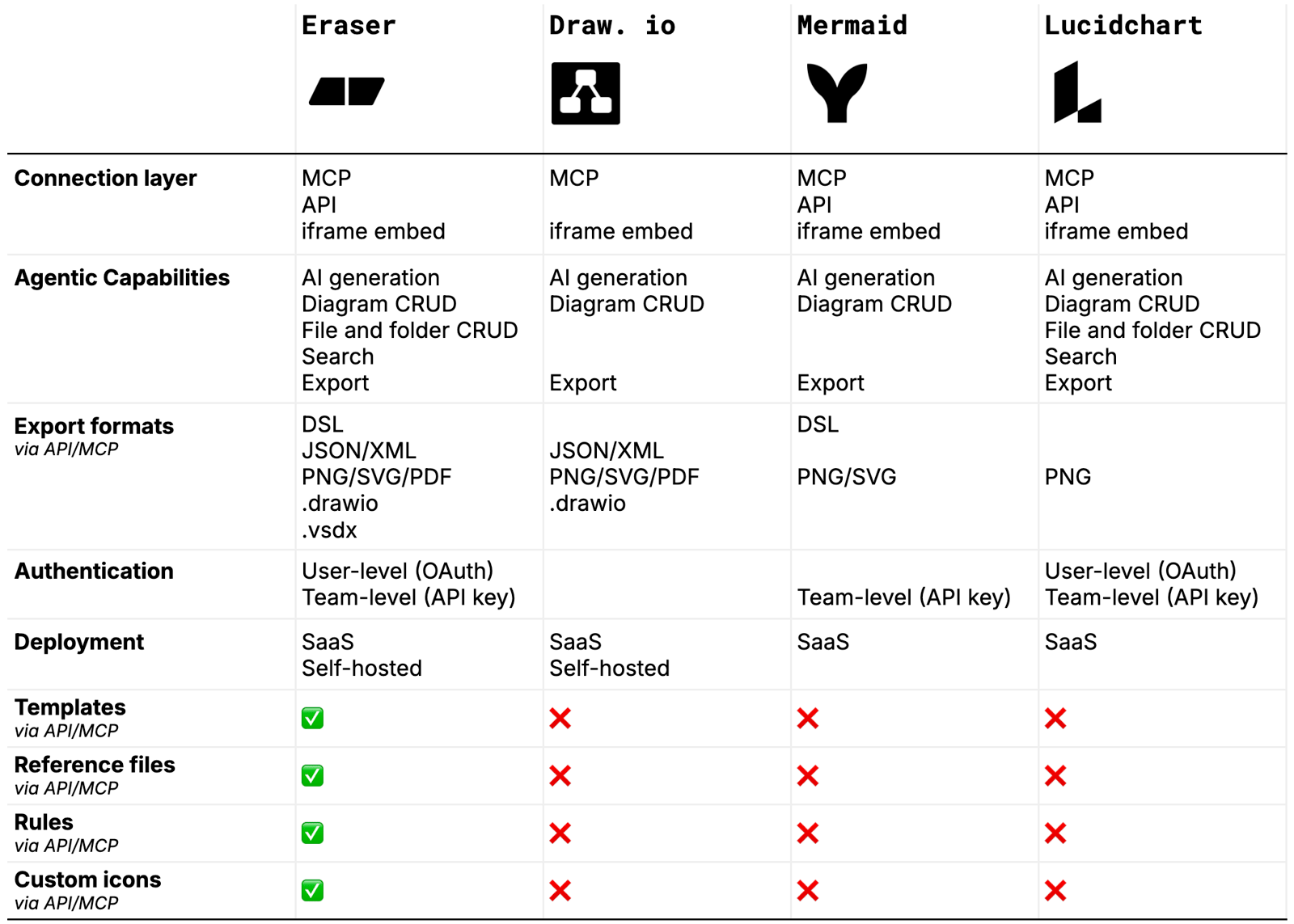 The best agentic diagramming platforms in 2026
1. Eraser
Features
- Full connection layer: MCP, API, and iframe embed
- Complete primitives: AI generation, diagram CRUD, file/folder CRUD, search, and export
- Widest export surface: DSL, JSON/XML, PNG/SVG/PDF,
.drawio, and.vsdx(interop with Draw.io and Visio) - The only platform with a full grounding and governance layer: templates, reference files, rules, and custom icons
- Dual auth: user-level OAuth and team-level API key, covering both interactive and headless agents
- SaaS or self-hosted
Best for
- Technical teams running real organizational workflows through agents – architecture, compliance, documentation, pre-sales
- Teams that need consistent, on-brand diagrams at scale rather than one-off sketches
- Enterprises that need SSO, self-hosting, governance, and audit-ready architecture across many teams
Limitations
- Limited native integrations with GSuite and Microsoft Office
2. Draw.io
Draw.io is best understood as agent-drives-the-editor, not agent-drives-a-platform. Its MCP manipulates diagram XML inside an editor session – there is no cloud store, search, or file management behind it.
Features
- Connection layer: MCP and iframe embed
- Primitives: AI generation and diagram CRUD against the in-session diagram XML
- Export: JSON/XML, PNG/SVG/PDF,
.drawio - Real strengths: self-hosting, the universal
.drawio/XML format, and a vibrant community-MCP ecosystem - SaaS or self-hosted
Best for
- Teams wanting a free, open, self-hostable, agent-drivable editor rather than a managed platform
- Teams happy to bring their own auth, storage, and file management around it
- Teams that value the portable
.drawio/XML format and a broad community-MCP ecosystem
Limitations
- No cloud store, search, or file/folder management – the agent drives a session, not a library
- No API in the connection layer, making headless and custom agent stacks harder to wire up
- No authentication layer, so no identity or permissioning for team workflows
- No grounding or governance layer: no templates, reference files, rules, or custom icons
- No DSL or
.vsdxexport
3. Mermaid
Mermaid is two distinct products, and conflating them is the easiest way to get this wrong. Mermaid is the open-source render library: diagram-as-code, no account, no CRUD, self-hostable, and ideal for embedding diagrams-as-code in docs, markdown, and CI. Mermaid Chart is the SaaS that provides the actual agentic platform – MCP plus a token API at mcp.mermaid.ai, with create, read, and update – and it is SaaS-only.
Features
- Native diagram-as-code (DSL), strong for version control and agent-to-agent handoff
- Connection layer (Mermaid Chart): MCP, API, and iframe embed
- Primitives (Mermaid Chart): AI generation and diagram create/read/update
- Export: DSL, PNG/SVG
- Team-level API key auth
Best for
- Developer teams fluent in Mermaid syntax who want code-defined diagrams in agent workflows
- Embedding diagrams-as-code via the open-source library, with AI-assisted authoring and storage via Mermaid Chart
Limitations
- The agentic platform lives only in Mermaid Chart (SaaS-only); the self-hostable piece is the render library, which has no account, CRUD, or MCP
- No file/folder CRUD and no search, so agents can’t discover or organize existing diagrams
- No grounding or governance layer: no templates, reference files, rules, or custom icons
- No user-level OAuth (team API key only), so no per-user permission inheritance or SSO
- Narrow export: PNG/SVG only – no PDF, JSON/XML, or interop formats
4. Lucidchart
Features
- Connection layer: MCP, API, and iframe embed
- Primitives: AI generation, diagram create/read/update, and search
- Dual auth: user-level OAuth and team-level API key (SSO and headless)
Best for
- Companies already standardized on Lucid that want AI-driven create, update, and search inside their existing governance and SSO
- Teams that are fine with a SaaS-only model
Limitations
- API export is PNG/JPEG only – no programmatic SVG, PDF, or Visio, a hard ceiling for documentation pipelines that need vector or editable output
- The official MCP has no folder management, so agents can create and update diagrams but can’t organize them into a navigable library
- No grounding or governance layer: no templates, reference files, rules, or custom icons
- SaaS only – no self-hosted option
Key features to look for
The differences come down to three pillars.
Agent development – easy to build. The connection layer and deployment model. MCP serves AI clients (Claude, Cursor, ChatGPT), an API serves headless agents, and an iframe embed serves in-app surfaces. Self-hosting matters for regulated or air-gapped environments. Draw.io lacks an API; Lucid is SaaS-only; Mermaid’s agentic platform (Mermaid Chart) is SaaS-only too, with self-hosting limited to its render library. Only Eraser and Draw.io are genuinely self-hostable.
Agent-native primitives – capable agent. What the agent can actually do: full diagram CRUD, file/folder CRUD, search, multi-modal inputs, broad export, and grounding. Without update, every iteration spawns a duplicate; without search, agents can’t reuse what exists – Draw.io and Mermaid miss it, and Lucid has search but no folder management. Export breadth matters too: Eraser spans DSL, JSON/XML, PNG/SVG/PDF, and interop formats, while Mermaid and Lucid are capped at PNG/SVG and PNG/JPEG. Grounding – reference files and templates – keeps output consistent instead of guessing.
Agent operations – easy to govern and operate. Identity and governance. OAuth inherits user permissions and SSO; API keys serve headless agents – Eraser and Lucid offer both, Mermaid is API-key only, Draw.io neither. Governance is the decisive gap: rules, templates, and custom icons enforce standards without a human in the loop. Only Eraser exposes this layer; the other three have none.
How to choose an agentic diagramming platform
Clarify your use case. Which agents and clients will connect, and is the work create-heavy, read-heavy, or both? A read- and search-heavy workflow rules out tools without search or organization. Decide whether you need interactive (OAuth) agents, headless (API key) agents, or both.
Match the development model. Confirm the platform exposes the protocol your stack needs, and that it can be self-hosted if you have data-residency or regulatory constraints – remembering that “self-hostable” sometimes refers only to a render library, not the agentic platform.
Check capability depth. Look past create to update, search, and organization. Verify it accepts the inputs you care about (image, codebase) and exports the formats your downstream tools and agents consume – a PNG/JPEG-only ceiling will break any documentation pipeline that needs vector or editable output.
Pressure-test operations. Make sure the auth model matches who and what connects, and that you can enforce brand and compliance through rules, templates, and icons without a human in the loop. Confirm admin-gating, audit trails, and permissions for enterprise rollout.
Test with your real client. The same platform behaves differently across Claude, Cursor, and ChatGPT because each picks tools and constructs prompts differently. Confirm the output is usable, not slop that needs rework.
Choosing the right agentic diagramming platform
The right platform is the one whose depth matches your workflow across all three pillars: how agents connect and deploy, what they can create and retrieve, and how output is governed. Few options cover all three. The decisive question is whether your diagrams need to operate as connected, governed infrastructure or can remain disposable sketches.