Guide
Best diagramming MCP servers in 2026
Compare the leading diagramming MCP servers of 2026 and learn how to create, search, update and export diagrams from Claude, Cursor, Windsurf or ChatGPT.
MCP-powered diagramming dramatically expands what AI clients can do with visual artifacts. Teams can create, search, update, and export diagrams directly from Claude, Cursor, Windsurf, or ChatGPT, without leaving the AI client. It also makes a team’s existing diagrams discoverable and readable by every connected AI agent. Choosing the right MCP server determines whether diagrams remain isolated artifacts or become connected infrastructure.
What is a diagramming MCP server?
A diagramming MCP server lets AI clients create, edit, search, and manage diagrams in a diagramming platform on the user’s behalf. The Model Context Protocol (MCP), introduced by Anthropic in late 2024 and now adopted across the major AI clients, is the standard wire protocol that makes this possible.
How it works
- Connect. The user authenticates their diagramming platform to an AI client over MCP, typically via OAuth or an API token.
- Prompt. The user asks the AI to create, find, edit, or export a diagram. The AI client picks the right MCP tool to call.
- Action. The MCP server executes against the diagramming platform. The resulting diagram is persisted, shareable, and accessible to teammates and downstream agents.
Why do you need a diagramming MCP server?
- AI clients are becoming the orchestration layer. Modern AI clients are already grounded in user context and connected to other sources of truth through MCP: codebases, docs, tickets, calendars, CRMs. A diagramming MCP server brings diagrams, historically a siloed source of truth, into that connected workflow alongside everything else.
- Diagrams are read more than they are written. Once a diagram exists, its value is realized downstream by engineers, solution architects, compliance reviewers, technical writers, and AI agents grounding on it for further tasks. An MCP server that only creates diagrams produces orphaned artifacts; it has to let every user and agent find, read, and export them too.
- Persistent, shareable output. Unlike one-off diagram generation in chat, MCP-created diagrams live in a real platform with permissions, folders, and team access. They can be found and reused.
- Bidirectional workflows. Agents don’t just create; they read, search, and update existing diagrams. This unlocks documentation generation, compliance review, and codebase-to-diagram automation.
- Agent-ready by default. Diagrams become first-class artifacts in agentic SDLC workflows: PR review, design doc drafting, infrastructure audits, on-call runbook generation.
The best diagramming MCPs in 2026
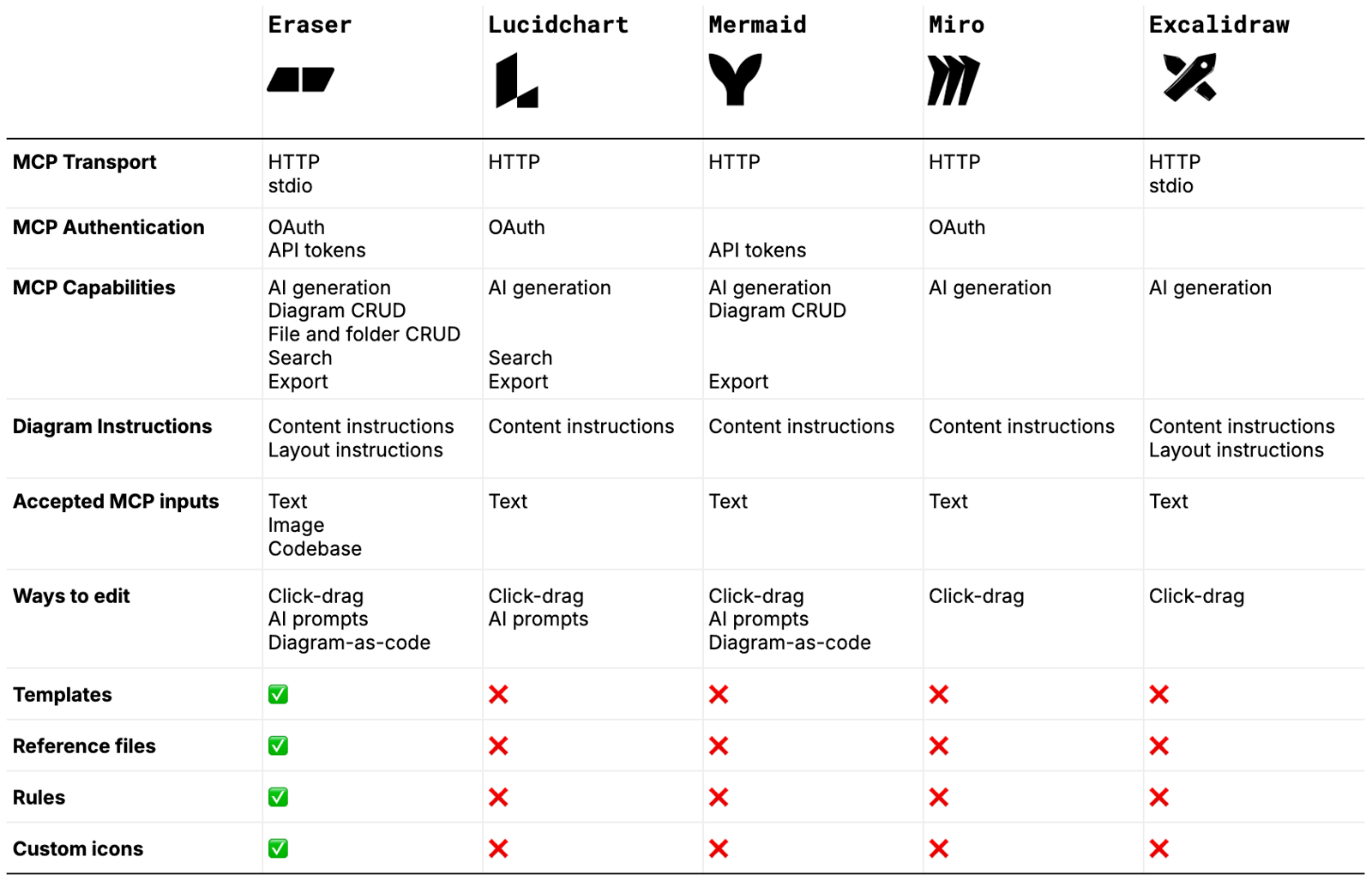 Comparison of the best diagramming MCPs in 2026
1. Eraser
Features:
- Full diagram and file/folder CRUD over MCP
- Codebase and image inputs alongside text
- All three editing modes: click-drag, AI prompts, diagram-as-code
- Both content and layout instructions
- Templates, rules, reference files, and custom icons
- HTTP and stdio transports, OAuth and API token auth
- Official one-click listings in the Claude directory and the ChatGPT plugin directory
Best For:
- Technical teams running real organizational workflows through MCP: architecture, compliance, documentation
- Teams that need consistent, on-brand diagrams at scale, not one-off sketches
Limitations:
- Limited native integrations with GSuite and Microsoft Office
2. Mermaid Chart
Features:
- Diagram CRUD over MCP (the only competitor in this list with diagram update)
- Native diagram-as-code (Mermaid syntax) plus click-drag and AI prompts
- PNG and SVG export
Best For:
- Developers fluent in Mermaid syntax who want AI-assisted authoring of code-defined diagrams
Limitations:
- No customization layer at all: no templates, no reference files, no rules, no custom icons. The biggest gap for any team needing on-brand or consistent output.
- No layout control via AI prompt or DSL
- Text-only inputs over MCP
- No folder management, no search
3. Lucidchart
Features:
- AI generation, search, and export over MCP
- OAuth-backed enterprise authentication with Dynamic Client Registration
Best For:
- Enterprises already on Lucid who want AI-assisted diagram discovery inside their existing governance and SSO
Limitations:
- What Lucid users can create manually is fundamentally different from what they can create via AI. The MCP is restricted to a small set of standard diagram types with standard shapes. The rich shape libraries and custom stencils that justify Lucid as a manual tool are not exposed to the AI.
- No diagram update over MCP (create-new-document only)
- No diagram-as-code editing path
- No customization, no layout control
4. Miro
Features:
- AI generation over MCP
- Board-context awareness: the AI can read existing board content
- OAuth 2.1 with Dynamic Client Registration
Best For:
- Cross-functional EPD teams using Miro as their whiteboarding hub who want AI to read from and contribute to boards
Limitations:
- No diagram update over MCP
- No export, no search, no customization, no layout control
- Disabled by default on Enterprise plans (admin must enable)
5. Excalidraw
Features:
- AI generation over MCP
- Accepts both content and layout instructions
- Open-source, lightweight, supports HTTP and stdio transports
Best For:
- Individual developers and OSS-friendly teams wanting quick AI-driven sketches
Limitations:
- No authentication on the open-source server, so no real team workflows or access control
- No export to standard formats (only an excalidraw.com URL)
- No search, no customization
- Hand-drawn aesthetic only
Key features to look for
- Diagram CRUD. Most servers can create a diagram, but few can update or delete. Without update, every AI iteration spawns a new file instead of refining the existing one, and your diagram library fills with near-duplicates.
- Discoverability and downstream consumption (search, read, export). Diagrams are only valuable if downstream users and agents can find and use them. Search makes the library navigable for both humans and agents; read and export let diagrams flow into docs, tickets, PRs, and compliance reports instead of getting stranded in the diagramming tool.
- Customization (templates, rules, reference files, custom icons). This separates one-off generation from consistent, on-brand output at team scale: templates enforce structure, rules encode style and naming, reference files ground the AI in your existing diagrams, custom icons preserve visual identity. Without these, every diagram is a fresh roll of the dice, and this is the single biggest gap among the four non-Eraser MCPs.
- Diagram instructions (content and layout). Most AI diagramming tools accept content instructions (“show three tiers connecting to a database”) but ignore layout instructions (“put the database on the right, the load balancer at the top”). Among the MCPs compared here, only Eraser and Excalidraw accept layout instructions; the rest auto-layout regardless of what the prompt says.
- Multi-modal inputs. Text is table stakes. Image input matters because “draw it like this” is a common prompt, and codebase input matters because diagrams should reflect the actual system rather than a description of it.
- Editing flexibility (all three modes). AI prompts for zero-to-one and bulk edits, drag-and-drop for surgical changes, diagram-as-code for version control and agent-to-agent communication. Drop any one of the three and a real workflow disappears with it.
- Transport and authentication. HTTP for web-based AI clients like Claude.ai and ChatGPT, stdio for local agents and developer tools. OAuth for user-permission inheritance and enterprise SSO, API tokens for headless agents that aren’t tied to a user account.
How to choose a diagramming MCP server
Clarify your use case
Which AI client(s) will your users connect from? Which diagram types matter most: architecture, sequence, ERD, flowchart, BPMN? Is the workflow create-heavy, read-heavy, or both? An MCP that only creates diagrams is useless for a team whose primary need is searching and updating existing architecture documentation.
End-user testing
Test with the actual AI client your team uses. The same MCP server can behave differently across Claude, Cursor, Windsurf, and ChatGPT because each client picks tools and constructs prompts differently. Make sure the diagrams produced are usable, not slop that requires manual rework.
Onboarding, customization, and migration
Can existing diagrams be discovered and updated through MCP, or only new ones created? Can templates, icons, rules, and layout be controlled programmatically? If your team has a brand or compliance standard, the MCP must be able to enforce it without a human in the loop.
Security and compliance
OAuth with Dynamic Client Registration for enterprise SSO inheritance. Data residency and tenant isolation. Whether the MCP server can be admin-gated so end users can’t connect it without IT approval. These matter the moment you move past individual use.
Scalability and AI roadmap
Does the server expose enough surface area to support real agentic workflows, not just chat-driven authoring? Does it integrate with the rest of your SDLC tools (code generation, PR review, doc generation) over MCP? A diagramming MCP that doesn’t compose with the rest of your agent stack will become a dead end.
Choosing the right diagramming MCP
MCP turns diagrams from passive artifacts into agent-accessible infrastructure connected to every other source of truth in the AI client. The differentiation among MCP servers in 2026 comes down to five axes: CRUD depth, customization, layout control, inputs, and editing modes. Most servers in this comparison handle one or two of those well; few handle all five. For teams that want diagrams to operate as real connected infrastructure rather than disposable sketches, Eraser is purpose-built for that workflow.