The C4 model, level by level
Software architecture at four levels of zoom: context, containers, components and code.
- Level 1 System context Who uses it, and what it relies on.
- Level 2 Containers The apps and data stores inside it.
- Level 3 Components The parts inside one container.
- Level 4 Code The classes behind one component.
What is the C4 model?
The C4 model is a way to diagram software architecture at four levels of zoom: Context, Containers, Components and Code, the four Cs in its name. Simon Brown created it. It doesn’t prescribe a notation: it defines what each level shows and leaves the shapes, colors and tools up to you. The official reference is c4model.com.
The four levels of the C4 model
Each level zooms into one part of the level above, for a different reader.
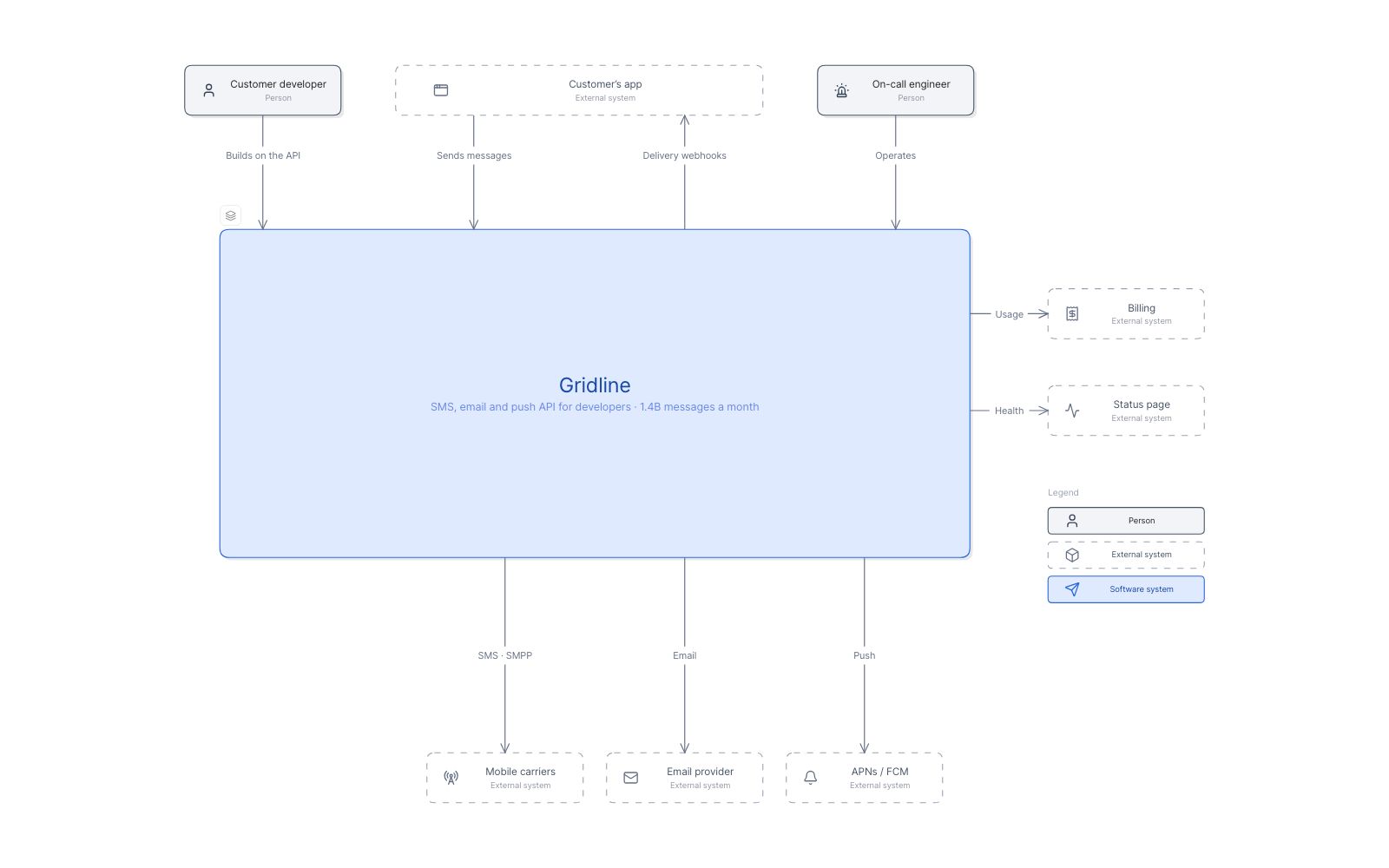
Gridline, an example messaging API, follows the level you’re reading.
-
Level 1: System context diagram
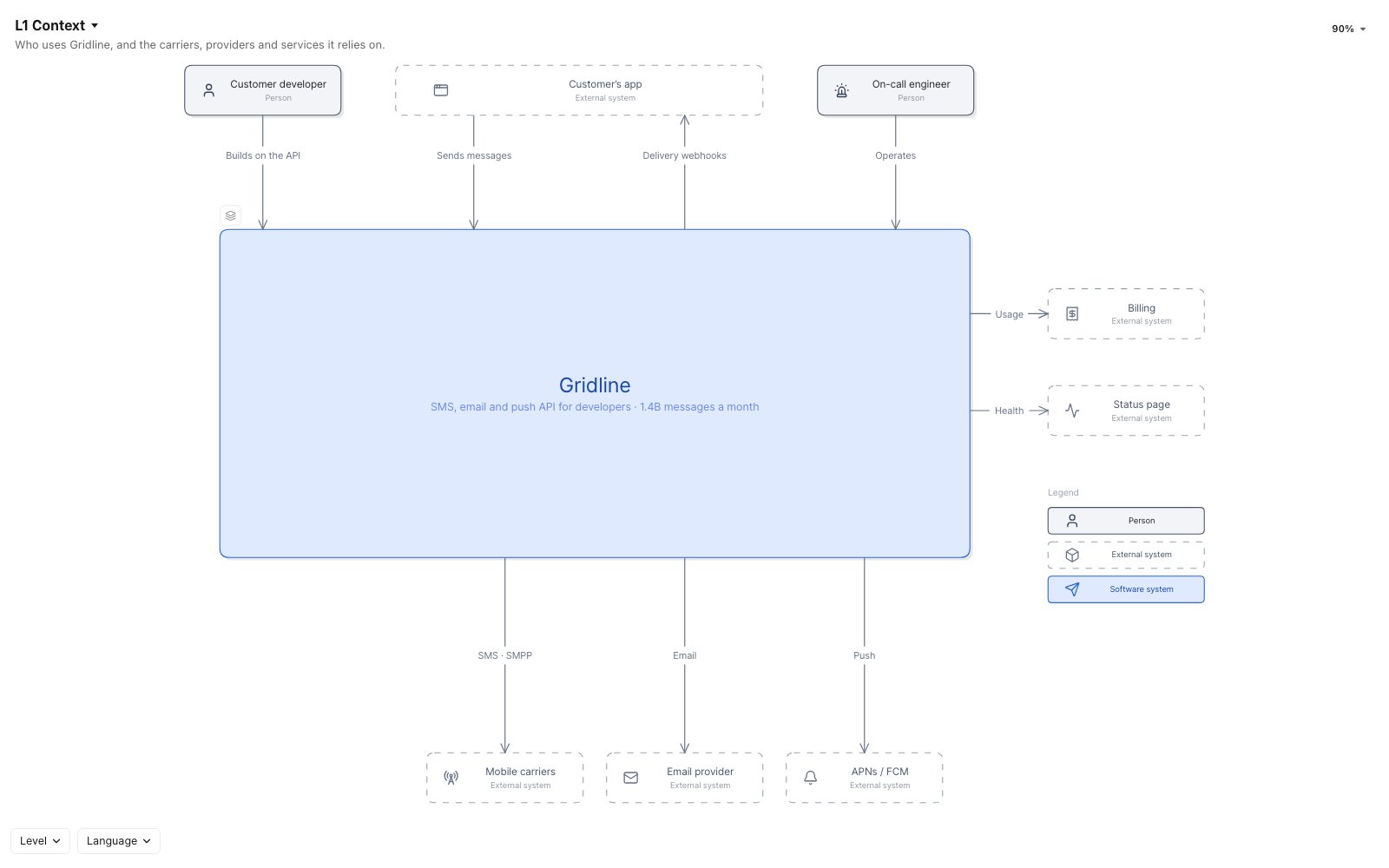
Your system as one box, with the people who use it and the other systems it interacts with. No technologies, protocols or internals.
Who reads it- Technical people
- Non-technical people
Gridline in context: the developers and on-call engineers who use it, and six systems around it. -
Level 2: Container diagram
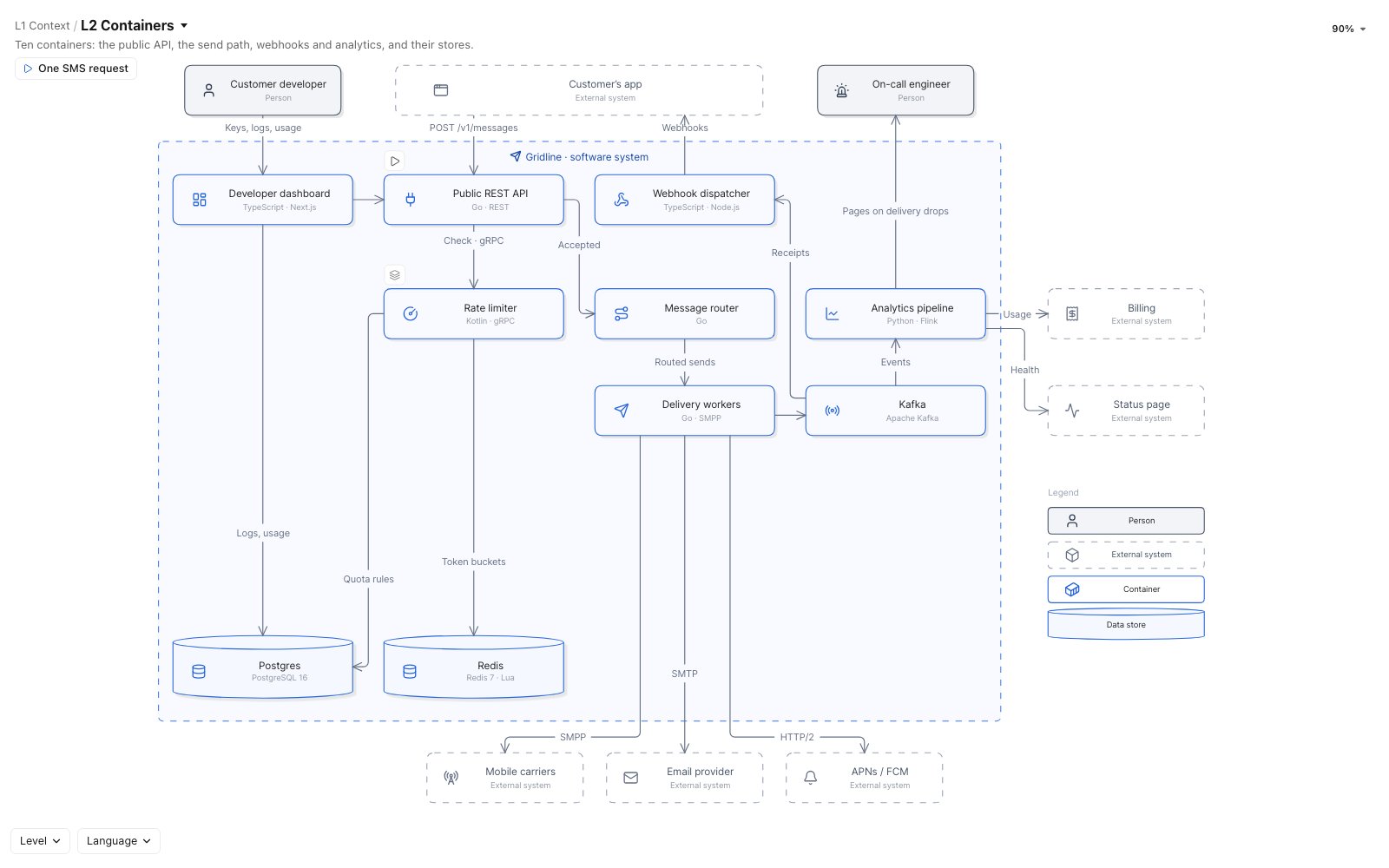
The system opened up into its containers: the apps and data stores that make it up, such as web and mobile apps, APIs, databases, serverless functions and file stores. Here a container is anything that has to run for the system to work, not a Docker container.
Who reads it- Architects
- Developers
- Operations
- Security
Gridline’s ten containers, from the public REST API and rate limiter to Kafka, Postgres and Redis. -
Level 3: Component diagram
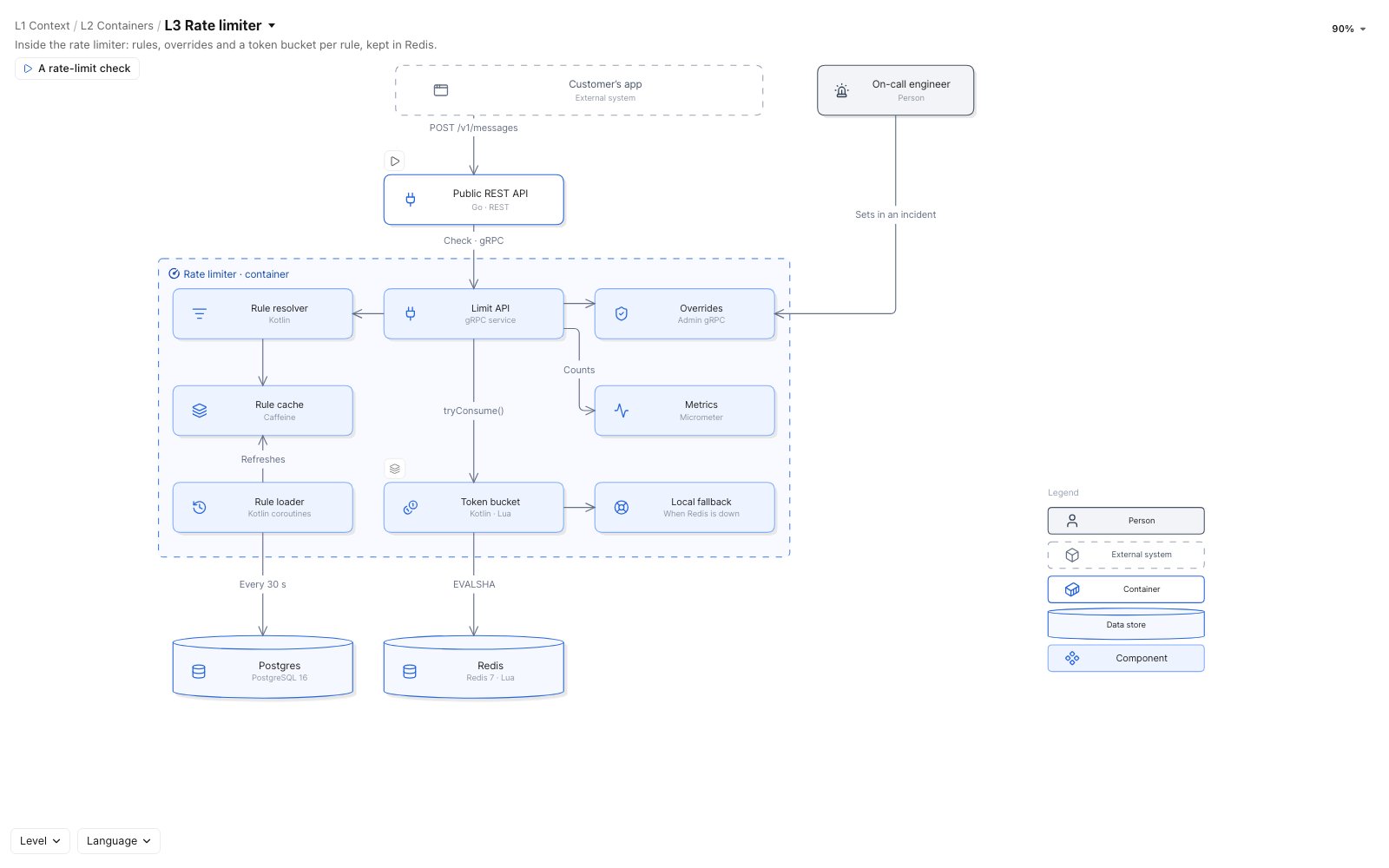
One container opened up into its components: groups of related functionality behind an interface, each with its responsibility and technology.
Who reads it- Architects
- Developers
Inside Gridline’s rate limiter: the Limit API, rules, overrides, metrics and a token bucket kept in Redis. -
Level 4: Code diagram
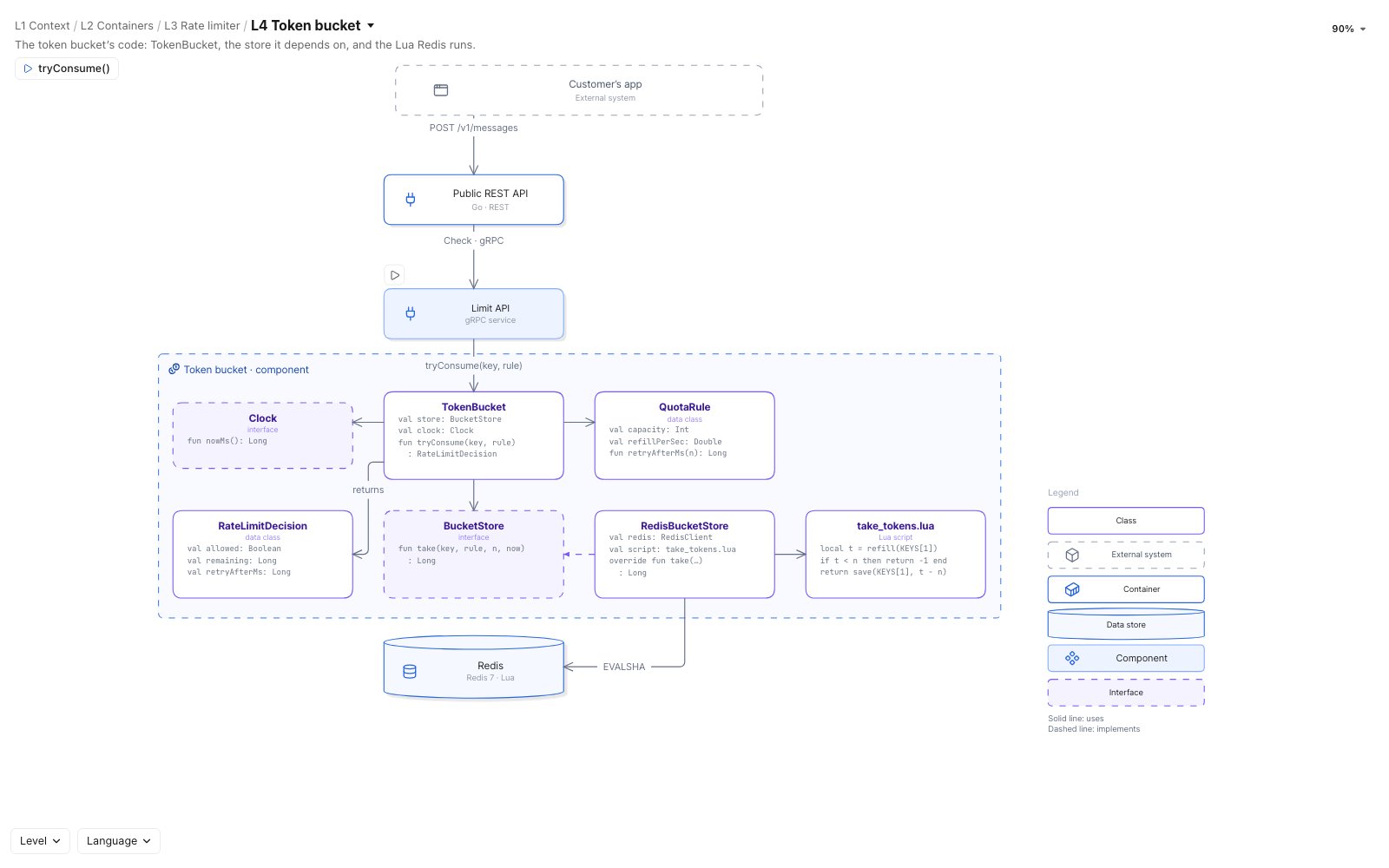
One component opened up into its code: classes and interfaces in a UML class diagram, or tables in an entity relationship diagram. This level is optional. It’s best generated by tools, and only worth having for your most important components.
Who reads it- Developers
The token bucket’s code: TokenBucket, the BucketStore it depends on, and the Lua script Redis runs.
The anatomy of a C4 diagram
Whatever shapes and colors you use, every C4 diagram needs these parts to be read on its own.
- 1Title What the diagram shows, and at which level.
- 2Type Person, software system, container or component.
- 3Description One line on what it does.
- 4One-way arrow Each relationship points one way.
- 5One level Only containers here. Components get a view of their own.
- 6Technology What it’s built with.
- 7Label What it does, and how: a check, over gRPC.
- 8Key Explains every shape, color, line and icon.
Supplementary diagrams
Three more views of the same model, for questions the four levels don’t answer.
-
System landscape diagram
Every software system in the enterprise and the people who use them, on one page: a system context diagram with no single system in focus.
Who reads it- Technical people
- Non-technical people
-
Dynamic diagram
How elements work together at runtime for one feature or use case, as numbered steps over a context, container or component view.
Who reads it- Technical people
- Non-technical people
-
Deployment diagram
How containers map to infrastructure in one environment: deployment nodes such as cloud regions, clusters, servers and managed services, and the container instances each one runs.
Who reads it- Architects
- Developers
- Infrastructure
- Operations
C4 vs UML, ArchiMate and CALM
C4 explains a software system to people.
UML goes deeper into its design, ArchiMate wider across the enterprise, and CALM turns it into code a pipeline can check.
C4 model
Diagramming approach · Simon Brown
Mainly System context to code, sometimes enterprise.
UML
Modeling language · Object Management Group
Mainly Components to code, sometimes containers.
ArchiMate
Enterprise architecture language · The Open Group
Mainly Enterprise to system context, sometimes containers.
CALM
Architecture-as-code specification · FINOS
Mainly System context to containers.
Diagrams, any notation
Diagrams, standard notation
Diagrams, standard notation
JSON, checked against a schema
Best forExplaining a system to technical and non-technical readers
Detailed design: classes, sequences and state machines
Describing and analyzing architecture across business domains
Automated validation and compliance checks in CI/CD
Make your own C4 model
Start from a description, from the systems you run, or from the diagrams you already have.
From a description
Describe your system in plain English. Eraser AI draws the C4 diagram, and you refine it with follow-up prompts.
Open the C4 diagram generator →From the systems you run
Connect the systems that already describe your architecture. Eraser models them, and Eraser AI draws a map from the model. Rescan a source to bring its maps up to date.
| C4 level | Built from |
|---|---|
| Context and landscape |
|
| Containers and deployment |
|
| Components |
|
 ServiceNow CMDB
 Ardoq
 OrbusInfinity
 AWS
 Azure
 Google Cloud
 VMware
 Infrastructure as code in your repos
 GitHub
 GitLab
 Azure DevOps
From Mermaid or PlantUML
Paste your Mermaid or PlantUML into Eraser AI, and it redraws the diagram in Eraser, ready to edit.
Start in Eraser →Click through a C4 model
C4 doesn’t prescribe a medium, so a model doesn’t have to be a stack of images.
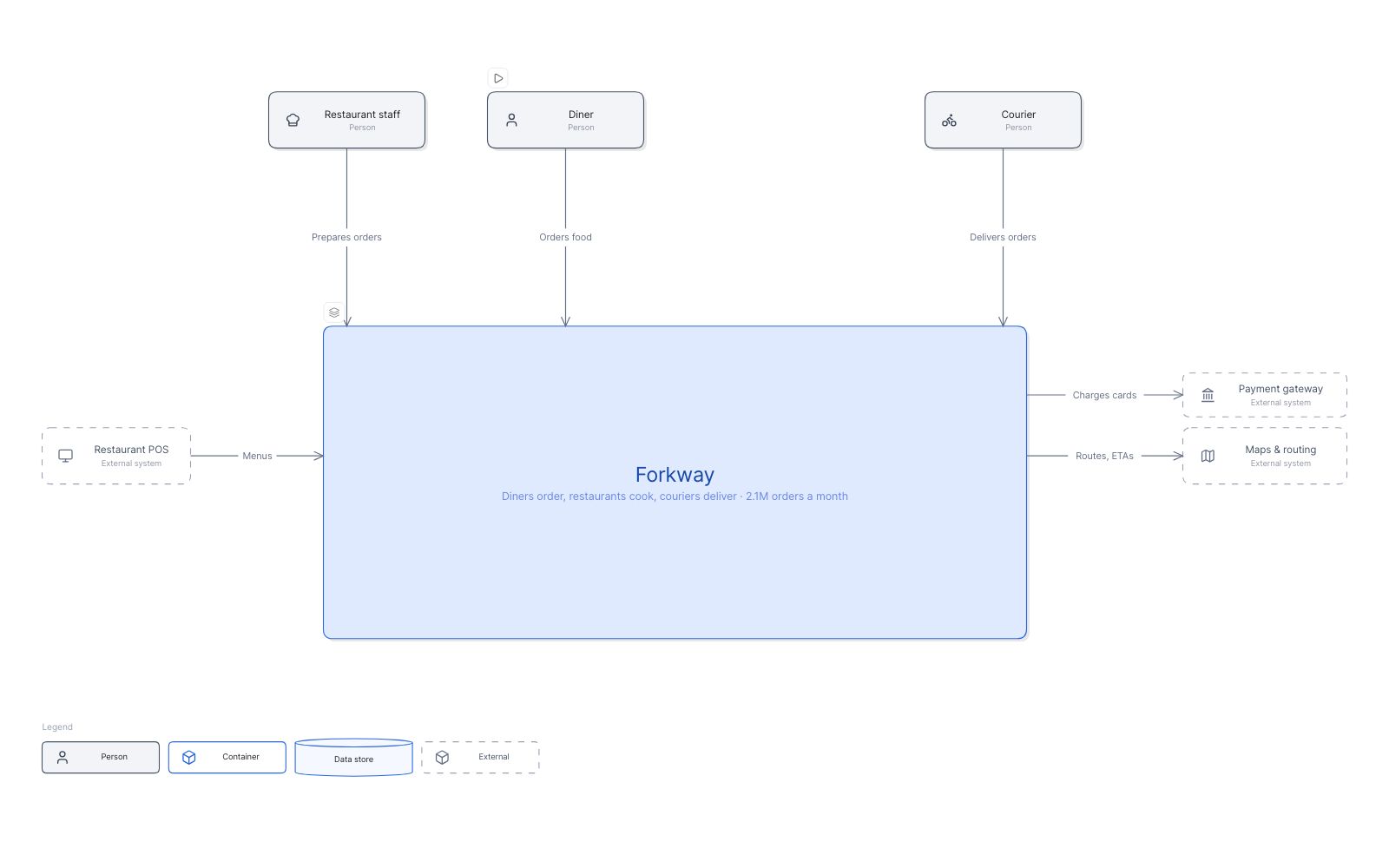
Forkway, an example food-delivery platform. Press Play a flow to watch an order go end to end.
-
Drill down
Open a box to see what’s inside it.
-
Play a flow
Watch a dynamic diagram move, one step at a time.
-
Filter
Show one team, phase or technology, and fade the rest.
-
Open a record
Every box is a record, with details such as its team and technology.
C4 model examples
See all map examples →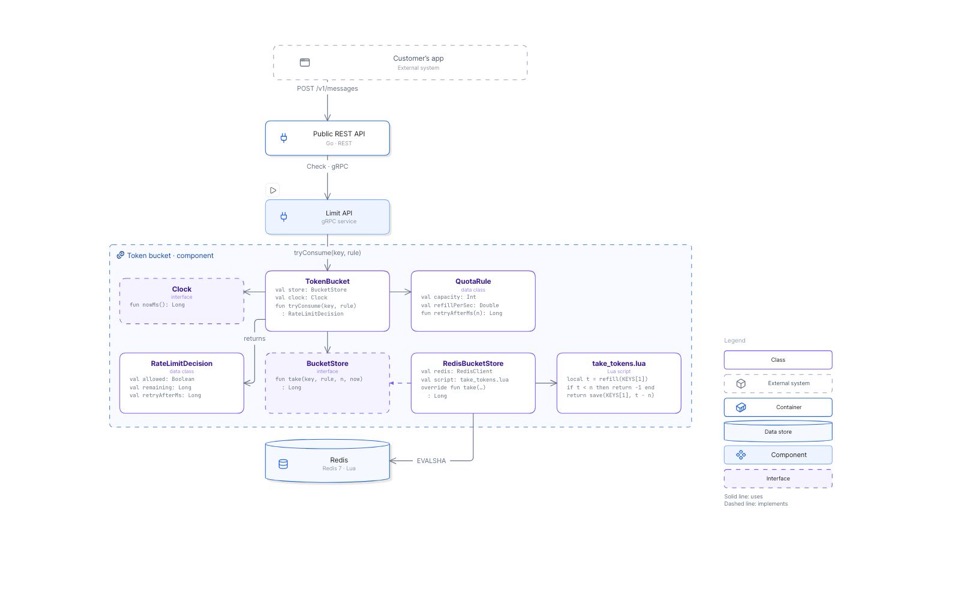
C4 model of a messaging API, all four levels
One drill through all four C4 levels: the system, its containers, the rate limiter, and the token bucket’s code.
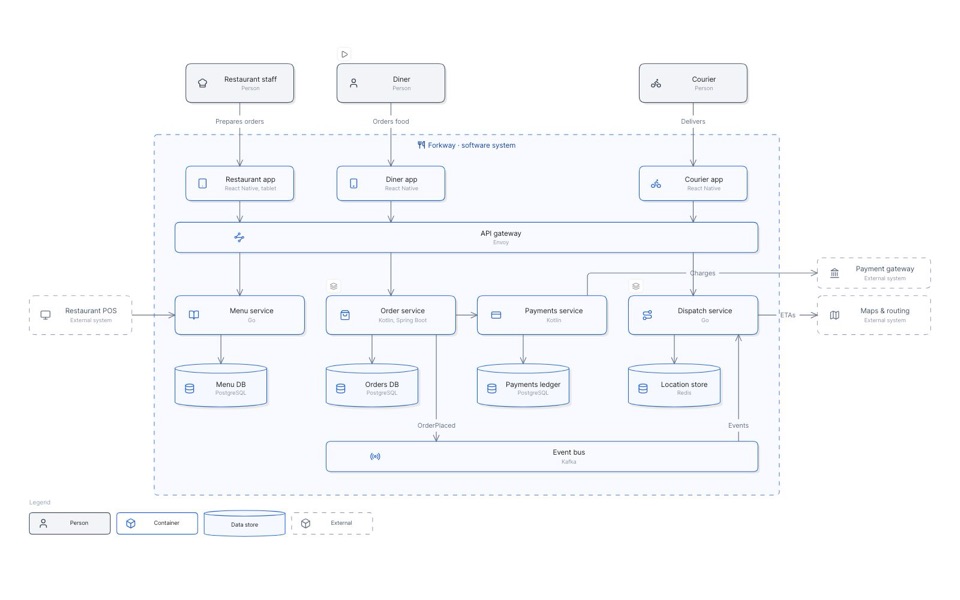
C4 model of a food-delivery platform
Who uses Forkway, the containers inside it, and the parts of its order and dispatch services.
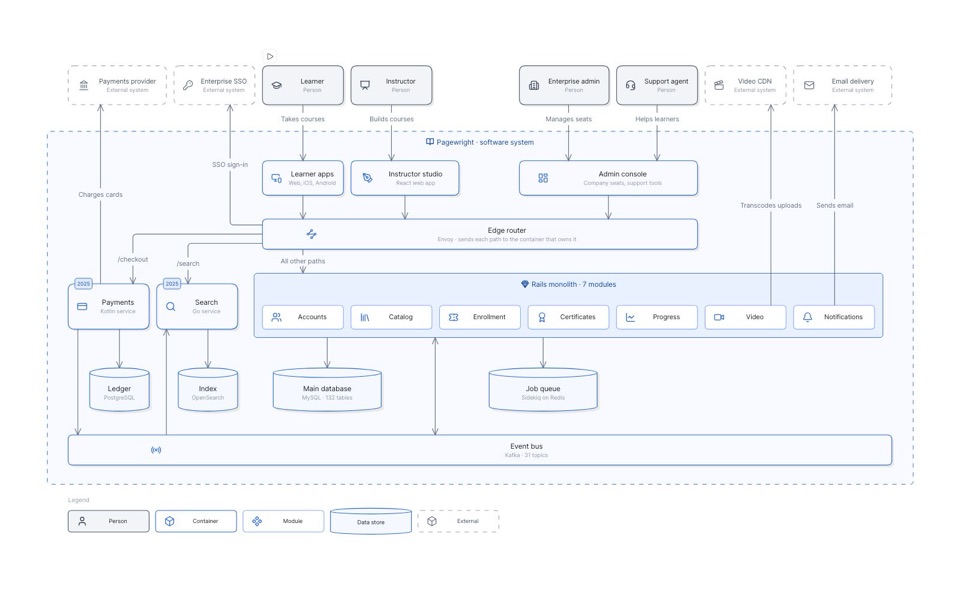
C4 model of a monolith carved into services
A Rails monolith becomes five services over three years, drawn as C4 containers on one frame.
Choosing a C4 tool
C4 tools differ in where the model comes from: code you write, diagrams you draw, or the systems you already run. They also differ in how the model stays current, and who can see it.
Frequently asked questions
-
What does C4 stand for?
Context, Containers, Components and Code: the four levels of the model, from the widest view of a software system to the most detailed.
-
What are C1, C2, C3 and C4 diagrams?
Informal names for the four levels. C1 is a system context diagram, C2 a container diagram, C3 a component diagram and C4 a code diagram.
-
Do you need all four levels?
No. System context and container diagrams are enough for most teams. Draw component diagrams where they help, and code diagrams rarely: they’re optional, and best generated from the code.
-
What’s the difference between a container and a component?
A container is something that must run for the system to work, such as a web app, an API or a database. A component is a group of related functionality inside one container, behind an interface. It runs as part of its container, not on its own.
-
When is the C4 model a good fit?
When different people need to understand one software system at different levels of detail, such as in onboarding, design reviews and architecture documentation. For a whole enterprise portfolio, start with a system landscape diagram.
-
Who created the C4 model?
Simon Brown created it, and c4model.com is the official reference.
-
Can I share a C4 map with people who don’t use Eraser?
Yes. Export the map to HTML and you get an interactive page anyone can open in a browser. Every interactive map on this page is one of those exports.
-
Can I use Eraser for free?
Yes, the Free plan is for individuals and small teams who are getting started on Eraser. Free plan teams get a limited number of files and AI credits.
Start your C4 model.
Describe it, or build it from the systems you run, and share a map anyone can click through.