Guide
Diagramming agents: 4 real-world use cases
Four real-world use cases for diagramming agents, where agents both produce and consume diagrams – and learn how that keeps a picture current instead of stale.
Most diagrams die the moment they’re made – drawn by hand for one meeting, then left to go stale as the systems they describe move on. Agentic diagramming breaks that cycle by moving diagrams into the agent loop, where agents both produce and consume them: a coding agent reads an approved architecture before it writes code, a review agent checks a proposed design against it, a process agent keeps the picture in sync as work changes.
This post shows what you build on top of an agentic diagramming platform: four agents that put a diagramming MCP server at the center of a real workflow, orchestrating across the tools teams already run – Claude, Cursor, GitHub, Salesforce, SharePoint, and Power Pages.
The four share a pattern: each pulls context from one or more sources of truth, uses the Eraser MCP server to create, update, search, and export diagrams, and writes the result back where people and other agents will find it. The diagram stops being a deliverable and becomes infrastructure. (For the platforms that make this possible, see Best agentic diagramming platforms in 2026.)
- Architecture-aware coding agent
- SOP / process agent
- RFP / proposal agent
- Architecture-review agent
Agent 1: Architecture-aware coding agent
The problem
Coding agents write functional code fast, but blind to enterprise context. Existing infrastructure, reference architectures, approved patterns, prior solution architectures for similar work – that context lives in diagrams the agent never sees. So it ships code that runs but duplicates infrastructure, violates standardized patterns, or fails architecture review outright. And even when a team diagrams the plan up front, it’s stale by the time the code merges, because nothing reconciles it against what shipped.
The workflow
- A developer prompts a coding agent – Claude Code or Cursor – to build a feature.
- An installed Eraser skill makes the agent ground non-trivial plans in existing architecture before coding.
- It uses Eraser MCP search to find relevant diagrams: existing AWS infrastructure, reference architectures, approved patterns, prior solution architectures.
- It reads the top matches in full as planning context.
- It drafts an architecture that reuses what exists and follows approved patterns, then uses Eraser MCP to create a proposed-architecture diagram in the team’s style and embeds it in the plan for review.
- After approval, it implements the feature and opens a GitHub pull request.
- It diffs the build against the proposed diagram and uses Eraser MCP to update that same diagram – not a new one – so the persisted architecture matches shipped code.
- The updated diagram saves back to its Eraser folder as context for the next run.
The outcome
The agent plans against real architecture, reusing what exists and following approved patterns, so the feature clears review on the first pass instead of looping back for rework. Because it updates the diagram after the PR opens, the persisted architecture matches shipped code rather than original intent. And each diagram becomes searchable context for the next run, so the library compounds in value instead of filling with stale one-offs.
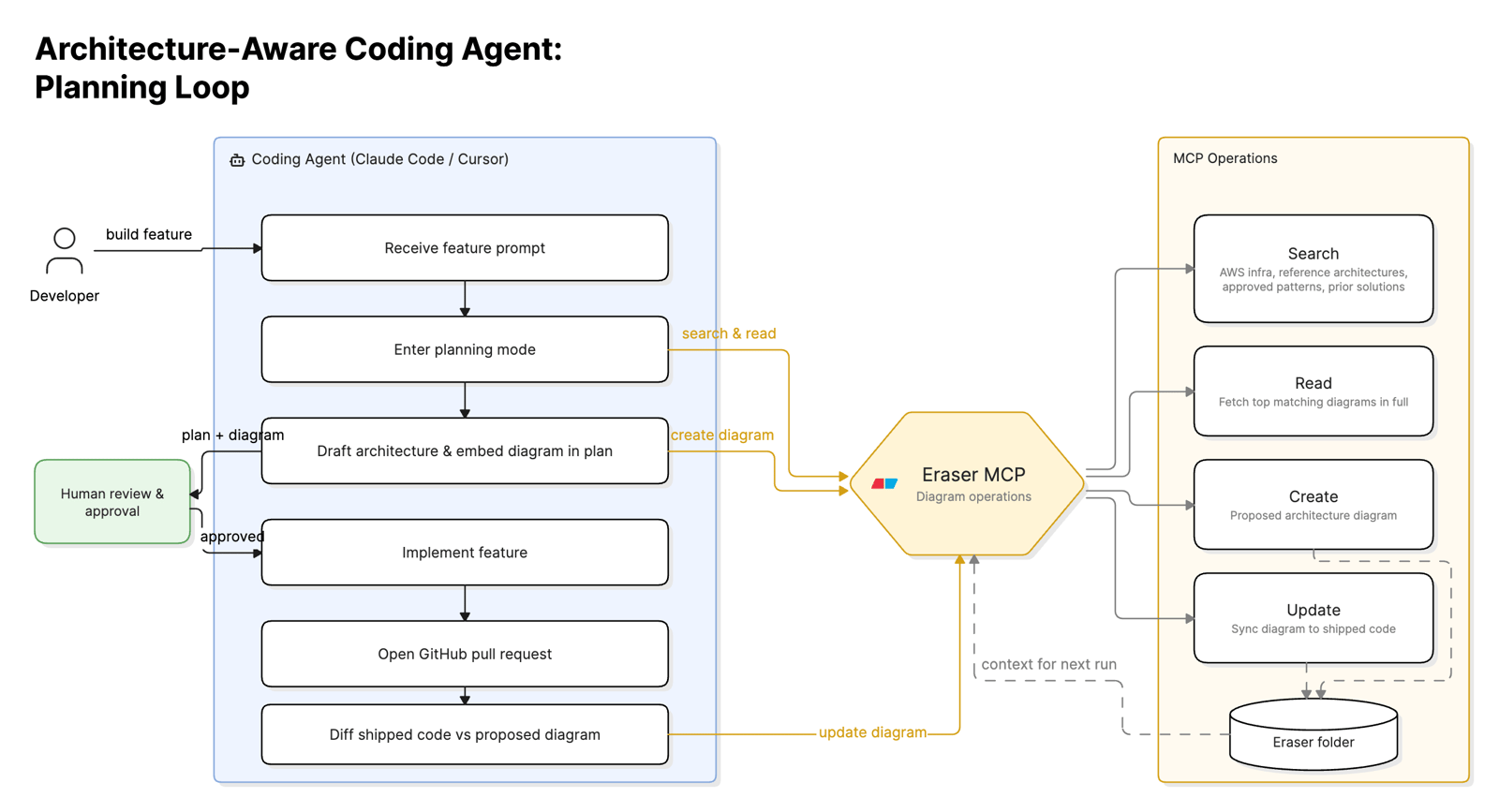 Coding agent + Eraser MCP + GitHub planning loop
Agent 2: SOP / process agent
The problem
Processes change constantly – a new stage in Salesforce, a revised procedure in Confluence, a workaround that lives only in a senior operator’s head. The visual SOP, if one exists, falls out of sync immediately, and keeping hundreds current is work no ops or quality team has time for. So teams run on text-heavy pages that get skimmed, or tribal knowledge that walks out the door.
The workflow
- A trigger fires when a process is introduced or changed: a workflow configured in a business system, a process doc created or edited, or an SME interview completed.
- The agent gathers context from whichever input applies:
- Business system – via the system’s MCP/API (Salesforce for CRM, SAP for ERP), reading the configured workflow: stages, statuses, transitions, automations.
- Document – via the doc source’s MCP (Confluence or SharePoint), fetching the procedure and linked references.
- SME interview – via a meeting MCP (Granola or Zoom), pulling the transcript and extracting the steps described.
- It normalizes the input into a structured sequence: actors, atomic steps, decision points, hand-offs, exception paths.
- It uses Eraser MCP search for an existing SOP diagram – updating it if found, creating one in the SOP folder named after the process if not.
- It applies the team’s SOP template and rules (swimlanes, decision/safety highlighting, naming) so the library stays consistent.
- Eraser MCP exports the diagram and returns the image plus an editable URL.
- The agent writes it back to the system of record – the Confluence page or the Salesforce record – so the visual lives beside the procedure.
The outcome
Every process change produces a current, on-brand flowchart in the same run, whatever the source. Because the agent finds the existing diagram and updates it in place, the SOP library stays consistent instead of accumulating near-duplicates. The visual lives beside the procedure, so people follow a diagram at the point of work instead of parsing paragraphs – and it changes the moment the process does.
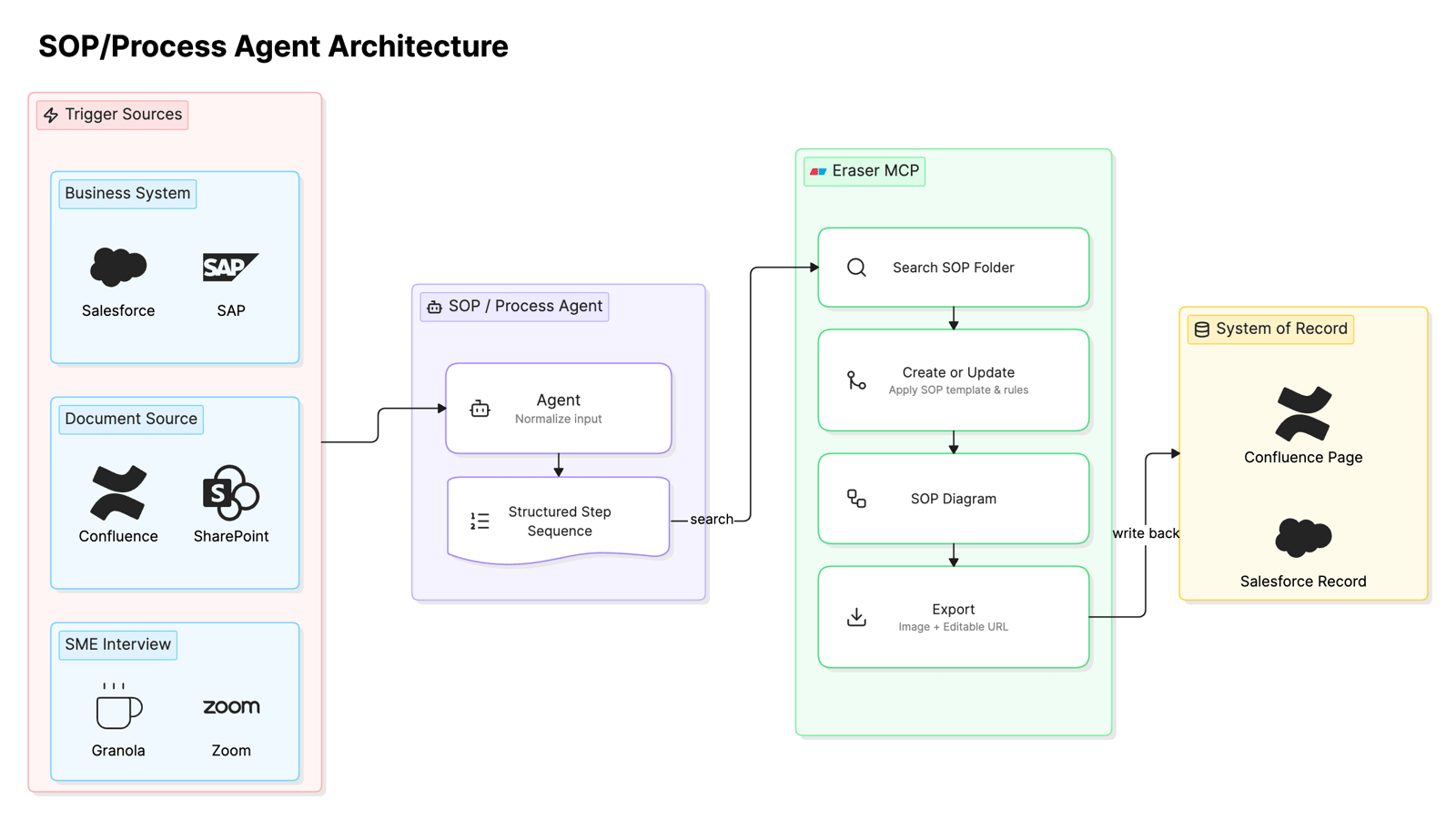 Business system / document / interview + Eraser MCP workflow
Agent 3: RFP / proposal agent
The problem
Responding to an RFP means turning a pile of requirements into an on-brand solution architecture and proposal deck – days of work per response for a solution architect. The bottleneck is diagram production, not architectural judgment, and slow turnaround costs deals where momentum decides the winner.
The workflow
- An RFP arrives; the user or an upstream intake agent points the proposal agent at it.
- The agent ingests it via the document MCP (Outlook or SharePoint) and parses requirements, constraints, evaluation criteria, and current-state details.
- It uses Eraser MCP search for reusable building blocks: approved reference architectures, prior winning solution architectures, and standard patterns that fit.
- It reads the top matches in full, then drafts a to-be solution architecture that meets the RFP and reuses proven patterns.
- It uses Eraser MCP to create the diagram in the firm’s template, rules, and custom icons so the output is on-brand.
- Eraser MCP exports vector (SVG/PDF) and image formats plus an editable URL.
- The agent uses the PowerPoint MCP to drop the diagram into the firm’s proposal template alongside a requirements summary.
- The deck saves to the engagement’s SharePoint folder and routes to the owner for review.
The outcome
A response that took days lands in hours. Reusing patterns from prior winning architectures, the proposed design starts from proven ground rather than a blank canvas, and the firm’s template, rules, and custom icons make the output indistinguishable from a hand-built deliverable. Architects spend their time qualifying the deal and refining the solution instead of drawing boxes, and faster, on-brand responses lift win rates.
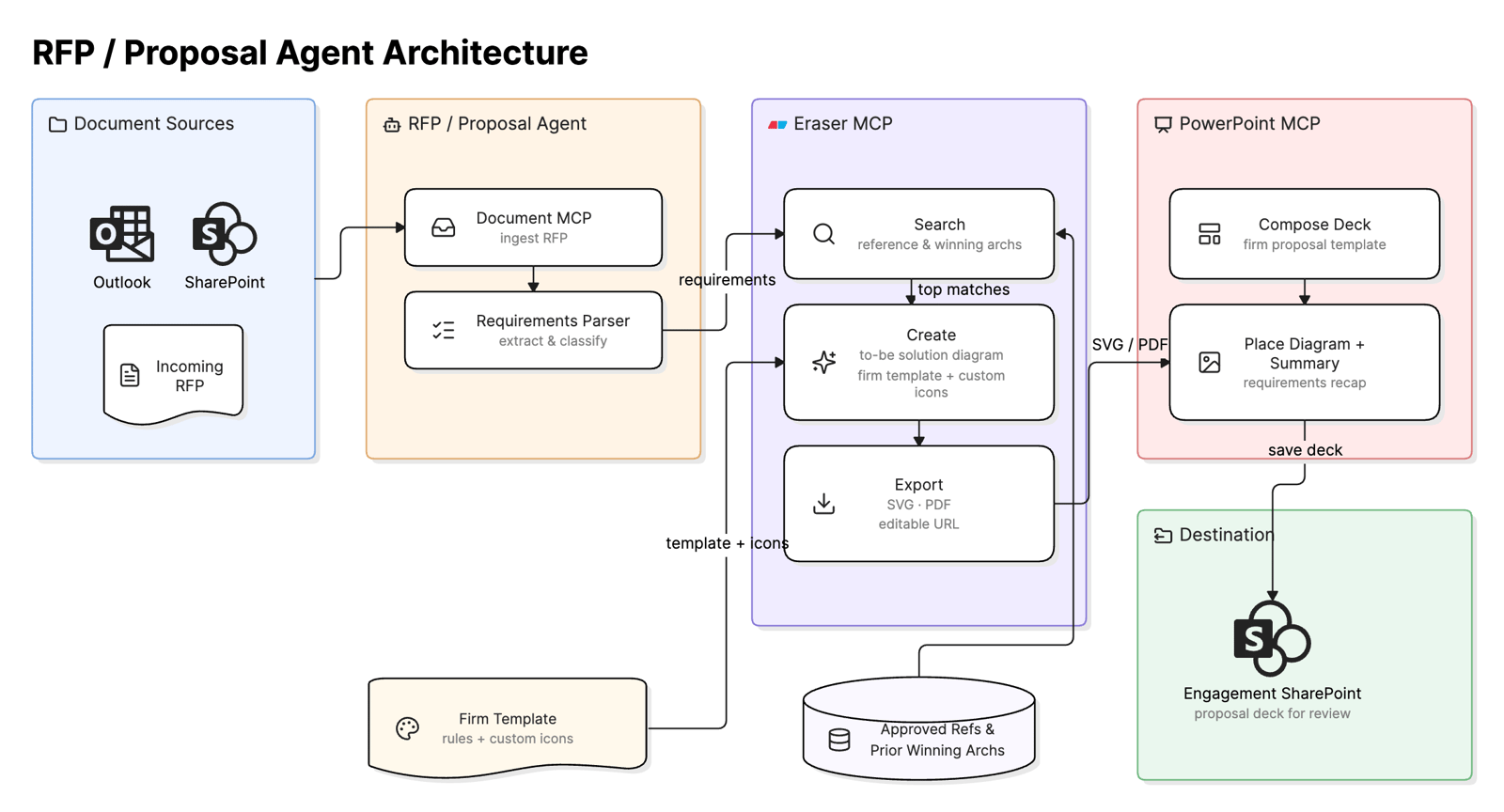 RFP + Eraser + PowerPoint MCP workflow
Agent 4: Architecture-review agent
The problem
Architecture review is a human bottleneck. A reviewer holds a proposed design up against approved reference architectures and org standards and checks it by hand – slow, inconsistent between reviewers, and impossible to scale. Governance happens only when a senior architect has time, so designs queue and standards drift.
The workflow
- A proposed design – a PowerPoint deck – is submitted through a Microsoft Power Pages site, triggering the agent.
- The agent retrieves the deck via Dataverse and extracts the proposed architecture: components, data flows, and the slide diagrams.
- It uses Eraser MCP search to pull the governing context: approved reference architectures, org standards, and the rules encoding required patterns (allowed AWS services, data-residency, security boundaries, naming).
- It reads those in full and compares the design against them, flagging deviations: unapproved components, duplicated infrastructure, violated patterns, missing controls.
- It uses Eraser MCP to create an annotated review diagram, marking compliant elements and tagging each deviation with the rule it breaks and a suggested fix.
- Eraser MCP exports it as a PDF review doc plus an editable URL.
- The agent posts both back to the submitter’s Power Pages site, enforcing the gate without a human reviewer.
The outcome
Every submission gets a consistent review in minutes, measured against the same architectures and rules each time. Deviations come back tagged with the standard they break and a suggested fix, so the submitter knows exactly what to change. The gate runs without a human in the loop, clearing the queue and holding the line on standards as volume grows – an architect steps in only on the genuinely ambiguous calls.
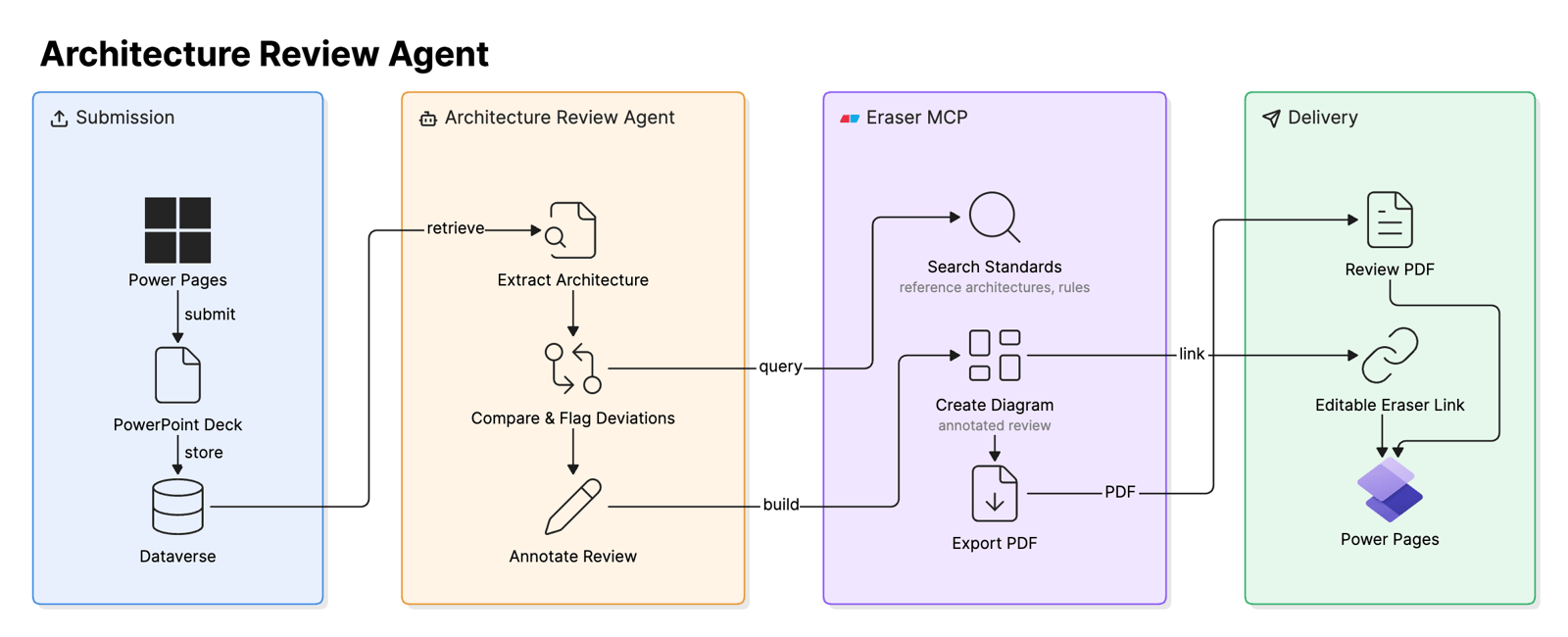 Power Pages + Eraser MCP review workflow
Try it with Eraser
Across all four, the pattern is the same: an agent orchestrates across the sources of truth a team already runs, and a diagramming MCP server makes the diagram a first-class, connected node rather than an after-the-fact artifact. It’s searched, read, created, updated, and written back – so it stays in sync with the system it describes instead of going stale the moment it’s drawn.
To build these workflows, start with the Eraser MCP setup docs and wire Eraser into the client your team already uses. For how the platforms underneath compare, see Best agentic diagramming platforms in 2026.