Guide
Cloud diagram automation: 4 real-world use cases
Four real-world use cases for cloud diagram automation, from architecture docs that keep themselves current to drift alerts, PR diagrams, and PCI DSS evidence.
Cloud architecture diagrams are the most expensive diagrams to keep true. Infrastructure changes every day – a new service ships, a hotfix goes in through the console, an account joins the organization – and every change quietly invalidates a diagram somewhere. A stale architecture diagram is worse than none, because people still trust it: on-call reads it during an incident, a reviewer approves a change against it, an assessor accepts it as evidence.
Connecting diagrams to the cloud accounts themselves changes that. Once Eraser scans an AWS organization, an Azure tenant, or a Google Cloud organization, a diagram can be regenerated from what is actually deployed, compared against what was planned, attached to the change that alters it, and handed to an auditor as evidence. For how the tools that do this compare, see Best cloud diagram tools in 2026.
This post walks through four use cases:
- Keep architecture docs current in an internal portal
- Detect drift between the plan and production
- Diagram every infrastructure pull request
- Produce audit-ready network and data-flow diagrams
Use case 1: Keep architecture docs current in an internal portal
The problem
A global insurer runs about 40 AWS accounts and an internal engineering portal with one page per workload: owners, runbooks, dependencies, and an architecture diagram. The diagrams are screenshots someone uploaded when each workload launched. Within weeks they are wrong – a queue added, a database moved to another account, a service retired – and no one has time to redraw sixty diagrams after every release. On-call engineers still open them during incidents, because there is nothing better.
The workflow
- A platform engineer connects the AWS organization to Eraser once. Every member account is included, along with accounts created later.
- For each workload, the engineer generates a diagram from the scan in AI chat – scoped by a prompt to the workload’s services, data stores, and dependencies – and saves it to a “Workload architecture” folder.
- Scans run on a schedule, and Eraser regenerates each diagram from the latest scan.
- When someone opens a workload page, the portal’s backend calls Eraser’s embed API with that workload’s diagram and gets back a short-lived embed URL.
- The page shows the diagram in an iframe. It is always the current version, viewers can pan and zoom, and no one needs an Eraser account to see it.
- Teams that keep their docs in Confluence or SharePoint embed the same diagrams there.
The prompt
Diagram the claims-intake workload in this organization: its API Gateway, Lambda functions, and ECS services, the queues and databases they use, and every service in other accounts that calls into it or that it calls. Group by account and VPC, keep data stores on the right, and use our architecture style preset.
The outcome
The insurer gets one internal portal where anyone can see current architecture: on-call, security, compliance, new hires, and the teams that depend on a workload. None of them need an Eraser account or access to the AWS console. The diagrams match production without anyone uploading a screenshot, and version history keeps each earlier state for incident reviews and audits.
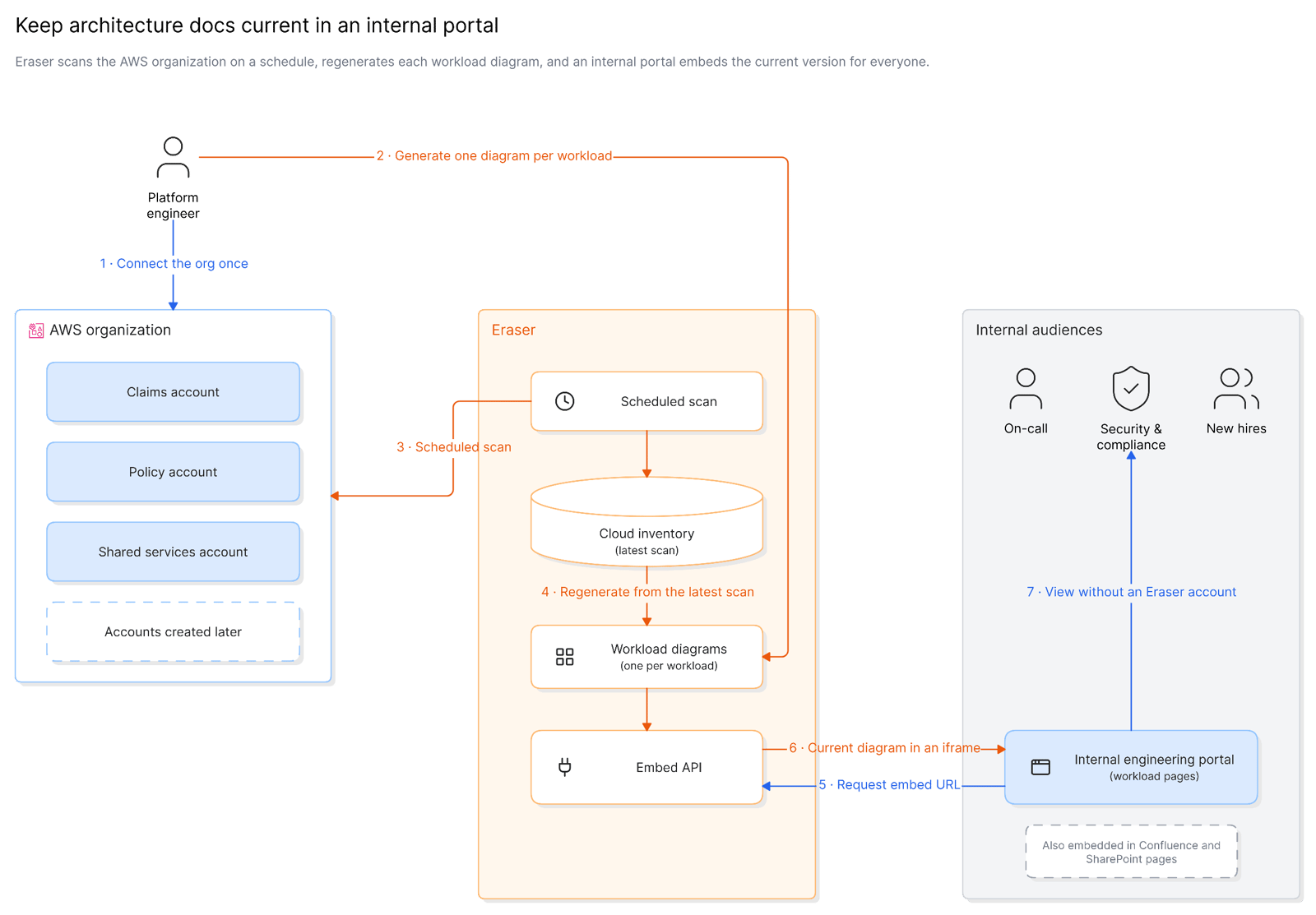 Scheduled scan + Eraser embed API workflow
Use case 2: Detect drift between the plan and production
The problem
At a healthcare company, every infrastructure change goes through an architecture review board, and the approved design lives in three places: Terraform in the platform repository, an approved diagram in Eraser, and the deck presented to the board. What actually runs drifts away from all three. A hotfix is applied in the console, a test database is never torn down, a subnet is opened to “just get it working”. No one notices until an audit or an incident, and by then no one remembers why. When the drift is a new path to patient data, it is a compliance problem, not a tidiness one.
The workflow
- The platform team connects the production accounts and the repository that holds the Terraform.
- Scans run on a schedule. After each one, a drift agent gathers the plan for each workload: its Terraform, its approved diagram in Eraser, and the review board’s deck.
- The agent asks Eraser, through its API, to compare the latest scan of the workload’s accounts with that plan.
- Eraser draws a drift diagram: resources that are running but not in the plan in red, resources in the plan that are not deployed as grey dashed outlines, and resources whose configuration changed in amber.
- The agent posts the diagram and a summary to the workload’s Slack channel, and opens a Jira ticket for any drift that touches patient data.
- When nothing has drifted, nothing is posted.
The prompt
Compare the latest scan of the clinical-prod accounts with the approved architecture for patient-portal: the Terraform in infra/patient-portal, the diagram “Patient portal – approved”, and the attached review board deck. Draw the workload as it runs today. Mark resources that are running but not in the plan in red, resources in the plan that are not deployed as grey dashed outlines, and resources whose configuration differs in amber, with a short note on what changed. Flag anything that has a path to the patient-records database.
The outcome
Drift is caught within a day of the change instead of at the next audit, and it arrives as a picture that explains itself: what changed, where it sits, and what it can reach. The review board’s approvals mean something again, because production is checked against them after every scan. Each alert ends one of two ways – the drift is removed, or the plan is updated to match – and either way the approved design stays true.
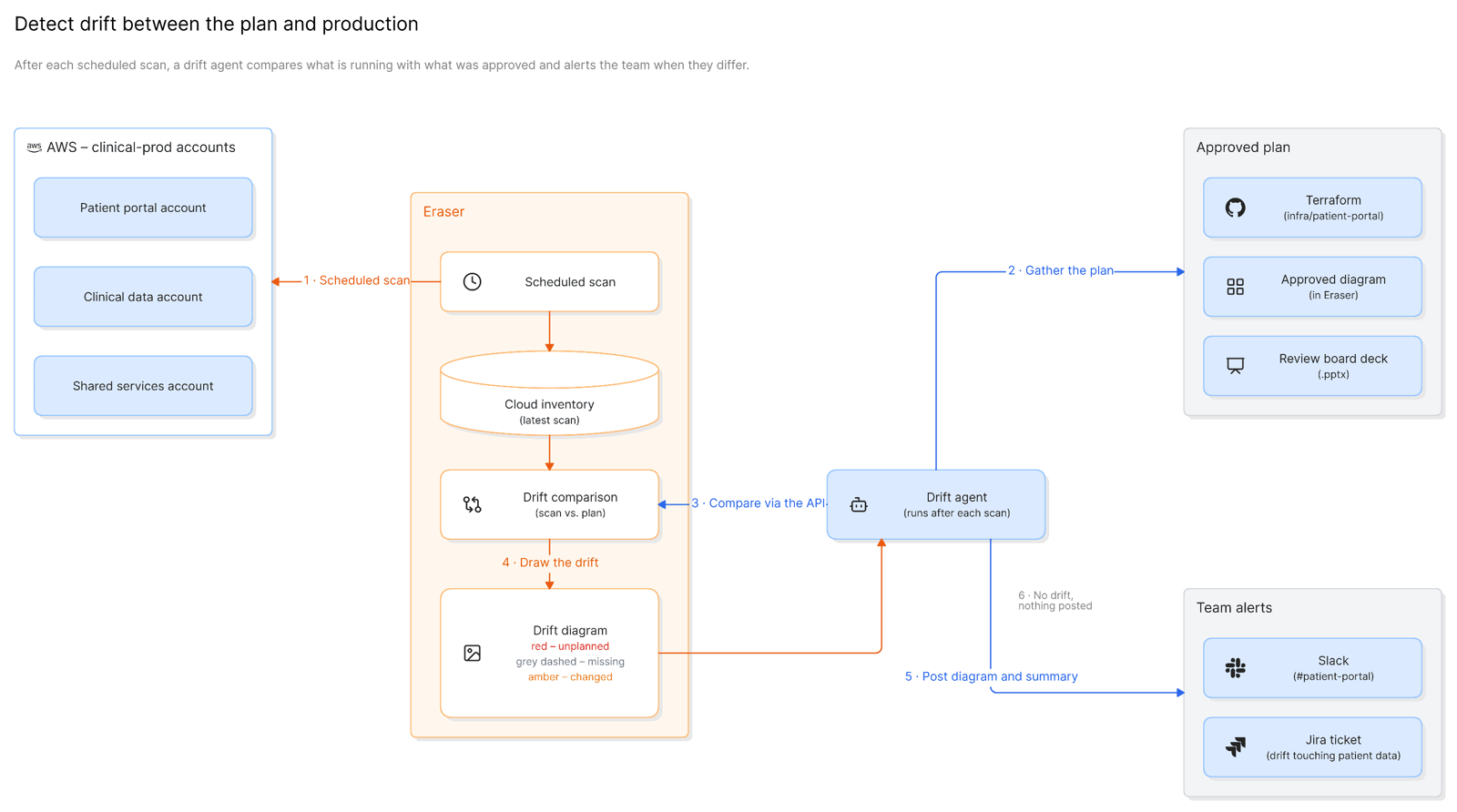 Scheduled scan + drift agent + Slack and Jira workflow
Use case 3: Diagram every infrastructure pull request
The problem
At a bank, infrastructure changes are Terraform pull requests, and reviewers approve them by reading HCL diffs and terraform plan output. A 400-line plan hides the one line that matters: a security group opened to a new CIDR range, a database moved into a public subnet, a new route between the payments VPC and a shared-services account. And reviewers only ever see the change, not what it lands on. If production has already drifted from the code, the plan does not show it.
The workflow
- The platform team adds its own job to GitHub Actions that runs on pull requests touching
infra/**. Eraser does not ship an official action, so the team owns this code – a single job calling one API. - The job runs
terraform planand collects the changed files. - It calls Eraser’s API with the changed files, the plan output, and the connected production environment, asking for a diagram of the change against what is deployed.
- Eraser returns a diagram image and an editable link.
- The job posts both as a pull request comment, and updates the same comment on each new push rather than adding another.
- Reviewers approve against the picture. When a change needs discussion, an architect opens the link and annotates the diagram.
The prompt
Diagram the change in this pull request against what is deployed in the payments-prod account. Draw the affected part of the architecture as it runs today, then mark what this change adds in green, removes in red, and modifies in amber. Call out any change to a security group, route table, or public exposure. Note anything in production that differs from the Terraform on main, so reviewers know what this change lands on.
The outcome
Reviewers see what a change does before they approve it, and the one line that matters in a 400-line plan becomes a red or green shape on a diagram. Because the diagram is drawn against the live environment, the comment also surfaces drift the change would land on top of – the console fix from last quarter that the Terraform never learned about. Security review moves from reading plans to reading pictures, and the same job runs just as well in GitLab CI or Azure Pipelines.
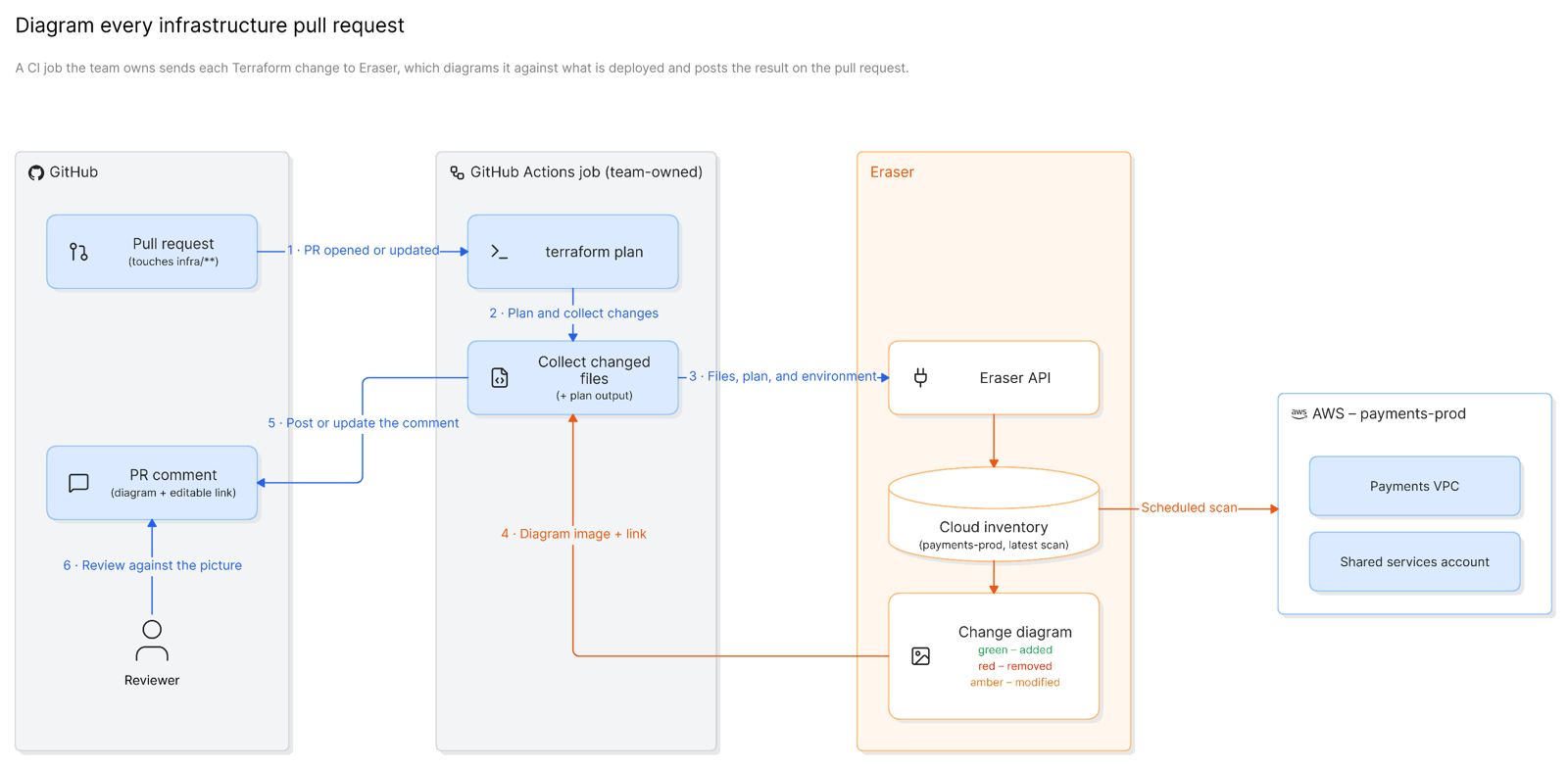 GitHub Actions + Eraser API pull request workflow
Use case 4: Produce audit-ready network and data-flow diagrams
The problem
A payments company is preparing for its PCI DSS v4.0 assessment. Requirements 1.2.3 and 1.2.4 call for an accurate network diagram showing every connection between the cardholder data environment and other networks, and an accurate data-flow diagram showing how account data moves across systems and networks, kept current as the environment changes. Every year, the compliance lead spends weeks chasing engineers for diagrams that are out of date the day they are drawn, and every year the assessor finds the gaps.
The workflow
- The compliance team connects the AWS organization and scopes the diagrams to the in-scope accounts and to resources tagged
pci-scope=cde. - In AI chat, they generate two diagrams from the scan: a network diagram of the cardholder data environment and every connection into and out of it, and a data-flow diagram tracing cardholder data from the payment API through tokenization to storage and the payment processor.
- Scans run on a schedule, and Eraser regenerates both diagrams from each new scan.
- Before the assessment, and after any significant change, the team exports dated PDFs to the evidence repository in its GRC tool.
- When the assessor asks when a connection appeared, the team answers from version history.
The prompt
Using the payments organization, draw a network diagram of the cardholder data environment: every account and VPC tagged pci-scope=cde, and every connection between the CDE and any other network – VPC peering, transit gateway attachments, VPN connections, and internet and NAT gateways – labeled with the security group or network ACL rules that allow it. Then draw a data-flow diagram of cardholder data from the payment API through tokenization to storage and the payment processor, showing each system that stores or transmits it. Group by account and VPC, and use our compliance style preset.
The outcome
The evidence is always current, and it is drawn from the real environment rather than from a whiteboard photo. Weeks of chasing engineers become an export, the assessor gets diagrams that match what they test, and questions about when something changed are answered from version history instead of memory. The same approach produces the network and data-flow diagrams that SOC 2, ISO 27001, and HIPAA reviews ask for.
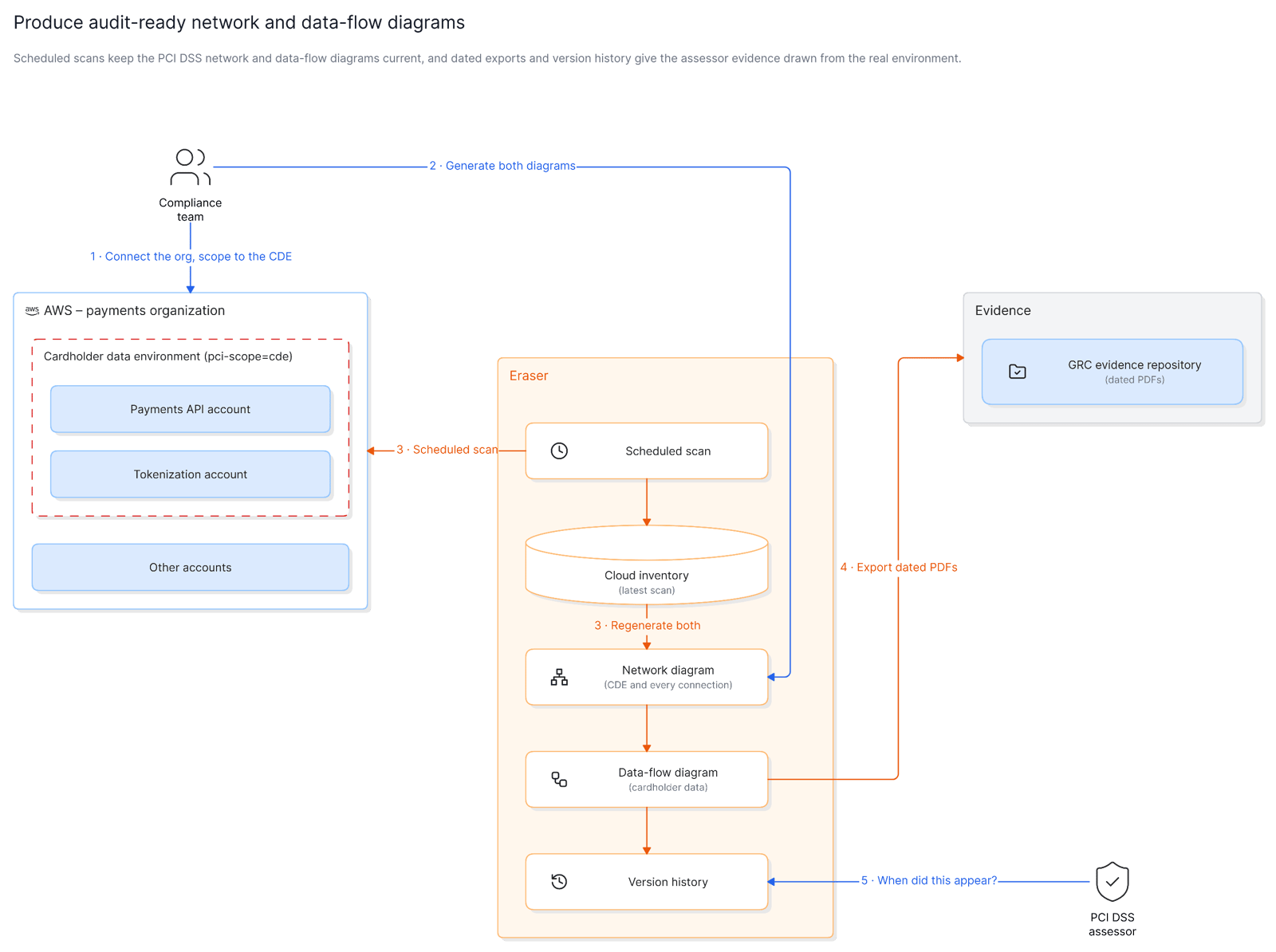 Scheduled scan + PCI DSS evidence workflow
Try it with Eraser
Across all four use cases the pattern is the same: Eraser scans the accounts, and the diagram is regenerated from what is deployed rather than redrawn from memory – then published to a portal, checked against a plan, attached to a change, or handed to an assessor. The diagram stops being a snapshot of the past and becomes a view of production.
To try these workflows, start by connecting a data source, then generate your first diagram from it with the cloud diagrams guide. The API docs and embed API cover the automation in use cases 1 and 3. For workflows that orchestrate diagrams across other tools over MCP, see MCP diagram automation: 4 real-world use cases.