Software architecture
Client-server architecture
Client-server architecture splits an application into clients that send requests and a server that holds the data and logic and answers them over a network.
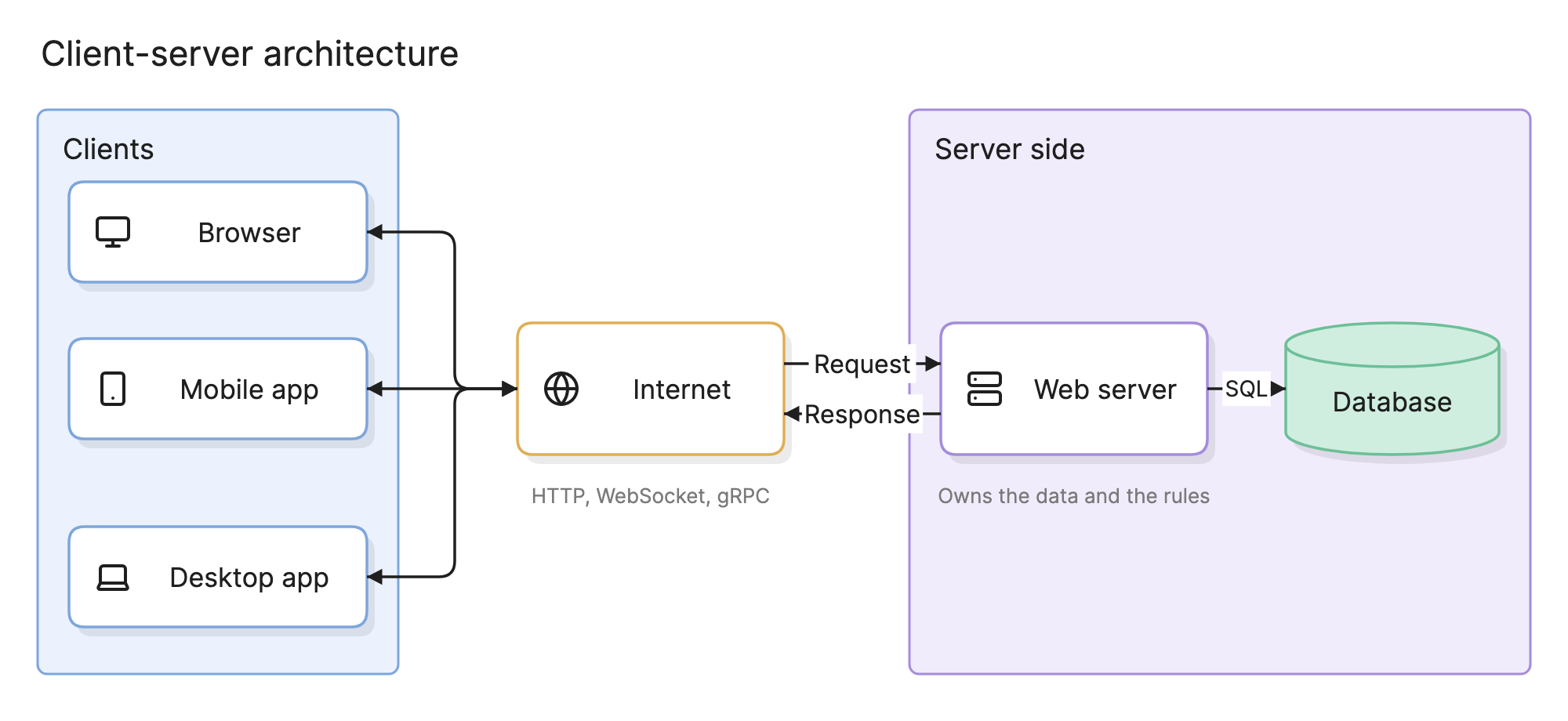
Nearly every networked application is client-server at its outer edge, from a browser loading a page to a mobile app syncing with a backend. The pattern is worth understanding precisely because it is so common that teams stop seeing it.
Why does client-server architecture matter?
- Central control. The server holds the database and the business logic, so there is one place to enforce permissions, validate input and fix bugs.
- Many clients, one backend. A browser, a mobile app and a partner integration all talk to the same server, so a feature is built once.
- A clear security boundary. The network between client and server is where authentication, TLS and rate limiting live.
What are the parts of a client-server architecture?
- Clients. The programs that start requests: browsers, mobile apps, desktop apps and other services. They hold the user interface and sometimes some logic and cached data.
- Server. The program that listens for requests, applies the business rules and reads or writes the data. It can be one process or a whole server-side system.
- Network and protocol. HTTP and HTTPS dominate, with WebSocket for two-way streams and gRPC for service-to-service calls.
- Request and response. The client sends a request and waits; the server answers. That waiting is what separates the model from an event-driven architecture.
- Database. The store behind the server. Clients never reach it directly in a well-designed system.
What are the types of client-server architecture?
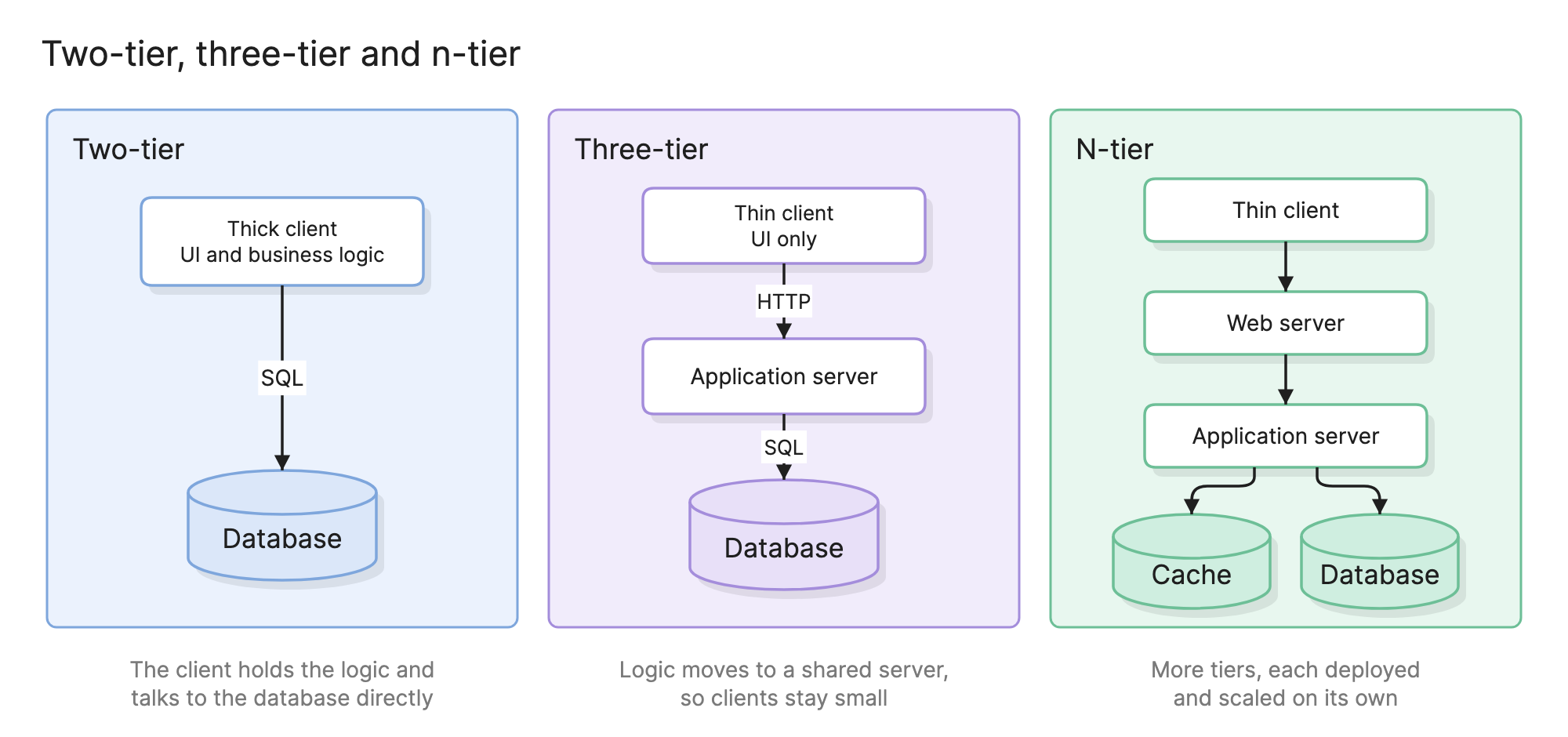
Two-tier
The client talks directly to a database server. The client is thick: it holds the user interface and the business logic, and the database enforces what it can with constraints. Every client needs database credentials and every rule change means redeploying the client.
Three-tier
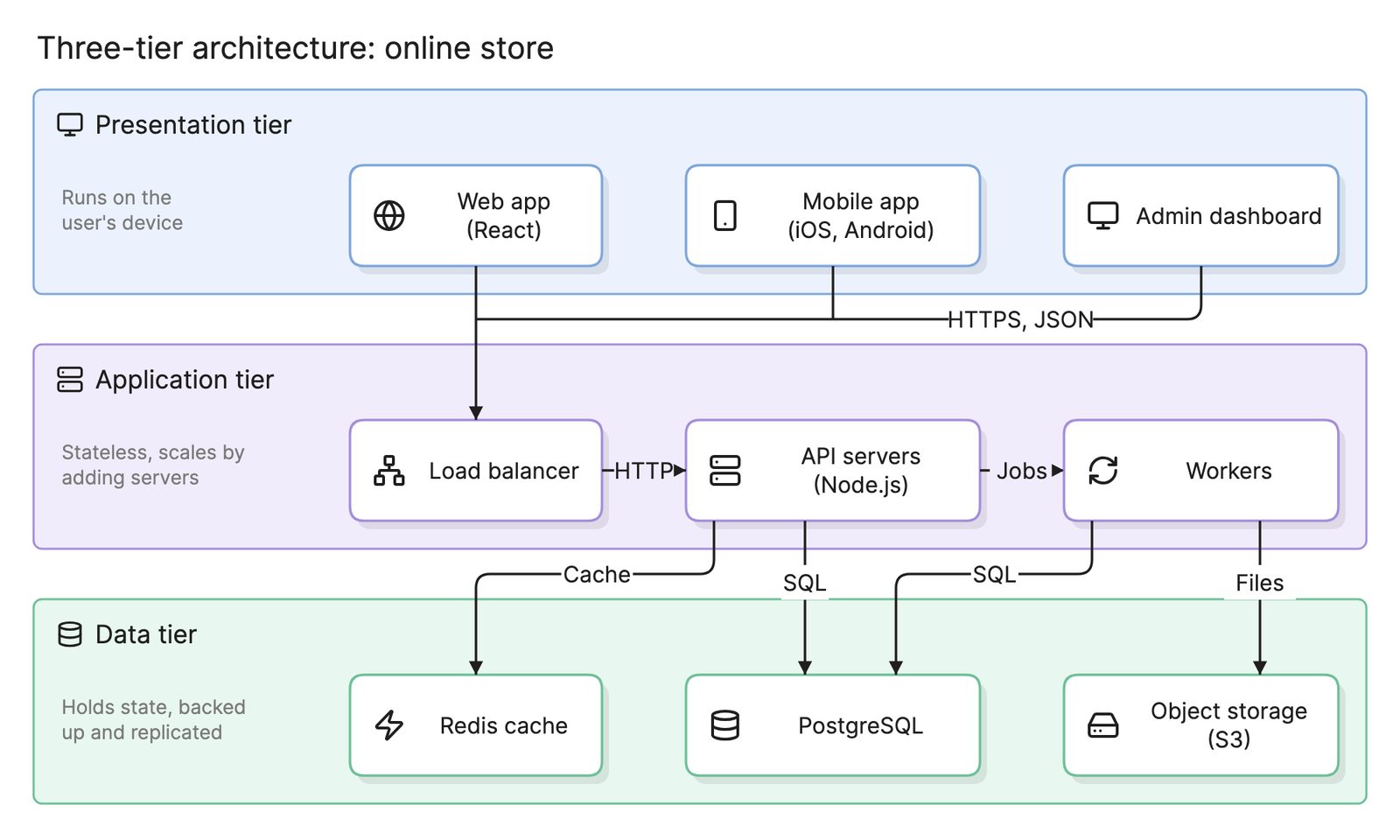
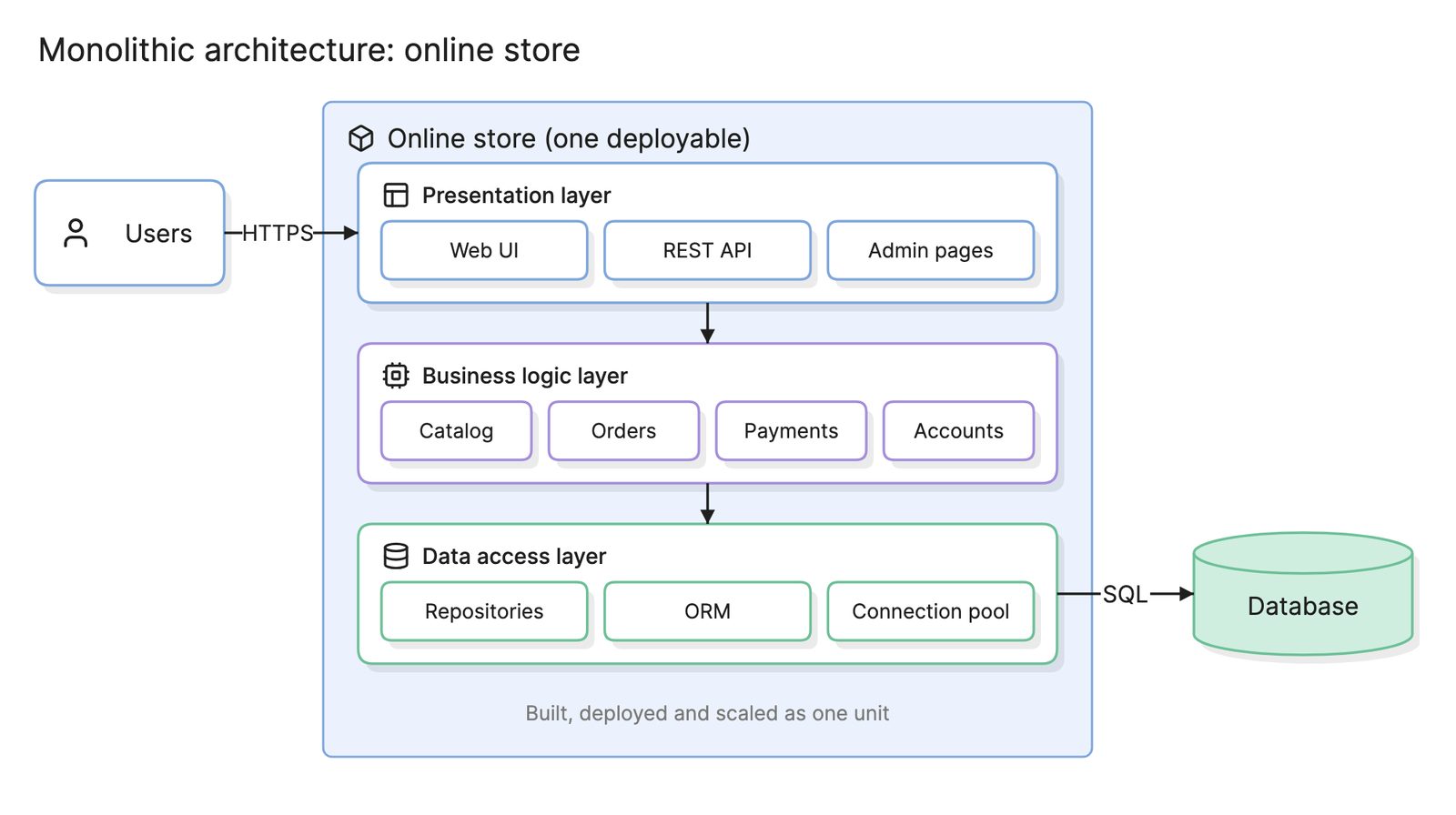
A middle tier, the application server, sits between a thin client and the database. The client renders and collects input, the application server holds the logic and the database stores data. This is the shape of most web applications and of a classic monolith; see three-tier architecture.
N-tier
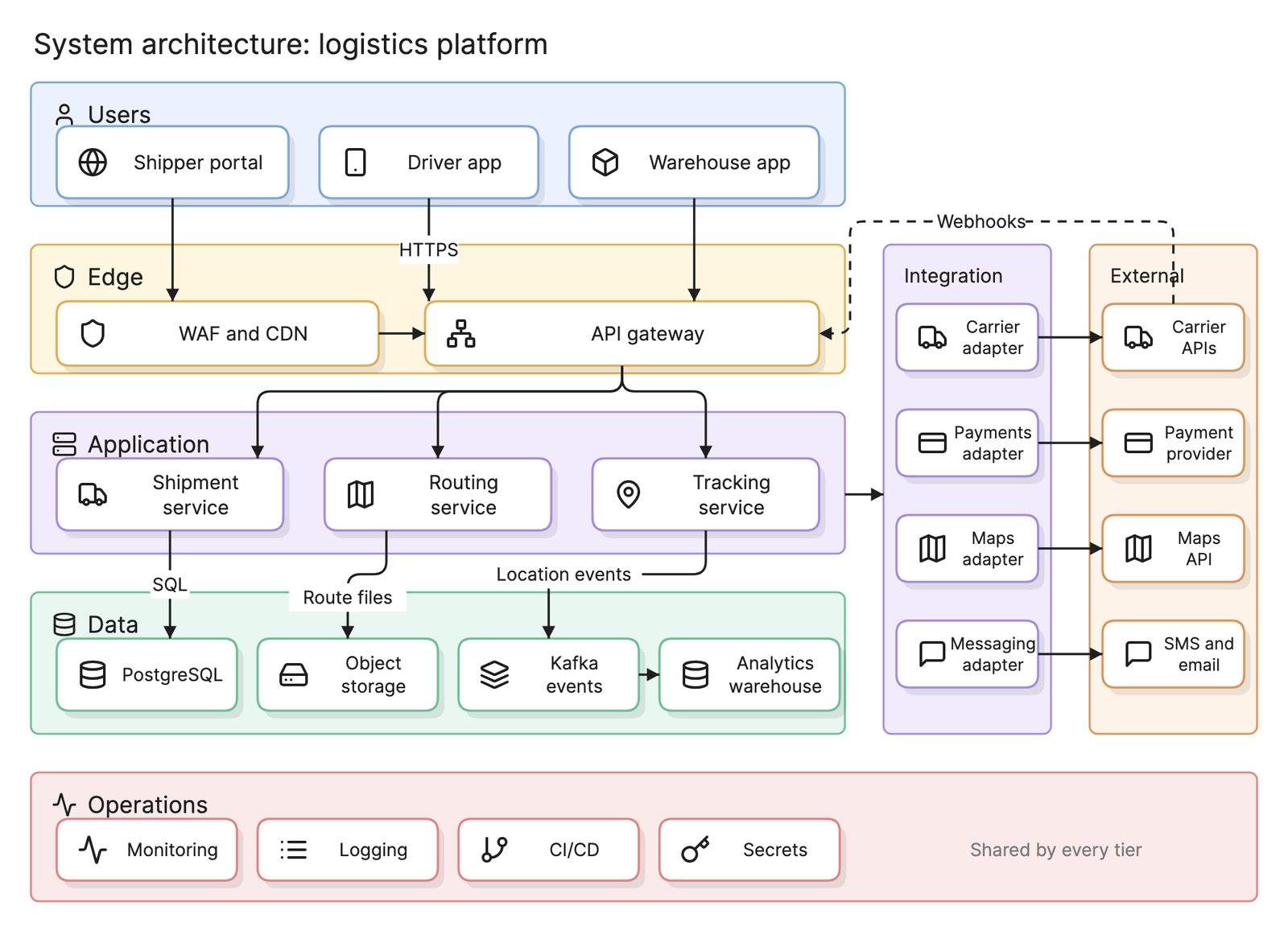
Three tiers generalized. A web tier terminates TLS, an application tier runs the logic, a caching tier absorbs repeated reads and a data tier stores. Each tier scales separately, and a system architecture diagram usually shows which tier each component belongs to.
What is the difference between thick and thin clients?
| Thick client | Thin client | |
|---|---|---|
| Where the logic runs | Mostly on the client | Mostly on the server |
| Works offline | Often | Rarely |
| Updating | Every client must be updated | Deploy the server once |
| Trust | Logic can be inspected and bypassed | Logic stays on the server |
Single-page applications and native apps that call an API sit in between: the interface and some validation run on the client, but every rule that matters is enforced again on the server.
How do you read a client-server architecture diagram?
Follow the request. In the example at the top of this page, a browser, a mobile app and a desktop app connect through the internet to the same web server. Traffic flows both ways, but the client always starts: it sends a request, the server does the work and sends a response.
The server owns the database, drawn to its right and reached over SQL. No client talks to the database directly, which separates a sound design from a two-tier one. The question this layout raises is the classic one: the server is a single point of failure, so how many copies run, and what sits in front of them?
How do you design a client-server system?
- Decide what the client owns. Rendering and input always; nothing that must be trusted.
- Define the protocol. Choose REST, GraphQL, gRPC or WebSocket, and write the contract down before building either side.
- Keep the server stateless. Put sessions in a shared store so any server copy can handle any request. Eraser’s engineering blog covers load balancing and API gateways.
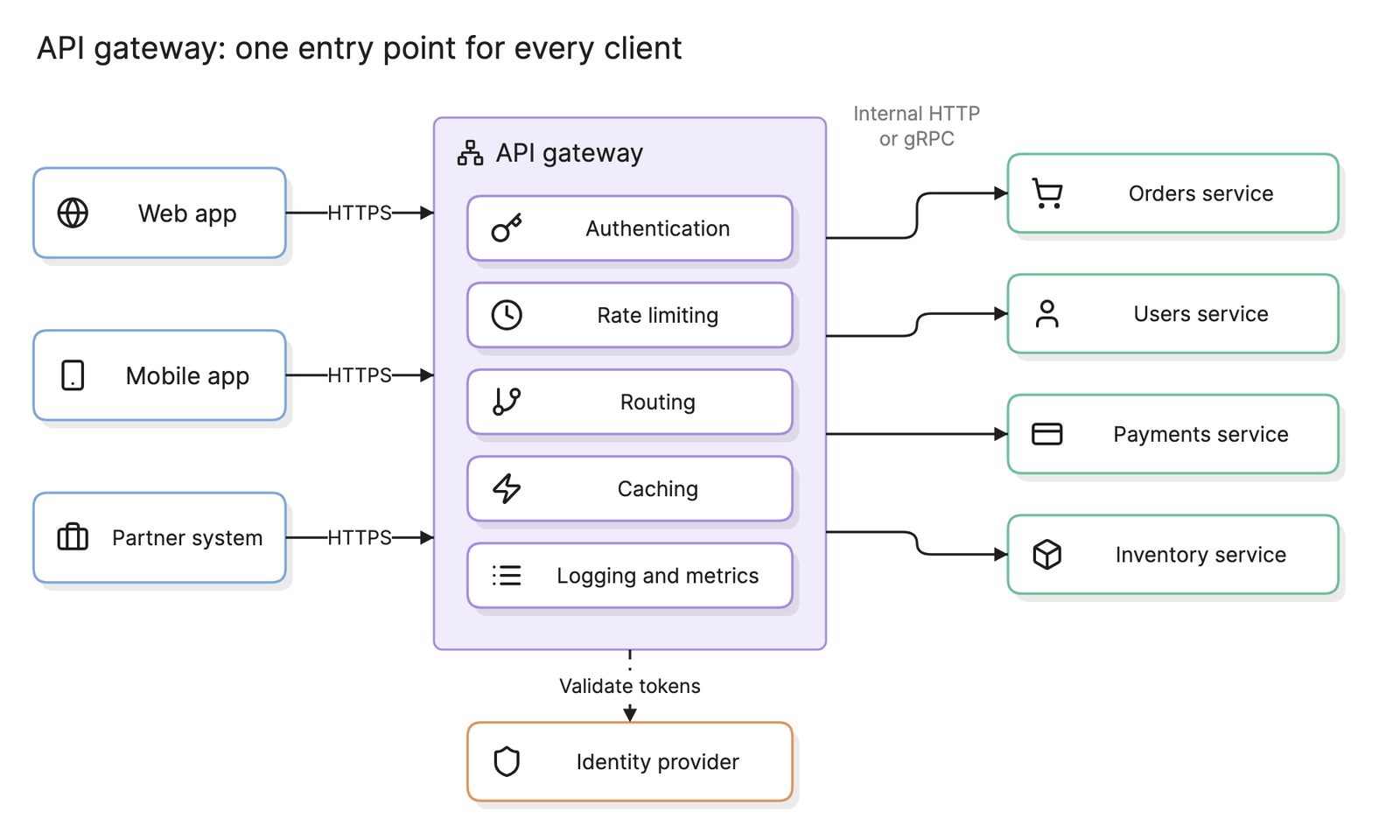
- Put a gateway at the edge. An API gateway handles TLS, authentication and rate limiting for every client in one place.
- Draw it. An architecture diagram with clients on one side, the server and its data on the other and the protocol on each arrow is enough for a review.
What are common client-server mistakes?
- Trusting the client. Validation in the browser is for the user’s convenience. The server must repeat it, or someone will skip it.
- Clients reaching the database. Shared credentials, no audit trail and a schema that can never change.
- Stateful servers. Sessions in server memory mean a user is stuck to one machine and loses everything when it restarts.
How does client-server compare with other architectures?
| Architecture | Roles | Where logic lives | Typical use |
|---|---|---|---|
| Client-server | Fixed: clients ask, servers answer | On the server, with some on the client | Web and mobile applications, email, databases |
| Peer-to-peer | Every node is both client and server | On every node | File sharing, blockchain, some messaging |
Client-server describes the relationship across the network boundary. A monolith, microservices and serverless functions are different ways to build the server side; from the client’s point of view they look the same.
What tools help with client-server architecture?
- API design tools. OpenAPI, GraphQL schemas and protocol buffers define the contract between client and server so both sides can be built and tested against it.
- Load balancers and gateways. NGINX, HAProxy, Envoy and managed cloud load balancers spread requests across server copies.
- AI diagramming tools. Tools like Eraser turn a description of your clients, servers and data stores into an architecture diagram you can keep editing, which helps when a system has grown from two tiers to many and nobody has drawn the current state.
For more on this kind of diagram, see architecture diagrams.
Frequently asked questions
-
What is the difference between a client and a server?
A client starts the conversation: it sends a request and waits for a response. A server listens for requests, does the work and replies. The roles are about the interaction, not the hardware. A web server is a client of its database, and the same machine can be a server to browsers and a client of a payment API at the same time.
-
What is the difference between client-server and peer-to-peer?
In client-server, roles are fixed: clients ask and servers answer, and the server is a central point of control. In peer-to-peer, every node is both client and server and talks directly to other nodes, as in BitTorrent or blockchain networks. Peer-to-peer has no single point of failure but is harder to secure and keep consistent.
-
What is the difference between a thick client and a thin client?
A thick client holds a large part of the application logic and often some data, so it can work with a weak connection, but every update has to reach every client. A thin client such as a browser mostly renders what the server sends and holds little logic, which keeps the server in control. Modern single-page apps sit between the two.
-
Is the web a client-server architecture?
Yes. A browser is the client, a web server is the server and HTTP is the request and response protocol between them. Almost every web and mobile application is client-server at the outer edge, even when the server side is itself built as microservices or runs on serverless functions.