Software architecture
Three-tier architecture
Three-tier architecture splits an application into a presentation tier, an application tier and a data tier that run on separate hosts and talk over a network.
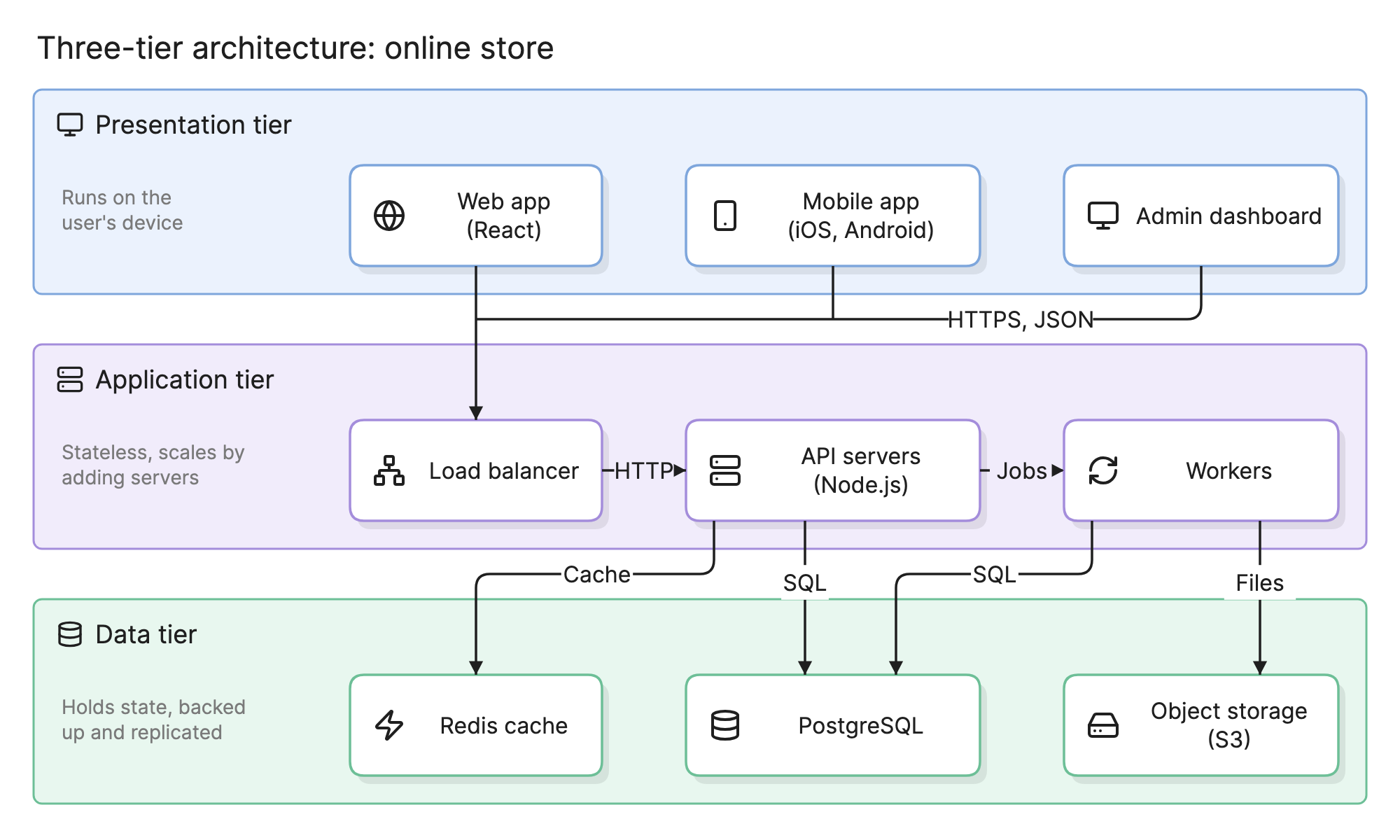
Teams choose three-tier architecture because it is the simplest layout that lets each part of a system scale and fail on its own, which is why it is the default starting point in system design. The user interface, the business logic and the data each run where they fit best, and the boundaries between them are where security, caching and load balancing go.
When should you use a three-tier architecture?
- Web and mobile applications with a shared backend. Several clients can share one application tier without touching the database.
- Systems that must scale unevenly. Stateless application servers can be added or removed without touching the data tier.
- Regulated environments. A database reachable only from the application tier is a common compliance requirement.
- Teams moving off a two-tier design. Pulling business logic out of stored procedures or a thick client into an application tier is the usual first step.
What are the three tiers?
| Tier | What it holds | Runs on | Scales by |
|---|---|---|---|
| Presentation | Web apps, mobile apps and any other user interface | The user’s device or a static host | Adding a CDN |
| Application | Business logic, APIs and background workers | Application servers behind a load balancer | Adding stateless servers |
| Data | Databases, caches, queues and file storage | Managed database hosts or dedicated machines | Replicas, sharding and bigger hosts |
The presentation tier holds no business rules, so a pricing change never means shipping a new mobile app. The application tier is the only tier that may talk to the data tier, which keeps every access rule in one place. The data tier holds state, which makes it the hardest tier to scale and the one that needs backups.
How does three-tier differ from three layers?
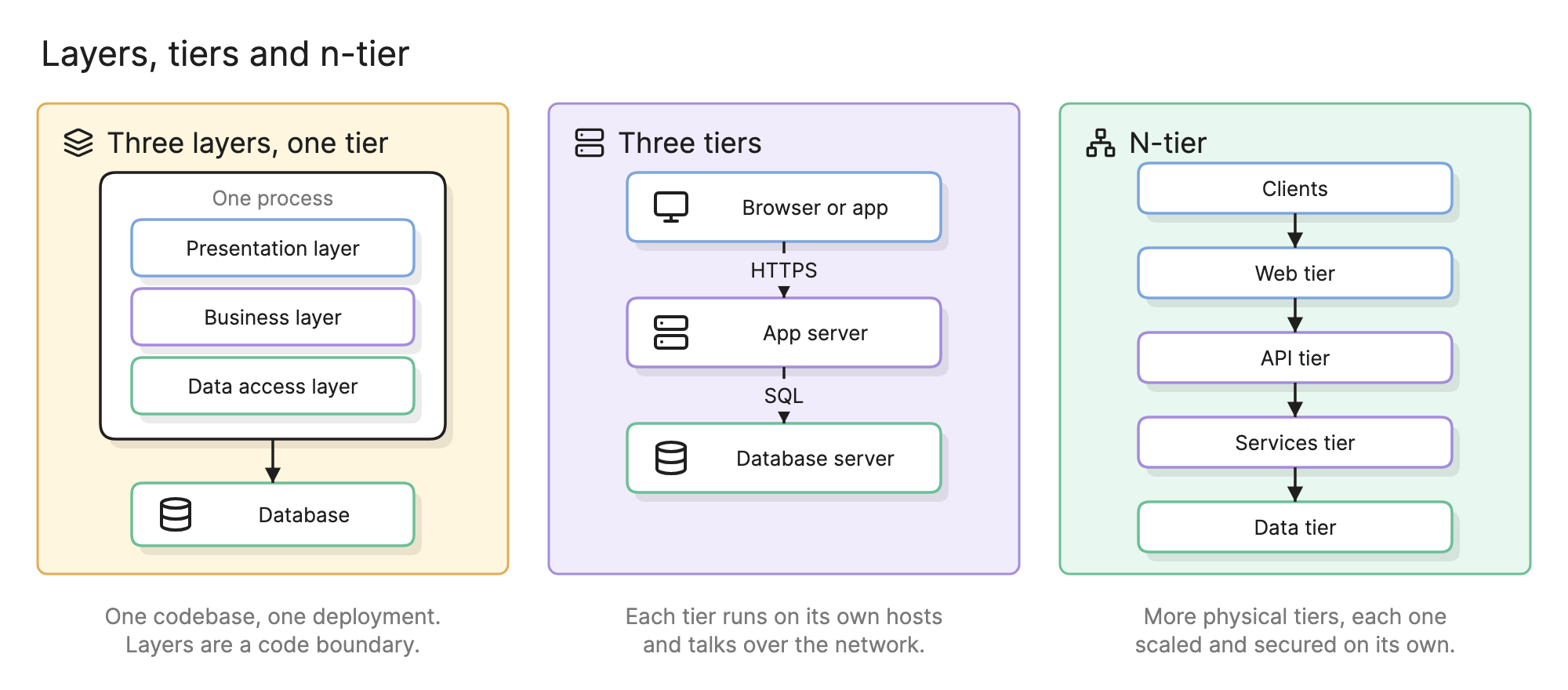
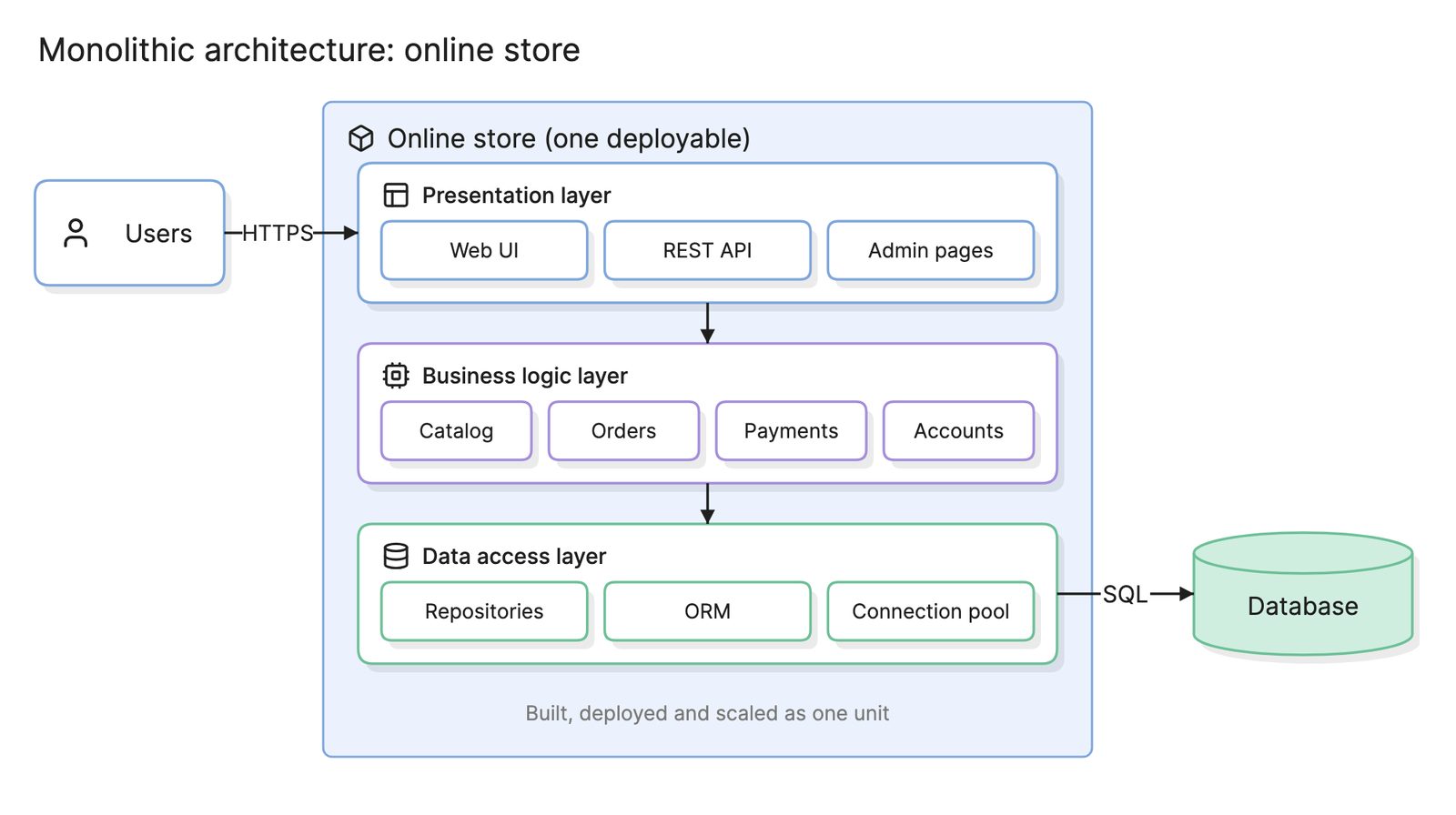
Layers and tiers get mixed up because they share the same three names. A layered application keeps presentation, business and data access code apart, but all three compile into one deployable and call each other in-process. A three-tier application puts those parts on separate hosts, so every call between them crosses a network. That is slower and harder to debug, but it lets you scale, secure and replace each tier on its own.
N-tier is the same idea with more physical boundaries, such as a web tier for static content or an API gateway tier that handles authentication and routing before anything reaches the services. Each extra tier buys isolation at the cost of another network hop.
How do you read a three-tier architecture diagram?
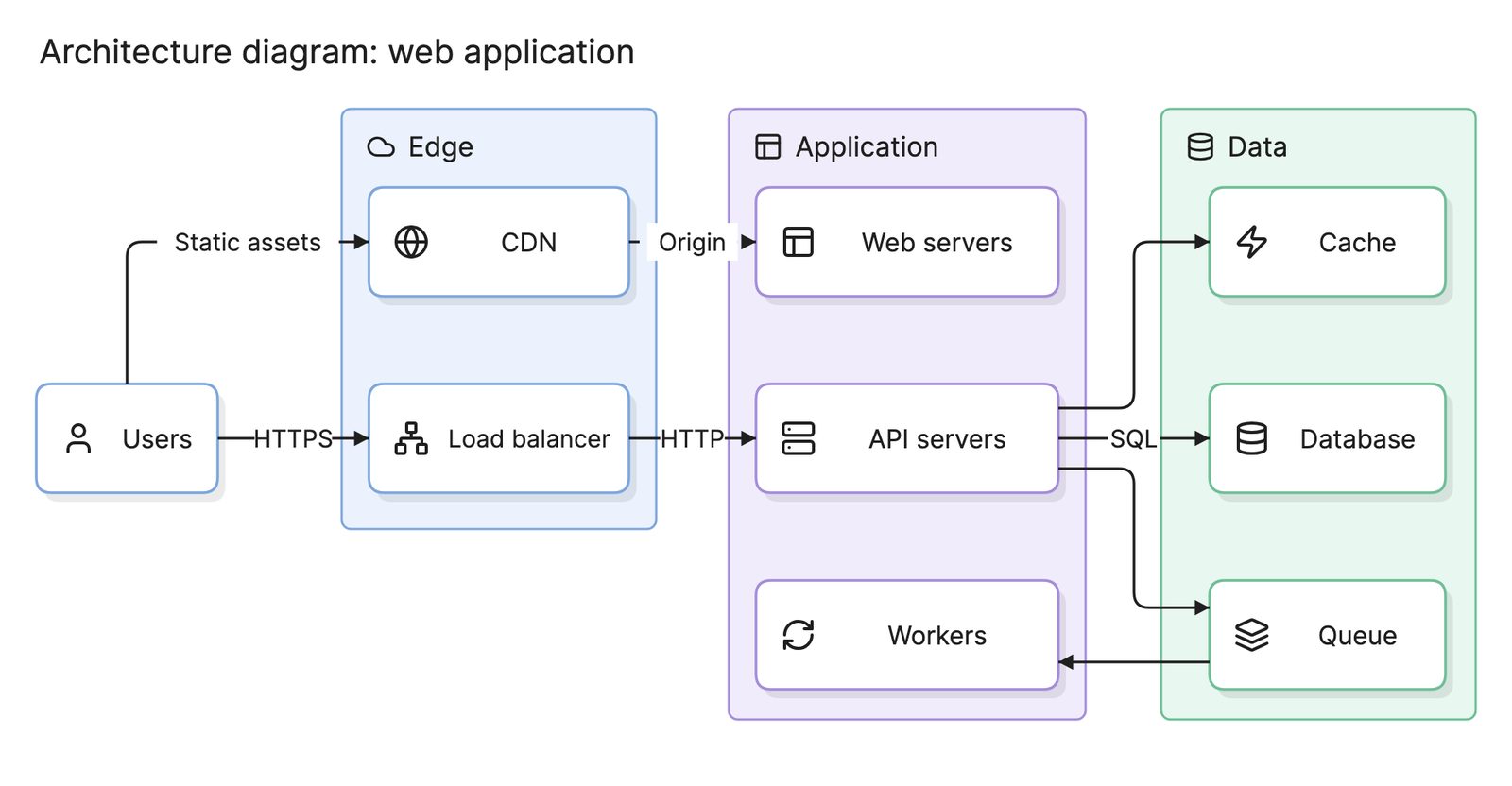
Start at the top and follow the arrows. In the online store at the top of this page, three clients make up the presentation tier: a React web app, a mobile app and an admin dashboard. All three send JSON over HTTPS to the same load balancer, which spreads requests across API servers that hold no state, so any server can answer any request. Slow work, such as sending receipts, goes to workers as jobs.
Every arrow into the data tier starts in the application tier. The API servers check Redis before PostgreSQL and leave the workers to write files to object storage. No client reaches a data store directly, which is the rule that makes this a three-tier architecture rather than a collection of servers.
How do you design a three-tier architecture?
- Sort the responsibilities. List everything the system does and put each item in exactly one tier. Rendering and input belong in presentation, rules and workflows in application, storage in data.
- Keep the application tier stateless. Sessions, uploads and caches go to the data tier, so any application server can be replaced at any time.
- Define the interfaces. Write down the API between presentation and application and the schemas between application and data, so the tiers can change independently.
- Place the boundaries on the network. Put a load balancer in front of the application tier and allow the data tier to accept connections only from it.
- Decide how each tier scales. Application servers scale out. Databases scale with replicas first, so plan which reads can tolerate lag.
- Draw it. An architecture diagram with one band per tier makes the rules visible. On a system architecture diagram the tiers are the top-level groups, and a C4 container diagram shows what runs inside each.
What are common three-tier architecture mistakes?
- Business logic in the wrong tier. Validation in the mobile app or rules in stored procedures means the same rule lives in two places.
- Clients that reach the database. A reporting tool pointed straight at production bypasses every rule the application tier enforces.
- Stateful application servers. In-memory sessions work until the second server is added.
- Treating the diagram as the deployment. Three tiers on one virtual machine are three layers, not three tiers. Say which one you have.
How does three-tier compare with other architectures?
| Architecture | Tiers | How it differs |
|---|---|---|
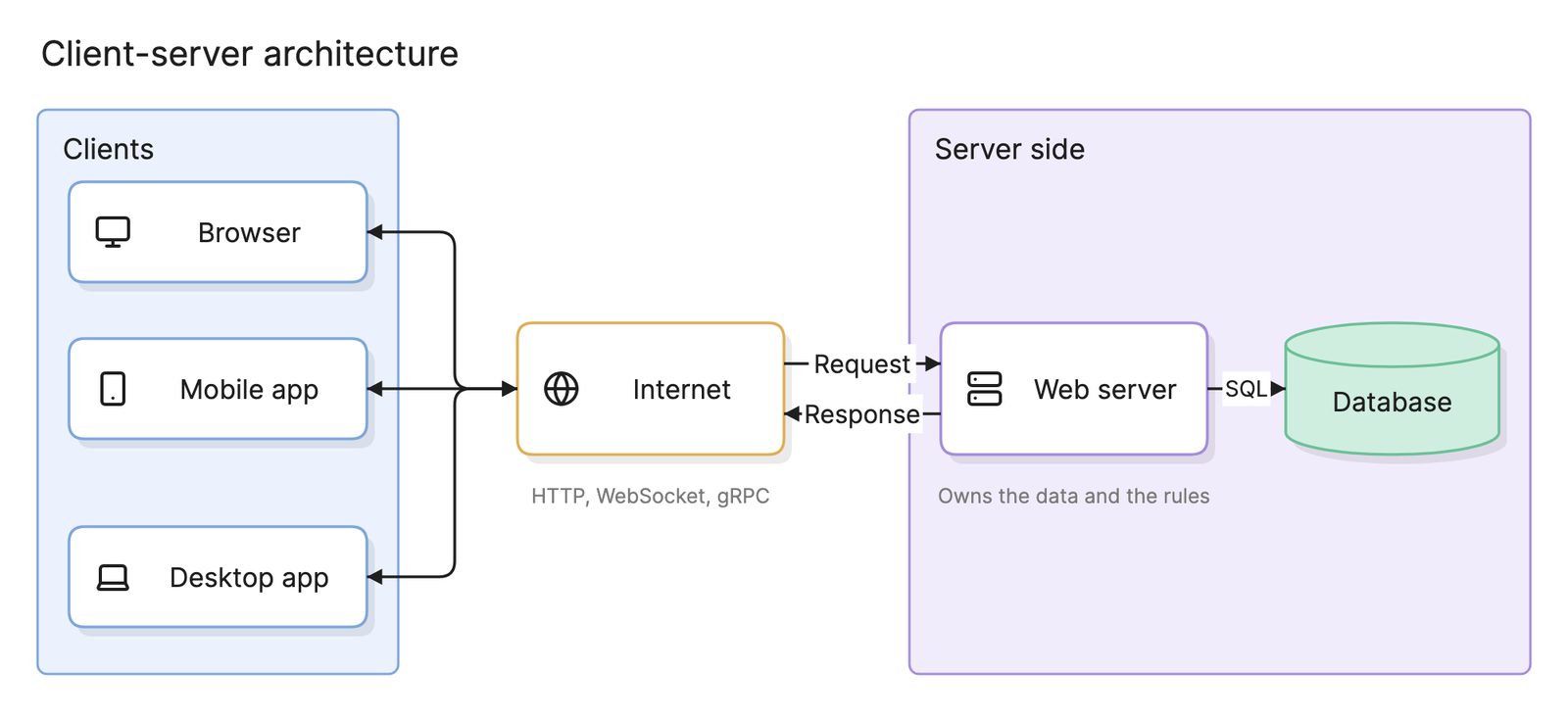
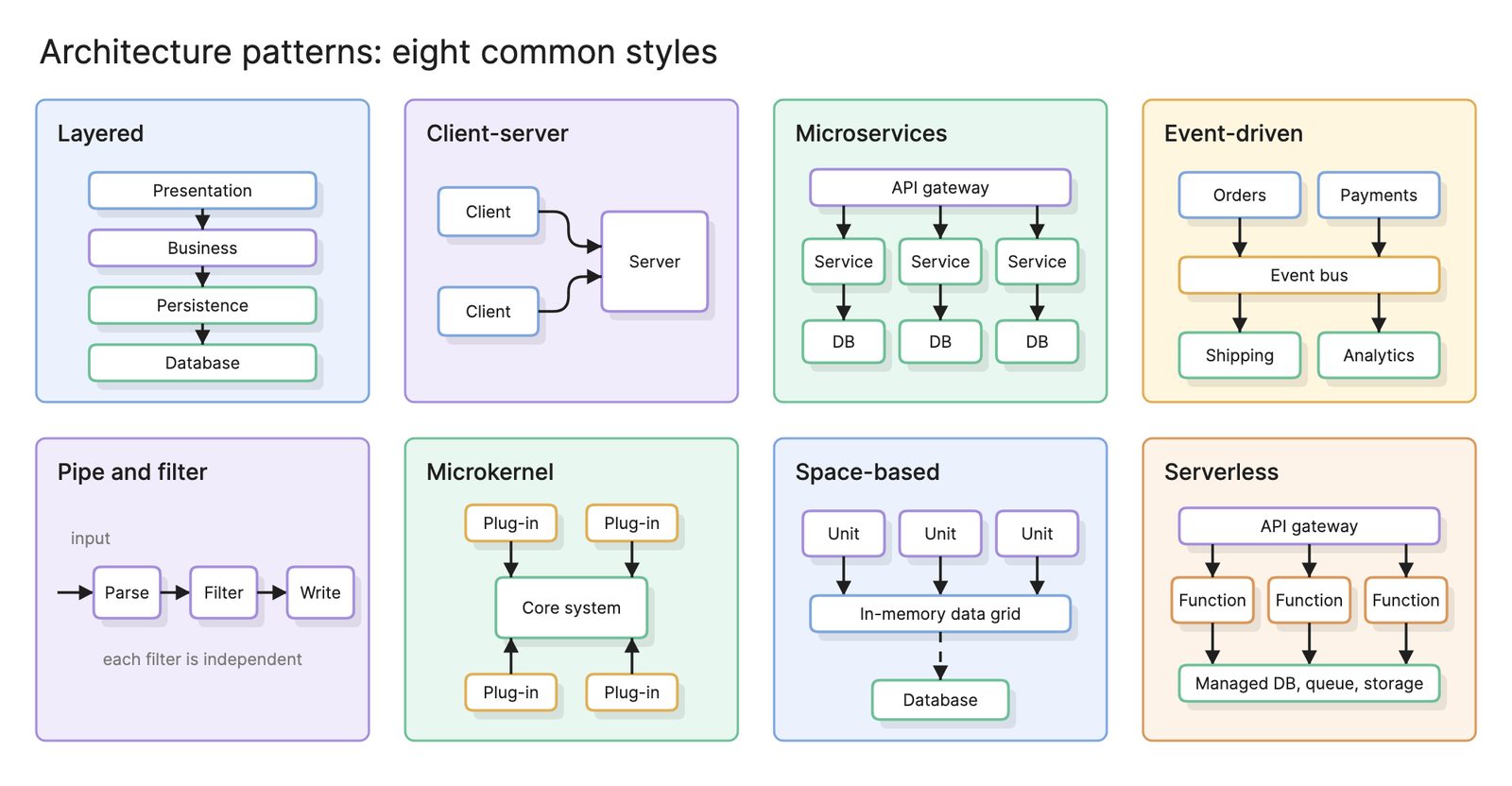
| Client-server | Two | The server holds both logic and data, so clients often talk to the database directly |
| Three-tier | Three | Logic moves into its own tier between the clients and the data |
| N-tier | Four or more | Adds web, gateway or integration tiers for isolation and scale |
| Microservices | Three or more | The application tier is split into independently deployed services, each with its own data |
Most monolithic architectures are deployed as three tiers, with a pattern such as MVC organizing the code inside the application tier. The architecture patterns catalog covers the other styles a tier can be built in.
What tools can you use to diagram a three-tier architecture?
- Drag-and-drop diagramming tools. Good for a first sketch, but every change to the system means a manual change to the picture.
- Diagram-as-code tools. Describing the tiers as text keeps the diagram in the repository next to the infrastructure code that deploys them.
- AI diagramming tools. Tools like Eraser turn a description of the tiers, or the infrastructure code itself, into an architecture diagram you can keep editing as the system grows.
For more on this kind of diagram, see architecture diagrams.
Frequently asked questions
-
What is the difference between three-tier and three-layer architecture?
A layer is a boundary in code: presentation, business and data access code kept apart inside one deployable. A tier is a boundary in deployment: the parts run on different hosts and talk over a network. A three-layer application can run as one tier, and a three-tier application usually has layers inside each tier.
-
Is three-tier architecture the same as client-server?
Three-tier is a kind of client-server architecture. Plain client-server has two tiers, a client and a server that often holds both the logic and the data. Three-tier pulls the logic out of the data store into its own tier, so the database is never reached directly by a client.
-
Is three-tier architecture a monolith?
Often, yes. The application tier is frequently one deployable, which makes it a monolith that happens to be deployed behind a load balancer. Three-tier describes how the system is split physically, not how the application tier is organized inside, so it can also hold several services.
-
What is n-tier architecture?
N-tier is the general form of three-tier: any number of physical tiers, each scaled and secured on its own. Common additions are a separate web tier for static content, an API gateway tier in front of the services or an integration tier for third-party systems.