Cloud and DevOps
Kafka architecture
Kafka architecture is the structure of a Kafka cluster: brokers store topics as partitioned, replicated logs that producers write to and consumer groups read.
Teams learn Kafka architecture because four ideas answer nearly every question about a cluster: why a consumer is behind, what happens when a broker dies, how far a topic can scale. Those ideas are the log, the partition, the replica and the consumer group.
What are the parts of a Kafka cluster?
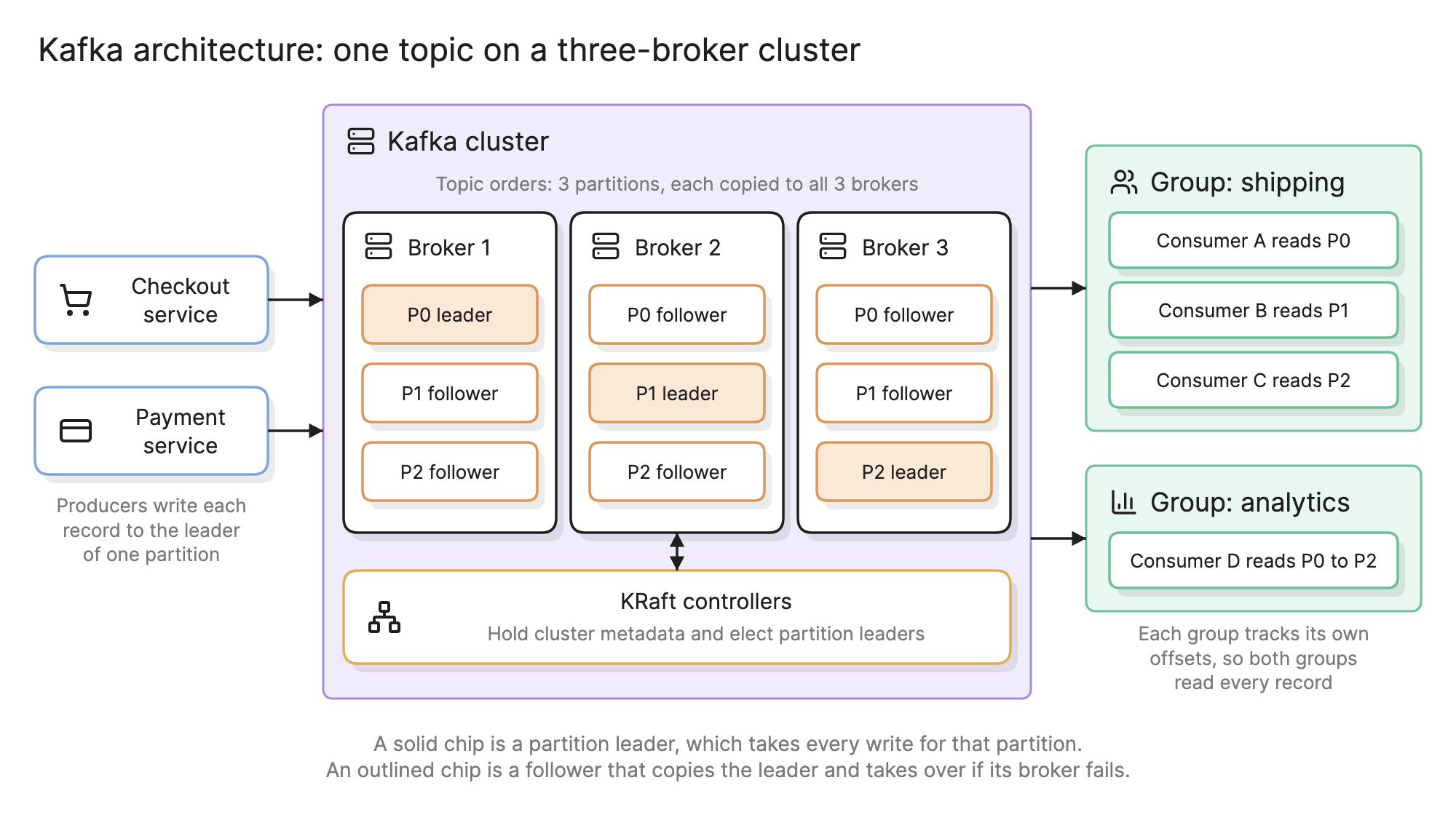
The diagram at the top of this page shows one topic on a three-broker cluster.
- Records. A key, a value, a timestamp and optional headers.
- Topics. Named streams of records, such as
orders. Producers write to a topic and consumers subscribe to it. - Partitions. Each topic is split into partitions, and each partition is an append-only log. A record’s position in its partition is its offset.
- Brokers. The servers that store partitions and answer reads and writes. A production cluster has at least three.
- Replicas. Each partition is copied to several brokers. One copy is the leader and takes every write; the others are followers that stay in sync and can take over.
- Producers. Clients that write records. The record’s key decides which partition it lands in.
- Consumer groups. Clients that read. Consumers sharing a group id divide the partitions between them, and each group reads the whole topic.
- Controllers. A small quorum of nodes that holds the cluster’s metadata and elects new partition leaders, using Kafka’s built-in Raft protocol, KRaft.
How do topics, partitions and offsets work?
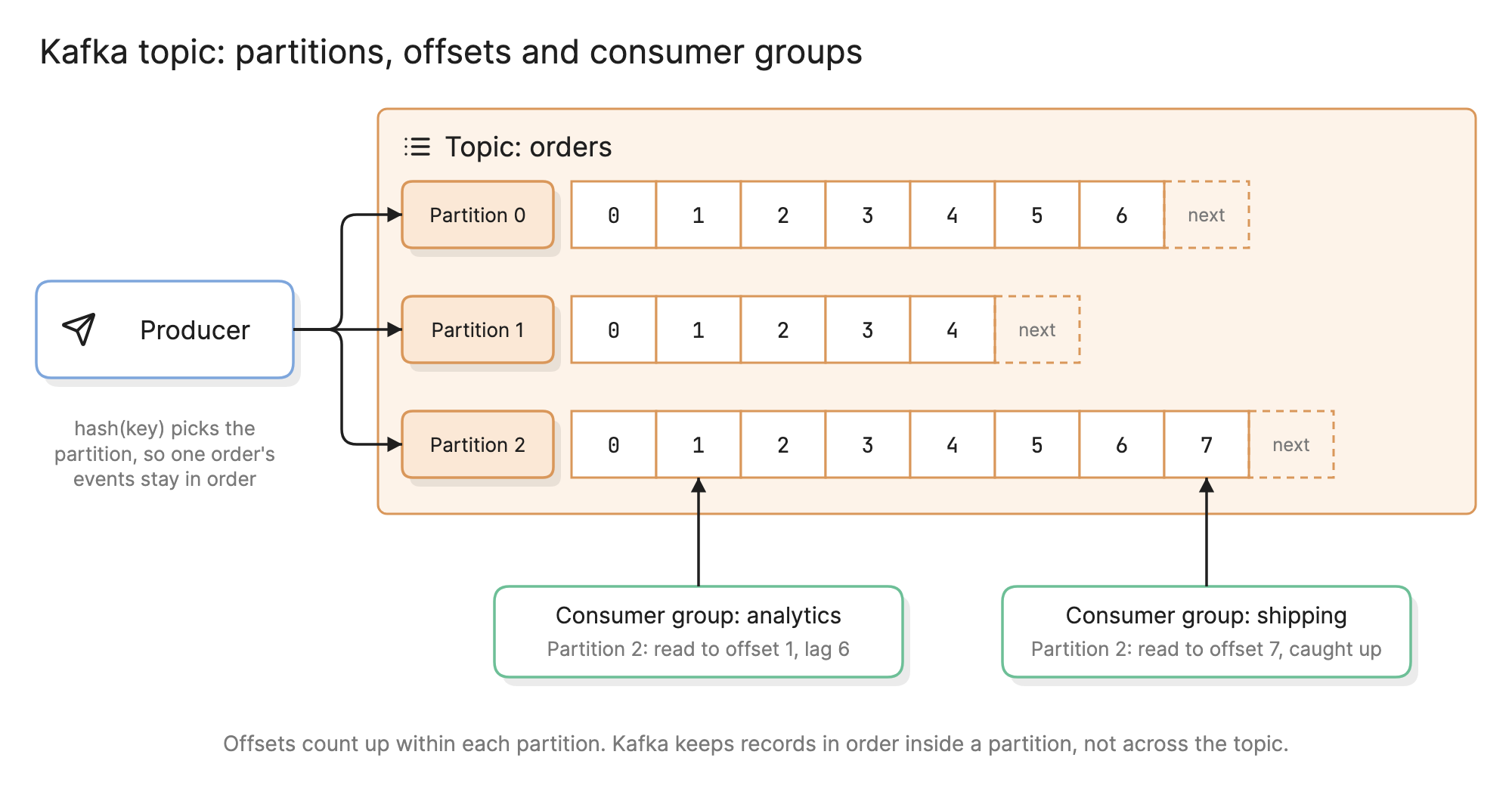
A partition only ever grows at the end. The producer hashes each record’s key to pick a partition, so every record with the same key lands in the same log, in the order it was sent. That is how all the events for one order stay in sequence while the topic as a whole is spread over many brokers.
Reading does not remove anything. Records stay until the topic’s retention period passes, seven days by default, or forever on a compacted topic, which keeps the latest record for each key. Each consumer group records how far it has read by committing an offset per partition. The gap between that offset and the end of the log is the group’s lag.
In the diagram, the shipping group has read partition 2 to the end while the analytics group is six records behind. Neither affects the other, and a new group could replay the topic from offset 0.
How do you read a Kafka architecture diagram?
Start with the producers on the left of the hero diagram. The checkout service writes an order record keyed by order id. Its client hashes the key to partition 1 and sends the record to broker 2, which leads that partition. Brokers 1 and 3 fetch it and append it to their follower copies.
On the right, the shipping group runs three consumers, one per partition, so the work is shared. The analytics group has a single consumer that reads all three.
Now remove broker 2. The controllers notice, pick an in-sync follower of partition 1 as the new leader and publish the change. Producers and consumers refresh their metadata and carry on. Reading the diagram this way raises the useful questions: how many copies must exist before a write counts, and are the brokers in different availability zones?
How does Kafka handle scaling and failure?
| Setting | What it controls | Common production value |
|---|---|---|
| Replication factor | Copies of each partition | 3 |
min.insync.replicas | Copies that must hold a record before it counts as written | 2 |
acks | How many copies the producer waits for | all |
| Partition count | The most consumers one group can run in parallel | Sized to peak throughput |
With those values a cluster loses a broker without losing an acknowledged record, which is the basis of high availability in Kafka. To scale reads, add partitions and consumers. To scale storage, add brokers and move partitions onto them.
Delivery is at least once by default, so consumers should be idempotent.
What runs around a Kafka cluster?
- Kafka Connect. Source and sink connectors that copy data between Kafka and databases, object storage and SaaS tools without custom code. Change data capture from a database usually runs here.
- Stream processors. Kafka Streams and similar engines filter, join and aggregate topics into new topics.
- Schema registry. Versioned record schemas, so a producer cannot publish a change that breaks its consumers.
How does Kafka compare with a message queue?
| Kafka topic | Message queue | |
|---|---|---|
| After a read | Record stays until retention expires | Message is deleted on acknowledgement |
| Readers | Many groups, each reads everything | One group shares the messages |
| Replay | Reset the offset and read again | Not possible |
| Typical use | Event streams, data pipelines | Background jobs |
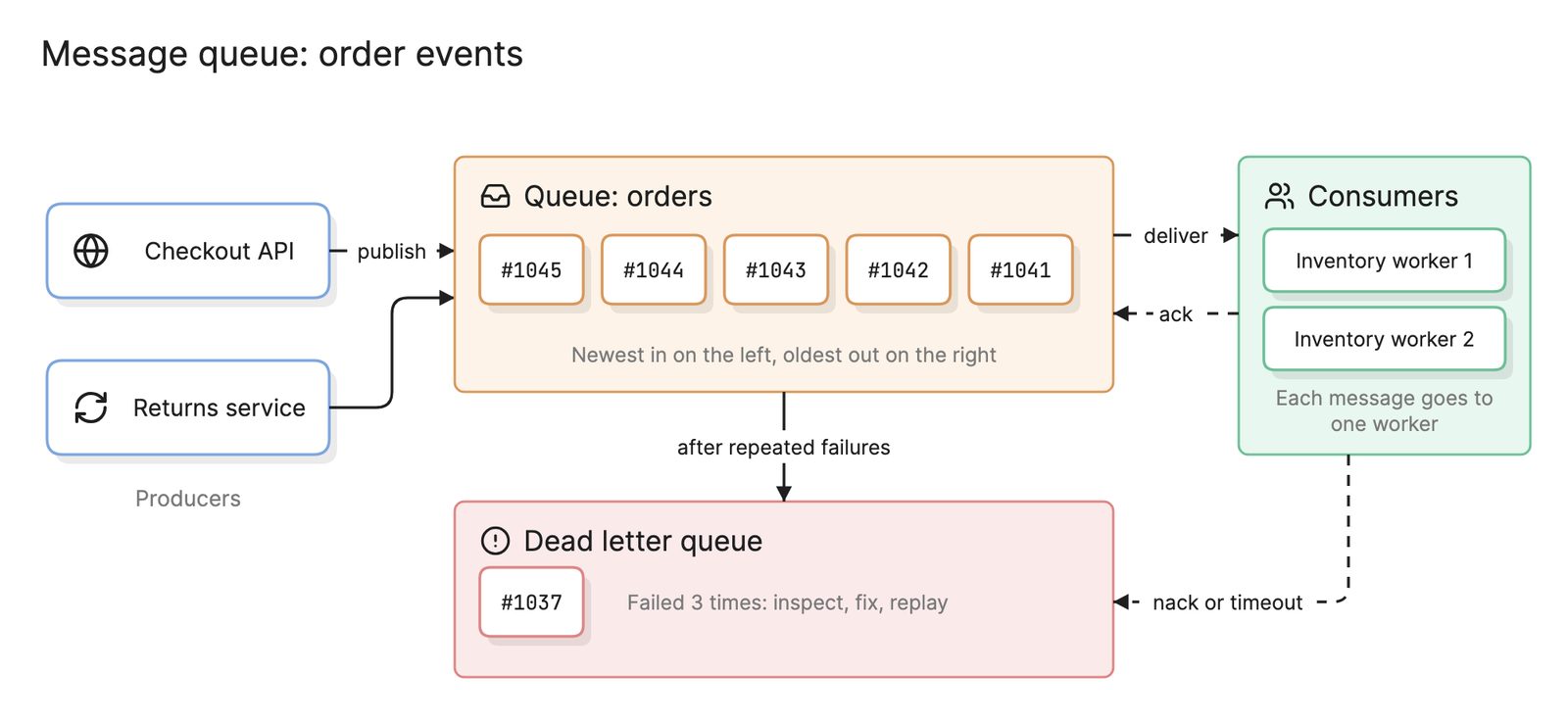
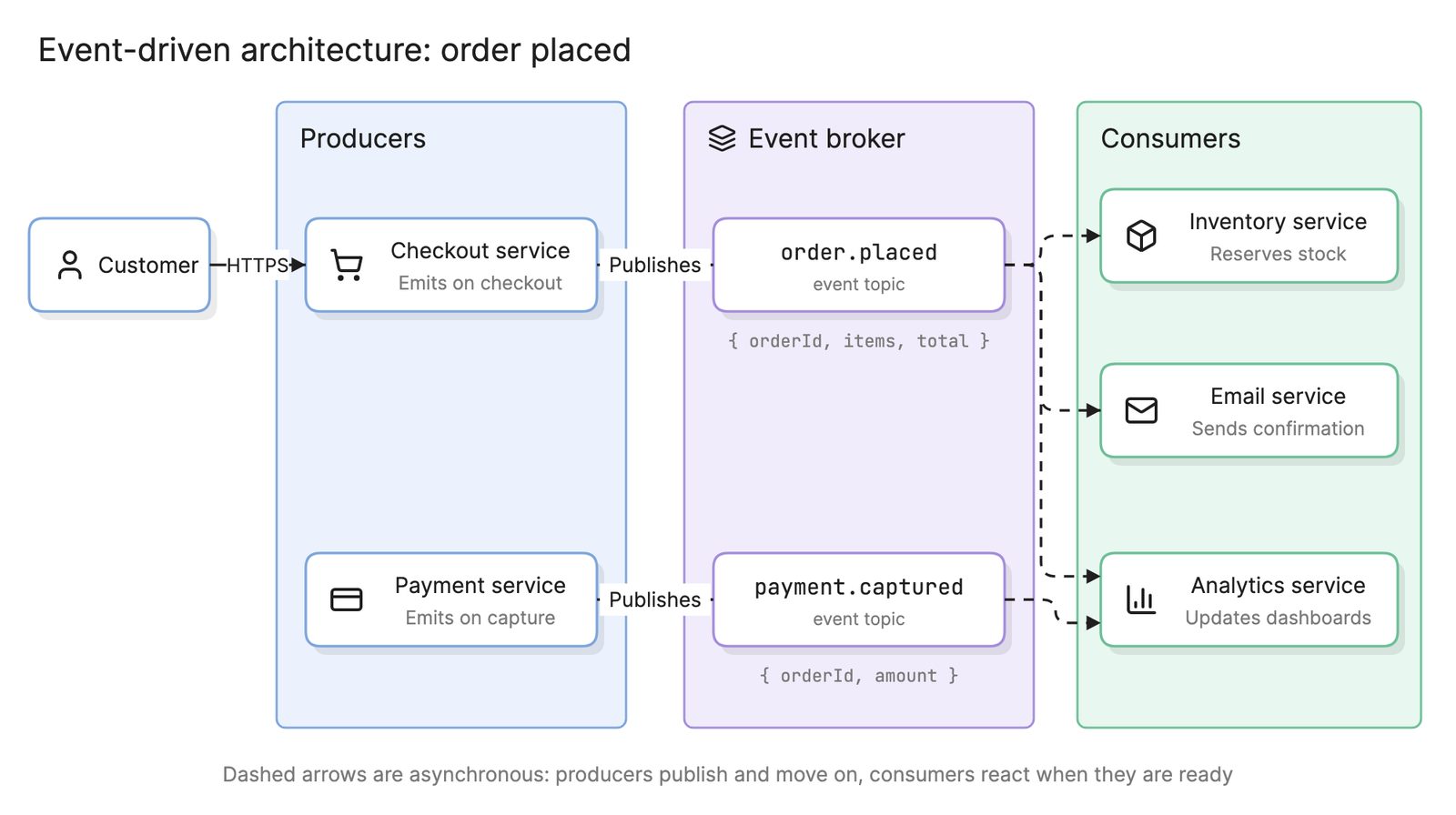
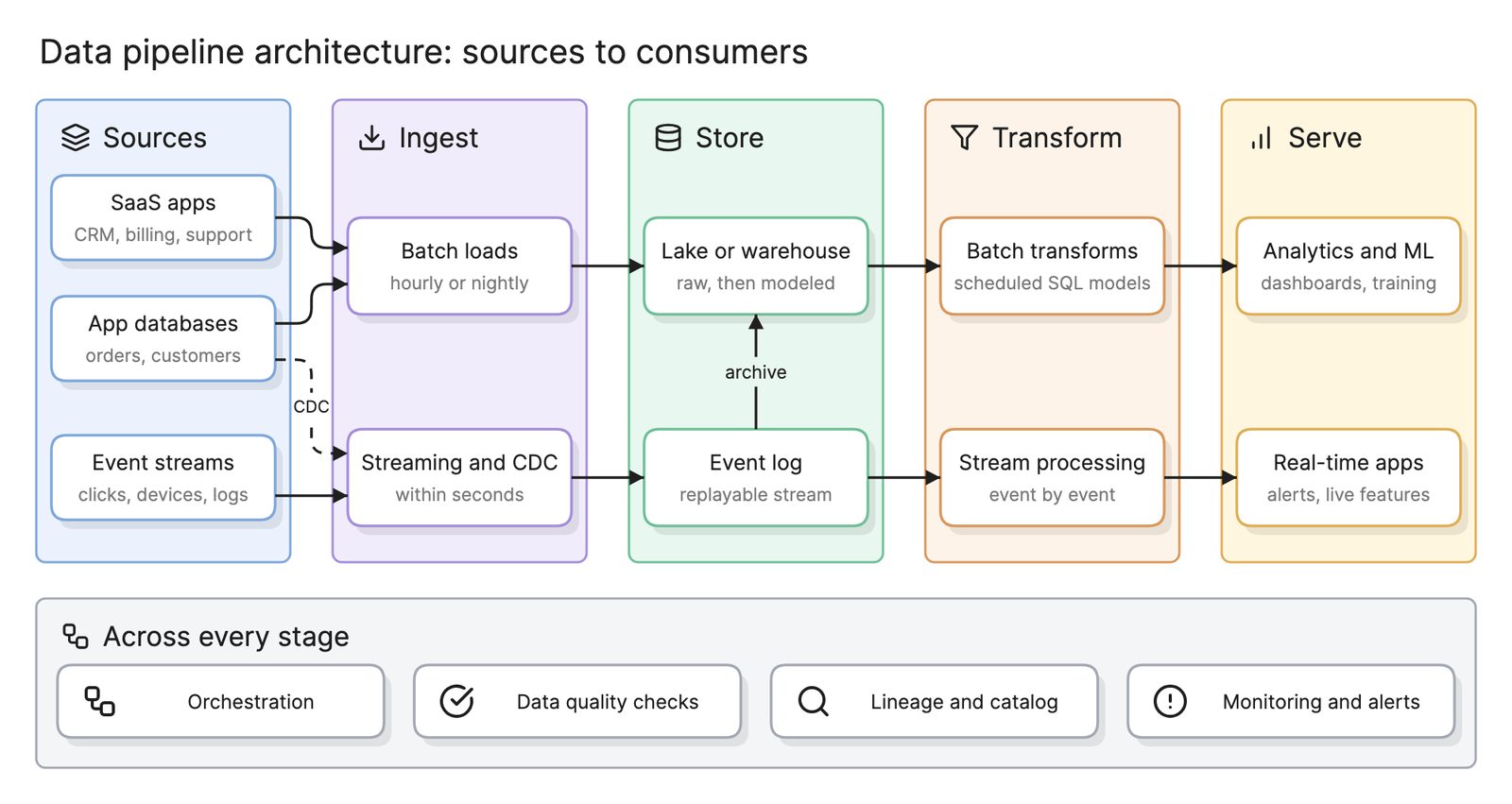
A message queue hands out work; Kafka records facts. That makes Kafka the usual backbone of an event-driven architecture and the event log in a streaming data pipeline architecture.
How do you design a Kafka deployment?
- Name the topics. One per kind of fact, such as
ordersorpayments.captured. - Choose the key. Everything that must stay in order shares a key.
- Size the partitions. Work from peak throughput and the number of consumers you expect.
- Set durability. Replication factor 3, two in-sync replicas and
acks=all, with brokers spread across zones. - Set retention per topic. Days for events, compaction for topics that hold the latest state.
- Plan the consumer groups. One group per application, with lag on a dashboard.
- Draw it. An architecture diagram of producers, topics and groups shows who depends on what.
What are common Kafka architecture mistakes?
- One partition, or thousands. Too few caps throughput; too many slow failover and waste memory.
- A skewed key. If one customer produces half the traffic, one partition does half the work.
- Consumers that are not idempotent. Rebalances and retries deliver some records twice.
- No lag monitoring. A stuck consumer looks healthy until someone asks where the data went.
What tools can you use to diagram Kafka architecture?
- The cluster itself. Kafka’s command-line tools and admin consoles list topics, partitions, leaders and consumer lag, as tables rather than a picture.
- Drag-and-drop diagramming tools. Every new topic or consumer group is a manual edit.
- AI diagramming tools. Tools like Eraser turn a description of your producers, topics and consumer groups into an architecture diagram you can keep editing as text, and a sequence diagram of what happens when a broker fails.
For more on this kind of diagram, see architecture diagrams.
Frequently asked questions
-
Is Kafka a message queue?
Not quite. A message queue deletes each message once a consumer acknowledges it. Kafka keeps records in a log for a retention period and lets any number of consumer groups read them independently. A consumer group does share work the way a queue does, and recent versions add share groups for queue-style delivery.
-
Does Kafka still need ZooKeeper?
No. Older clusters kept their metadata in a separate ZooKeeper ensemble. Since Kafka 4.0 a cluster runs only in KRaft mode, where a small quorum of controller nodes stores the metadata in an internal log and agrees on changes with the Raft protocol. That leaves one system to deploy, secure and monitor instead of two.
-
How many partitions should a Kafka topic have?
Enough for the parallelism you need, because a consumer group can run at most one consumer per partition. Start from peak throughput divided by what one consumer can process and add headroom. More partitions mean more files, slower failover and weaker ordering, and adding them later changes which partition each key maps to.
-
Does Kafka guarantee message ordering?
Only within a partition. Records with the same key go to the same partition and are read in the order they were written, so every event for one order stays in sequence. Across partitions there is no order. A topic that must be strictly ordered as a whole needs a single partition, which caps its throughput.