Cloud and DevOps
Message queue
A message queue is a buffer that holds messages from producers until consumers process them, so services can communicate without waiting on each other.
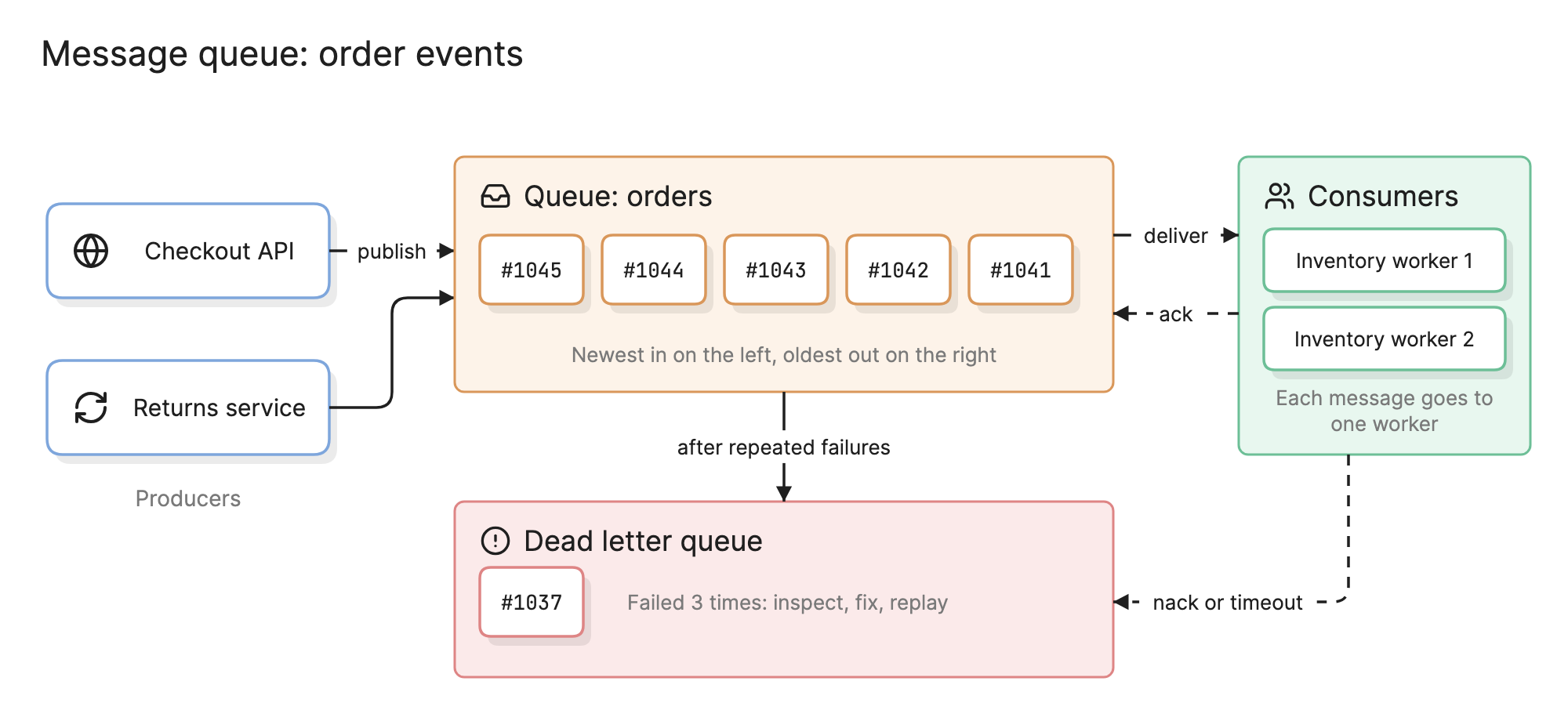
Teams add a message queue when one service should not have to wait for another. The checkout API records the order and returns in fifty milliseconds; reserving stock, charging the card and sending the email happen later, from the queue, by services that can be slow, busy or briefly down without the customer noticing.
Why do message queues matter?
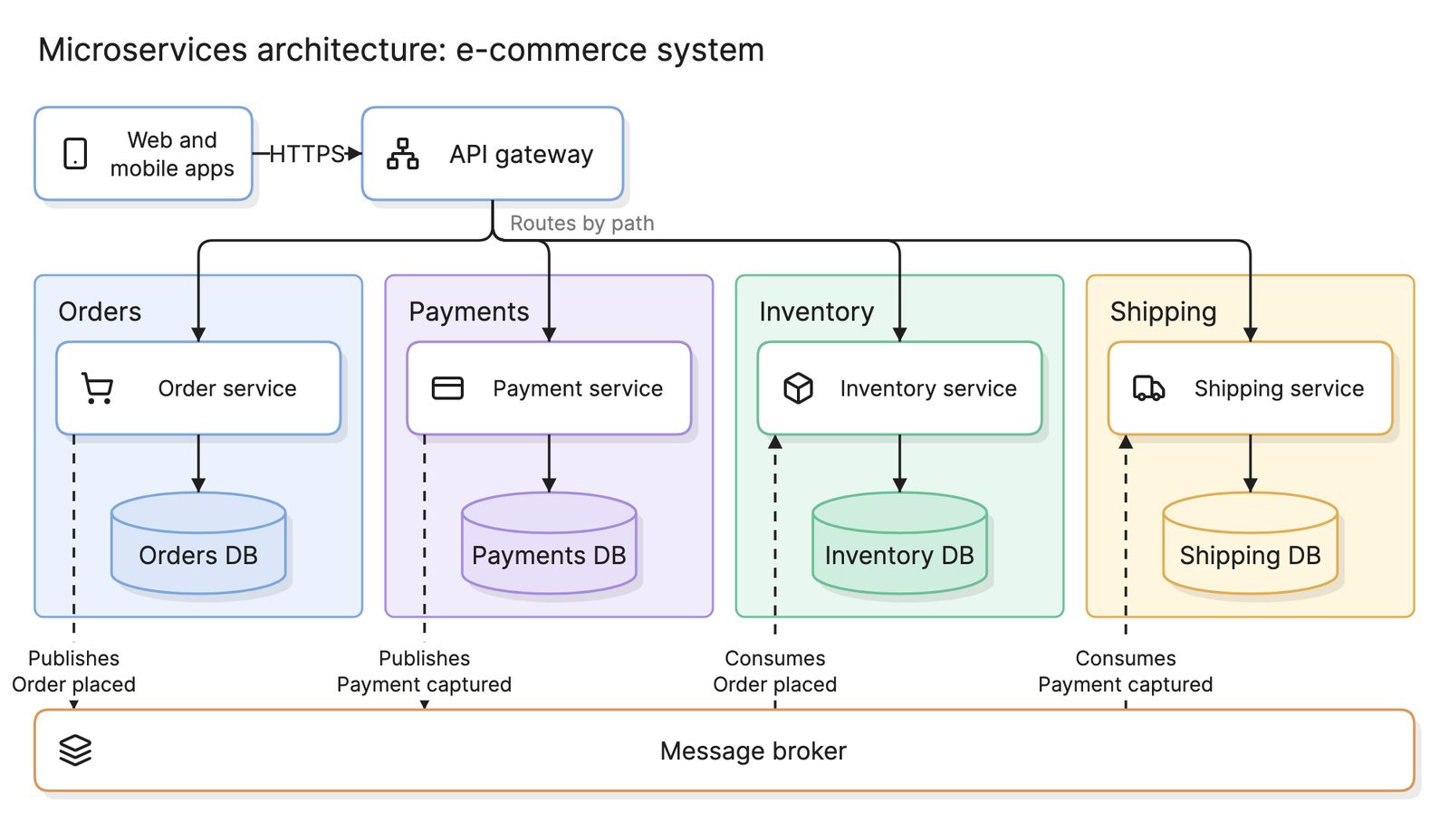
- Decoupling. The producer only needs the queue to be up, not every consumer. A microservices architecture uses this to keep slow shipping from slowing checkout.
- Buffering. A traffic spike fills the queue instead of overwhelming the consumers.
- Retries without code. If a consumer fails, the message goes back on the queue for another attempt.
What are the parts of a message queue?
- Producers. Services that publish messages: the checkout API and the returns service in the diagram above.
- Messages. A payload plus headers such as an id, a timestamp and a routing key.
- The queue. An ordered buffer on the broker. Messages wait here until a consumer takes one.
- Consumers. Workers that receive messages and do the work. Several on one queue form a consumer group that shares the load.
- Acknowledgements. A consumer acks a message when the work is done and the broker deletes it. A nack or an expired timeout puts it back for redelivery.
- Dead letter queue. Where messages go after repeated failures, so a bad message cannot block the rest.
- The broker. The server or managed service that hosts it all.
How do you read a message queue diagram?
Start with the producers on the left. The checkout API publishes an “order placed” message and immediately returns to the customer. The queue in the middle holds messages in arrival order, newest on the left and oldest about to be delivered on the right.
On the right, two inventory workers form a consumer group, and the broker delivers each message to exactly one of them. When a worker finishes it sends an ack and the broker removes the message. If the worker crashes or nacks, the message is redelivered after its timeout.
The red group at the bottom is the dead letter queue. Message #1037 failed three times, so the broker parked it there instead of retrying forever, and someone will inspect it, fix the bug and replay it.
What delivery guarantees can a queue give?
| Guarantee | How it works | Trade-off |
|---|---|---|
| At most once | Delete on send, never retry | Fast, but messages can be lost |
| At least once | Delete only on ack, retry on failure | Nothing lost, but duplicates happen |
| Exactly once | At least once plus deduplication by message id | Slower; usually built in the consumer |
Almost every production queue runs at least once, which is why consumers must be idempotent. Processing “reserve stock for order 1041” twice should reserve it once: store the ids you have handled, or make the operation a no-op on repeat.
How does a queue compare with a pub/sub topic?
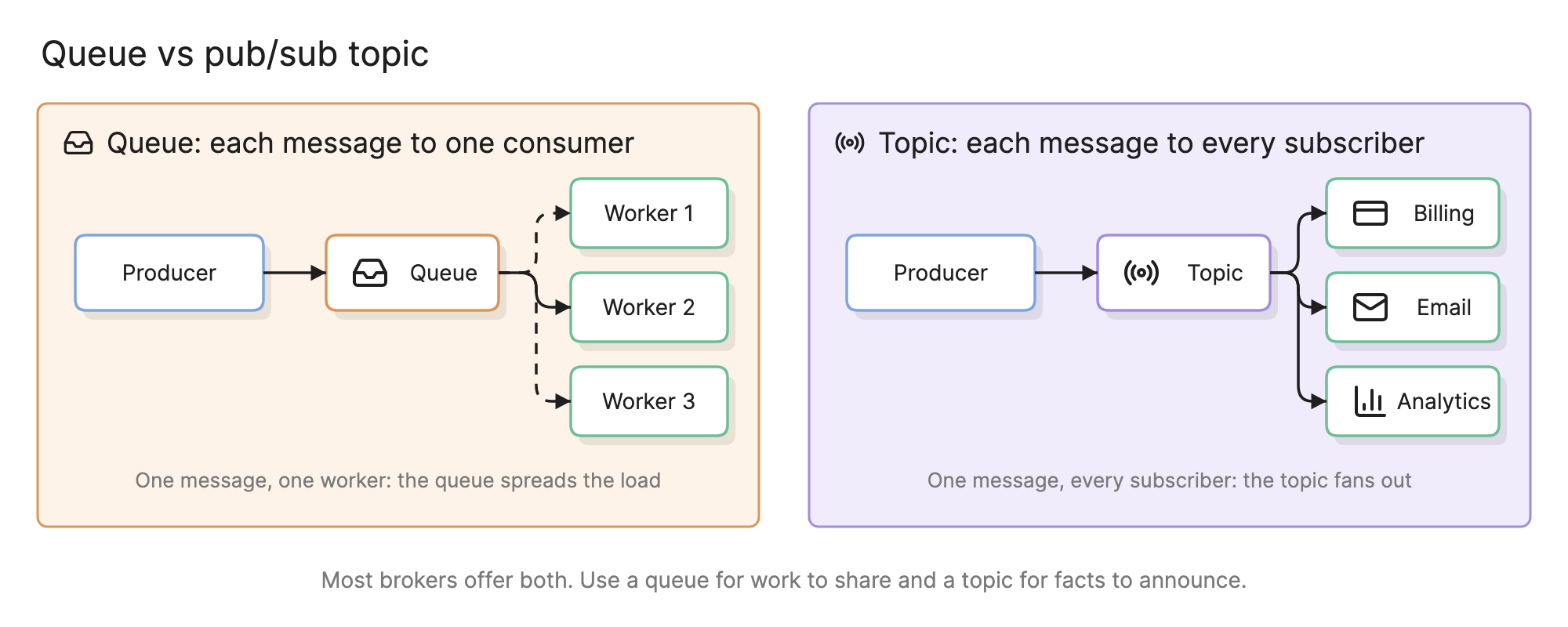
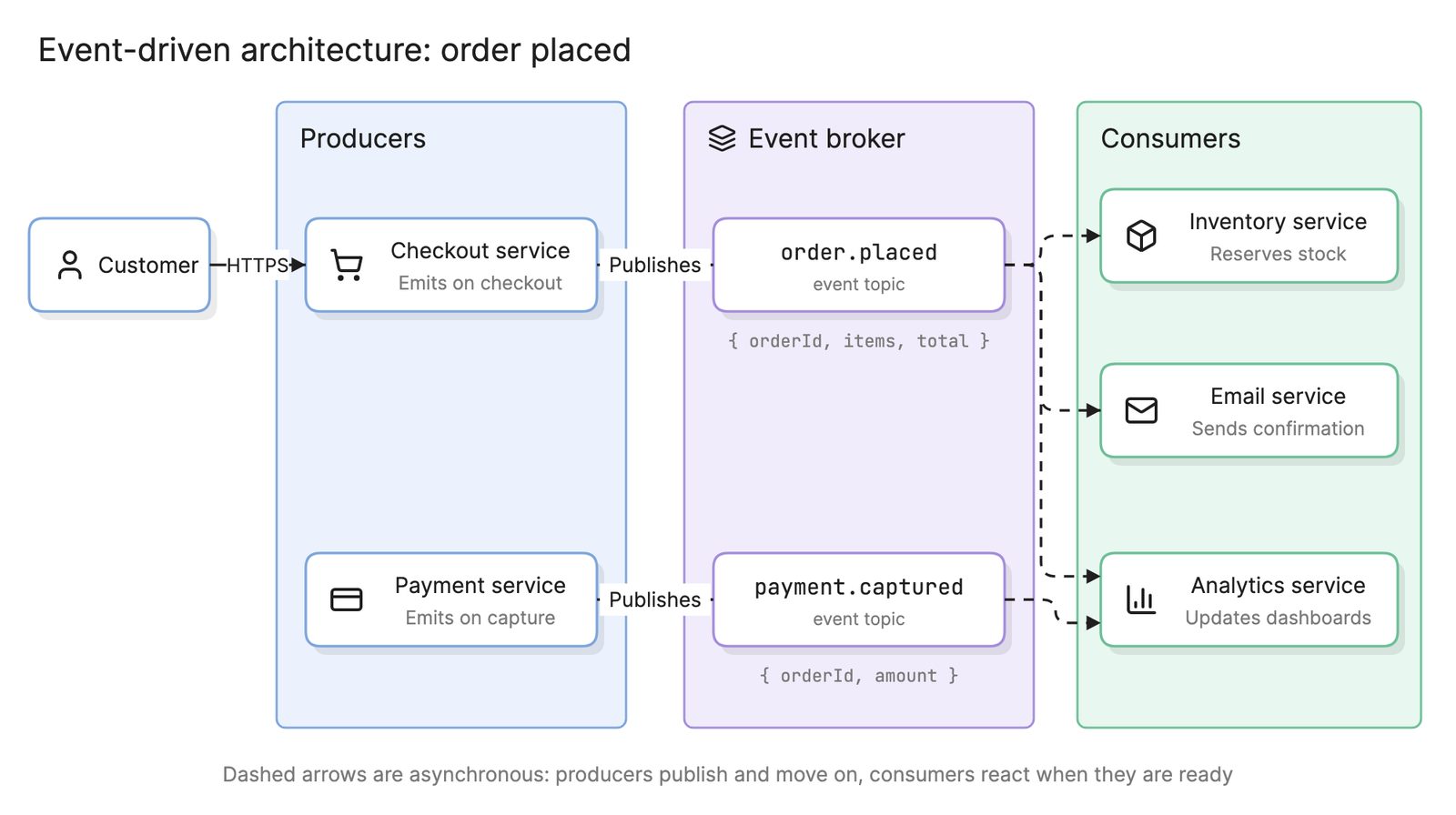
A queue delivers each message to one consumer; it is for distributing work. A topic delivers each message to every subscriber; it is for announcing facts. “Order placed” is a fact that billing, email and analytics all care about, so it belongs on a topic. “Resize this image” is work for one worker, so it belongs on a queue. A topic that fans out into one queue per subscribing service gives each its own buffer and retries, and is the backbone of an event-driven architecture.
How does a queue compare with a stream?
| Queue | Stream | |
|---|---|---|
| After consumption | Message deleted | Kept until retention expires |
| Consumers | One group shares the work | Many groups read the same history |
| Typical use | Background jobs | Event sourcing, analytics, feeding several systems |
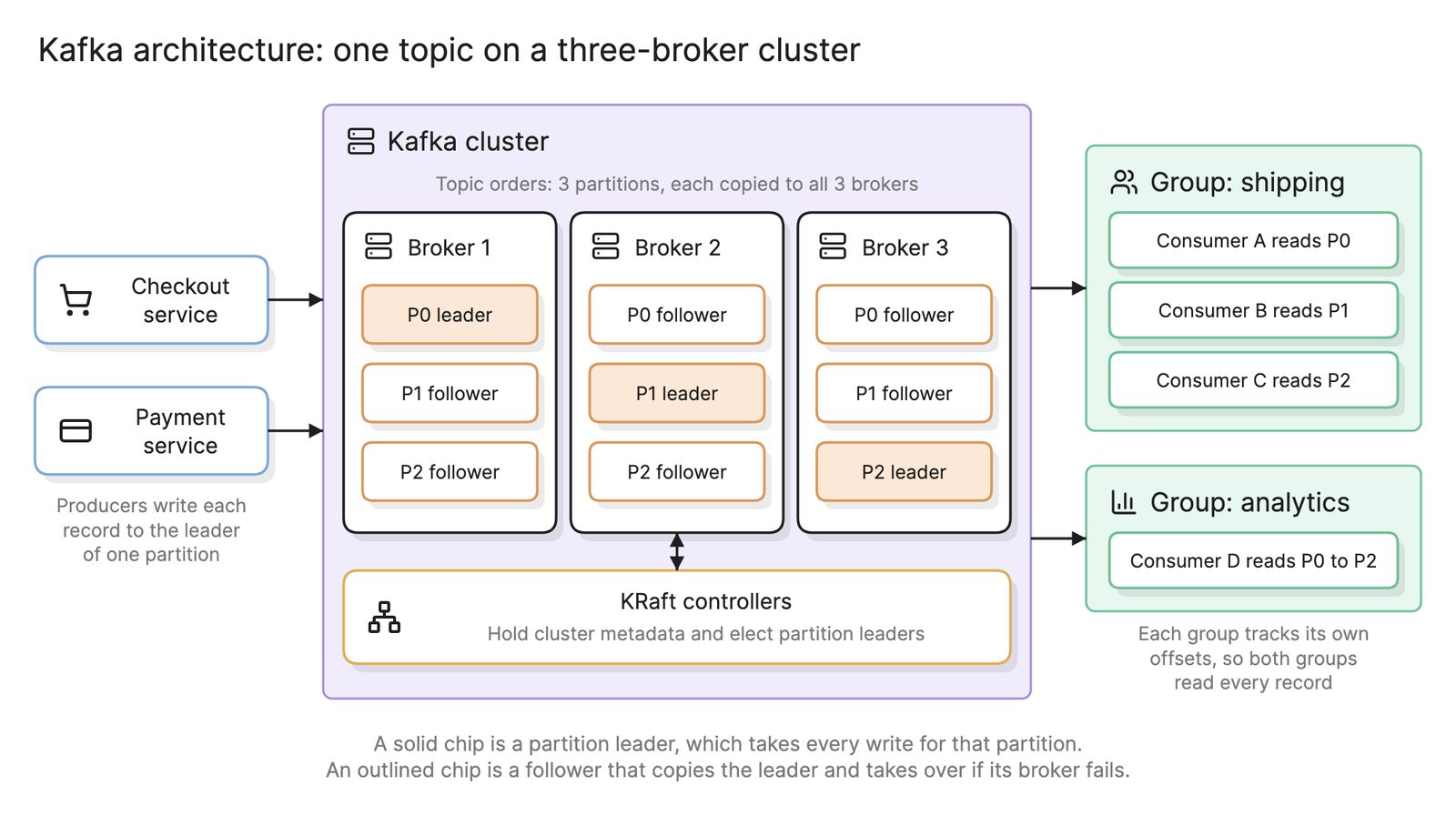
Kafka is the best-known stream. Kafka architecture covers how its partitions and consumer groups work.
How do you add a message queue to a system?
- Find the slow or fragile step in a request path that the caller does not need to wait for.
- Define the message. Name it as a past-tense fact or an imperative command, give it an id and a version and keep the payload small.
- Choose queue or topic by asking whether one consumer or many need it.
- Decide the ordering key. Everything that must stay in order shares a key.
- Make the consumer idempotent and set a retry count and a dead letter queue.
- Add observability. Queue depth, oldest message age and dead letter count are the metrics that matter.
- Draw it. An architecture diagram with producers, queues and consumers and a sequence diagram of the retry path.
What are common message queue mistakes?
- Consumers that are not idempotent. The first redelivery charges a card twice.
- No dead letter queue. One malformed message blocks the queue forever.
- Using a queue as a database. Queues are for in-flight work, not for storing or querying state.
- Synchronous waits on an asynchronous queue. If the caller blocks until the consumer replies, you have added latency and lost simplicity. Eraser’s engineering blog covers the trade-offs between communication patterns and handling the unhappy paths.
What tools can you use to make a message queue?
- Managed queue and topic services. Every major cloud offers a queue service and a pub/sub service with retries, dead letter queues and scaling handled for you.
- Self-hosted brokers and streaming platforms. Open-source brokers and distributed log platforms that run on your own Kubernetes architecture or virtual machines.
- AI diagramming tools. Tools like Eraser turn a description of your producers, queues and consumers into an architecture diagram and a sequence diagram of the retry path that you can keep editing as the system grows.
For more on this kind of diagram, see architecture diagrams.
Frequently asked questions
-
What is the difference between a message queue and a message broker?
A queue is the data structure: an ordered buffer of messages with one consumer per message. A broker is the server that hosts queues, and usually topics too, and handles delivery, acknowledgements, retries and persistence. When people say they "use a queue" they usually mean a queue hosted on a broker or a managed cloud queue service.
-
What is a dead letter queue?
A dead letter queue is a second queue where the broker moves messages that could not be processed after a set number of attempts. It keeps a poison message from blocking the main queue and preserves it so an engineer can inspect it, fix the bug and replay it. Alert on its depth; a growing dead letter queue is an incident.
-
Does a message queue guarantee ordering?
A single queue with a single consumer delivers in order. As soon as you add competing consumers or partitions, messages for different keys can be processed out of order. Most brokers guarantee ordering within a partition or a message group, so put everything that must stay ordered, such as all events for one order id, under the same key.
-
What is the difference between a message queue and a stream?
A queue deletes a message once a consumer acknowledges it. A stream, or log, keeps messages for a retention period and lets many consumer groups read the same history at their own pace, including replay from the start. Use a queue for work to do once and a stream when several systems need the same events.