IT management
CMDB (configuration management database)
A configuration management database (CMDB) stores information about an organization's IT components, called configuration items, and the relationships between them.
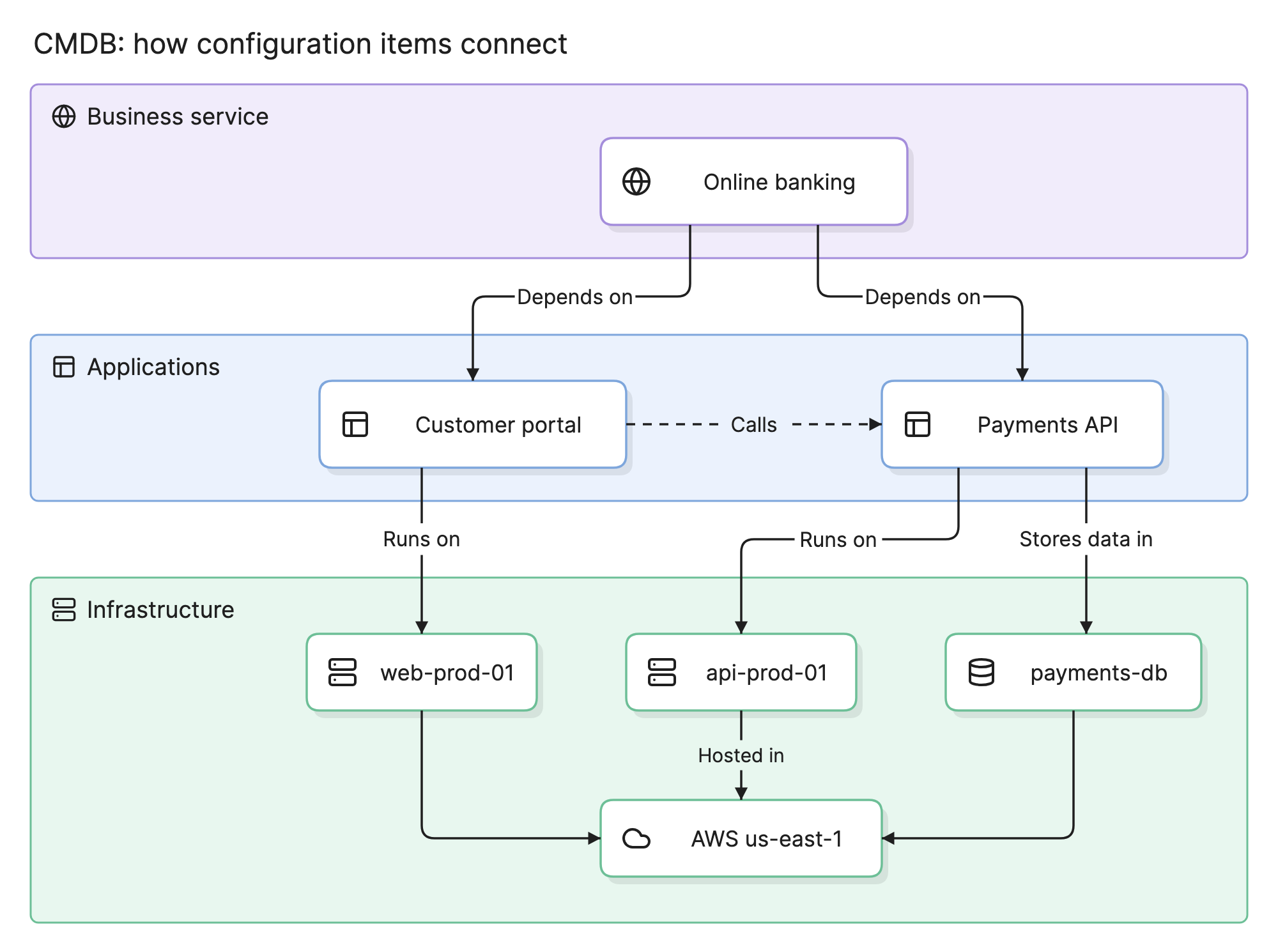
A CMDB helps IT teams answer questions like “what will this change break?” and “which services does this failing server support?” Those answers depend on the relationships between items as much as on the items themselves, and that is what sets a CMDB apart from a simple inventory.
What does a CMDB contain?
Configuration items
Each component a CMDB tracks is a configuration item (CI). CIs range from business services and applications down to servers, databases and cloud resources.
Attributes
Each CI has details that describe it, such as its owner, environment, version, location and status.
Relationships
Relationships record how CIs connect: a service depends on an application, an application runs on a server, and a server is hosted in a data center. In the example above, you can trace from online banking down to the region it runs in.
What counts as a configuration item?
A CI is anything you need to manage in order to deliver a service. Teams decide what to include, but most CMDBs cover some mix of these:
- Business services, such as online banking or customer support.
- Applications, such as a customer portal or a payments API.
- Infrastructure, such as servers, databases, containers and cloud resources.
- Network components, such as load balancers, firewalls and switches.
- Locations and environments, such as a data center, a cloud region or production.
A laptop or a software license may be tracked as an asset without being a CI. It belongs in the CMDB only if its configuration or relationships matter to a service.
How does a CMDB get its data?
Few CMDBs can be kept accurate by hand, so most combine several sources.
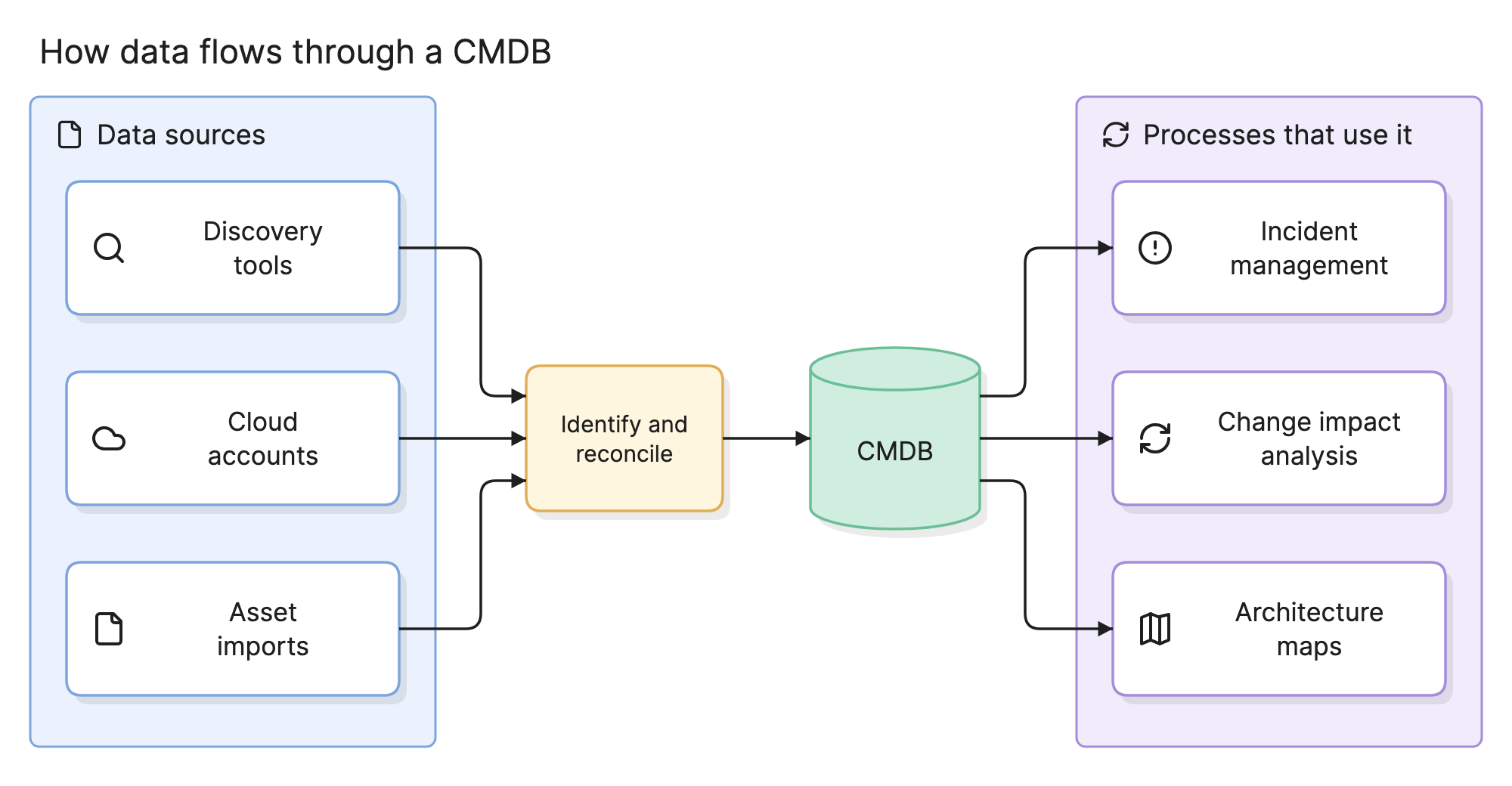
Discovery tools scan networks and hosts, cloud integrations pull resources from cloud accounts, and imports bring in data from other systems. Because these sources overlap, a reconciliation step decides whether two records describe the same CI and which source to trust for each attribute.
Why does a CMDB matter?
- Change management. See what depends on a component before changing it, which helps reduce failed changes.
- Incident management. Trace a failing component to the services it affects, or a service to its likely causes.
- Security and compliance. Find the systems affected by a vulnerability and show auditors who owns what.
- Enterprise architecture. Use real data to plan migrations, retire applications and understand dependencies.
What does a CMDB look like in practice?
Suppose payments-db from the example at the top of this page starts failing. Without a CMDB, the on-call engineer has to work out what depends on that database by asking around or searching through code. With one, they can follow its relationships upward: payments-db stores data for the payments API, which the customer portal calls, and both support online banking.
The same relationships help before a change. If a team plans to move api-prod-01 to a new region, the CMDB shows which applications and services run on it and who owns them, so the right people can review the change in advance.
How does a CMDB compare with similar tools?
| Tool | What it tracks | Main question it answers |
|---|---|---|
| CMDB | Components, their configuration and their relationships | What depends on this? |
| IT asset management | What you own, what it costs and its lifecycle | What do we have, and what are we paying for? |
| Application portfolio management | Applications and their business value, cost and risk | Which applications should we keep, replace or retire? |
| Service catalog | The services people can request or use | What can I ask IT for? |
How do you build a useful CMDB?
- Start with the questions. Decide what the CMDB needs to answer, then model only what those answers require.
- Scope it to key services. Start with your most critical services and expand from there.
- Automate data collection. Prefer discovery and integrations over manual updates.
- Assign owners. Give each CI class an owner who is accountable for its quality.
- Set reconciliation rules. Decide which source wins for each attribute.
- Measure health. Track how complete, correct and up to date your data is.
What are common CMDB challenges?
- Stale data. Once teams stop trusting the data, they stop using it, and it degrades further.
- Too much scope. Tracking every possible attribute creates upkeep without adding value.
- Missing relationships. A list of CIs with no links cannot show impact.
- Hard to read. A CMDB holds thousands of records in tables, which makes it difficult to see how a service actually fits together.
- No clear ownership. When nobody is accountable for a CI class, errors build up and nobody fixes them.
How do you visualize a CMDB?
Teams usually take one of three approaches.
- Built-in dependency views. Many CMDB platforms can show what a CI connects to. These work well for checking one item, but they are harder to use for explaining a whole service.
- Hand-drawn diagrams. Exporting the data and drawing it yourself gives you full control over the layout, but the diagram starts going out of date as soon as the data changes.
- Connected architecture maps. Tools like Eraser connect to a CMDB such as ServiceNow, along with cloud accounts and other data sources, and draw interactive maps from them. When a source changes, the map shows what moved.
Frequently asked questions
-
What is a configuration item?
A configuration item, or CI, is any component that a CMDB tracks because it needs to be managed to deliver a service. Examples include applications, servers, databases, network devices and business services.
-
What is the difference between a CMDB and IT asset management?
IT asset management tracks what an organization owns and what it costs, including contracts, licenses and lifecycle dates. A CMDB tracks how components are configured and connected, so that teams can understand their effect on services.
-
Is a CMDB part of ITIL?
The CMDB is closely associated with ITIL, which describes it as part of service configuration management. You do not need to adopt ITIL to use one.
-
Is ServiceNow a CMDB?
ServiceNow is a broader IT service management platform that includes a CMDB, and it is one of the most widely used. Other ITSM platforms offer their own.