Diagram types
Class diagram
A class diagram is a UML structure diagram that shows a system's classes, their attributes and operations, and the relationships between them.
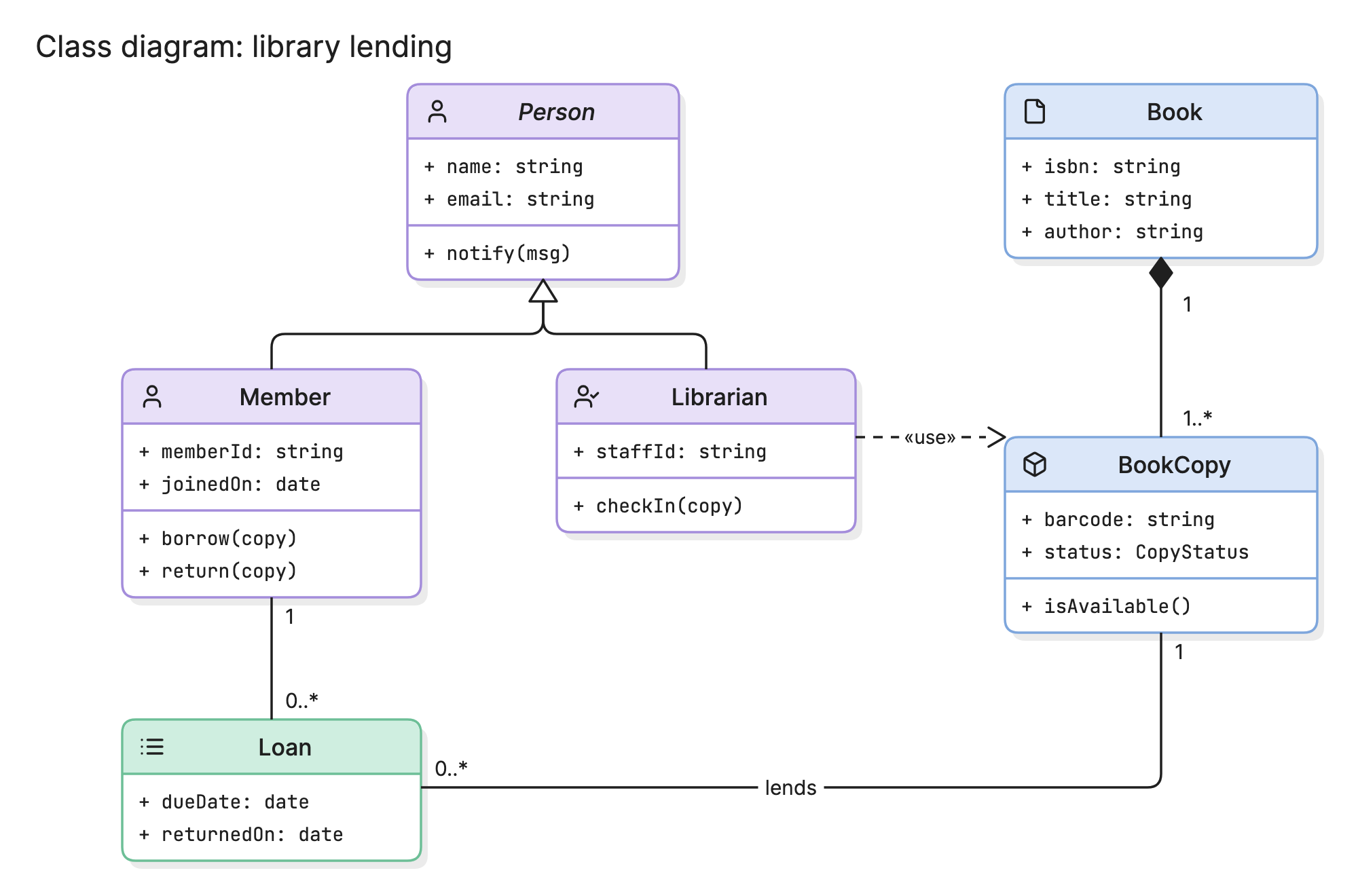
Class diagrams are the most used UML diagram because they answer the first question anyone asks about a codebase: what are the main things in it, and how do they relate? Teams draw them to design a domain model before writing code and to explain one that already exists.
When should you use a class diagram?
- Designing a domain model. Name the concepts, decide which owns which and settle inheritance before the first file is written.
- Explaining a codebase. Show a new engineer the ten classes that matter instead of the four hundred that exist.
- Reviewing a design. A missing class or a circular dependency is easier to spot on a diagram than in a pull request.
- Planning a refactor. Draw the current classes and the target classes side by side to see what has to change.
- Mapping code to data. Compare the class diagram with the ERD to find mismatches between objects and tables.
What are the parts of a class diagram?
Classes
A class is a rectangle with up to three compartments. The top holds the name, the middle holds attributes and the bottom holds operations. An abstract class, which cannot be instantiated, is written in italics, as Person is in the example above. An interface is marked with the «interface» stereotype.
Attributes and operations
Attributes are written as name: type, such as dueDate: date. Operations are written with parentheses, such as borrow(copy), and may include a return type. The sign in front shows visibility: + public, - private, # protected and ~ package.
Relationships
Lines between classes show how they relate, and the line style and end shape carry the meaning. There are six to know.
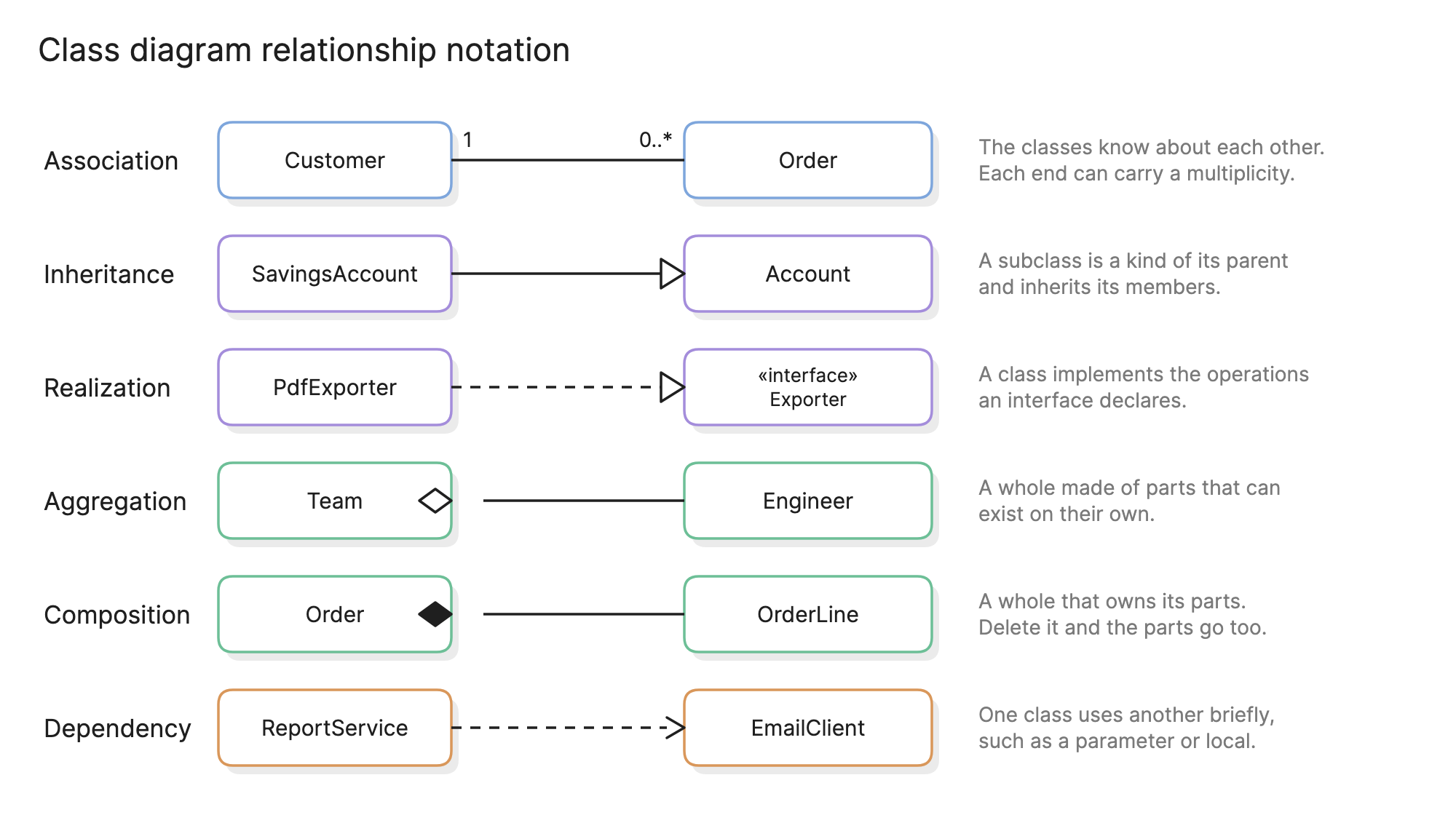
- Association. A plain line. The classes hold references to each other. Each end can carry a multiplicity and a role name.
- Inheritance. A hollow triangle at the parent. The child is a kind of the parent and inherits its members. UML calls this generalization.
- Realization. A dashed line with a hollow triangle at the interface. The class implements what the interface declares.
- Aggregation. A hollow diamond at the whole. The parts can exist without the whole.
- Composition. A filled diamond at the whole. The whole owns the parts and they are deleted with it.
- Dependency. A dashed line with an open arrowhead. One class uses another briefly, as a parameter or a local variable, without holding a reference.
Multiplicity
Numbers at the ends of an association say how many objects can take part.
| Notation | Meaning |
|---|---|
1 | Exactly one |
0..1 | Zero or one |
* or 0..* | Any number, including none |
1..* | One or more |
How do you read a class diagram?
Start with the inheritance, because it tells you the vocabulary. In the library example, Member and Librarian both point at Person with a hollow triangle, so both have a name and an email and both can be notified. Person is in italics, so there is never a plain person in the system, only members and librarians.
Then follow the diamonds. Book has a filled diamond on its line to BookCopy, so a book is composed of one or more physical copies, and the copies cannot exist without the book. Each copy has a barcode and a status.
Finally follow the associations. A Member has 0..* loans and each Loan belongs to one member. Each loan is for exactly one BookCopy, and a copy can appear on many loans over time. The dashed «use» line from Librarian to BookCopy is a dependency: checkIn(copy) takes a copy as a parameter but a librarian does not hold copies.
How do you create a class diagram?
- List the candidate classes. Underline the nouns in the requirements or scan the main types in the code.
- Cut the list. Keep the classes that matter to the question. A diagram of 8 to 15 classes is readable; 40 is not.
- Add the attributes and operations that explain the class. Leave out getters, setters and plumbing.
- Draw inheritance first. It sets the shape of the diagram, with parents above children.
- Add associations with multiplicities. Decide for each line whether it is a reference, an aggregation or a composition.
- Check it against a scenario. Walk through “a member borrows a book” and confirm every object and link it needs is on the diagram.
What are common class diagram mistakes?
- Showing every class. A diagram generated from a whole codebase is a map of everything and a guide to nothing. Split it by module or by question.
- Confusing aggregation with composition. When in doubt, use a plain association. A wrong diamond misleads more than a missing one.
- Deep inheritance. Five levels of subclasses on a diagram usually mean five in the code, which is worth catching here.
- Mixing levels. Do not put database tables, services and value objects on one diagram as if they were the same kind of thing.
- Letting it drift. The diagram should change in the same pull request as the classes it shows.
How does a class diagram compare with other diagrams?
| Diagram | What it shows | Use it when |
|---|---|---|
| Class diagram | Classes and their static relationships | You want to explain the model behind the code |
| Object diagram | Specific objects with real values at one moment | A class diagram is too abstract to make the point |
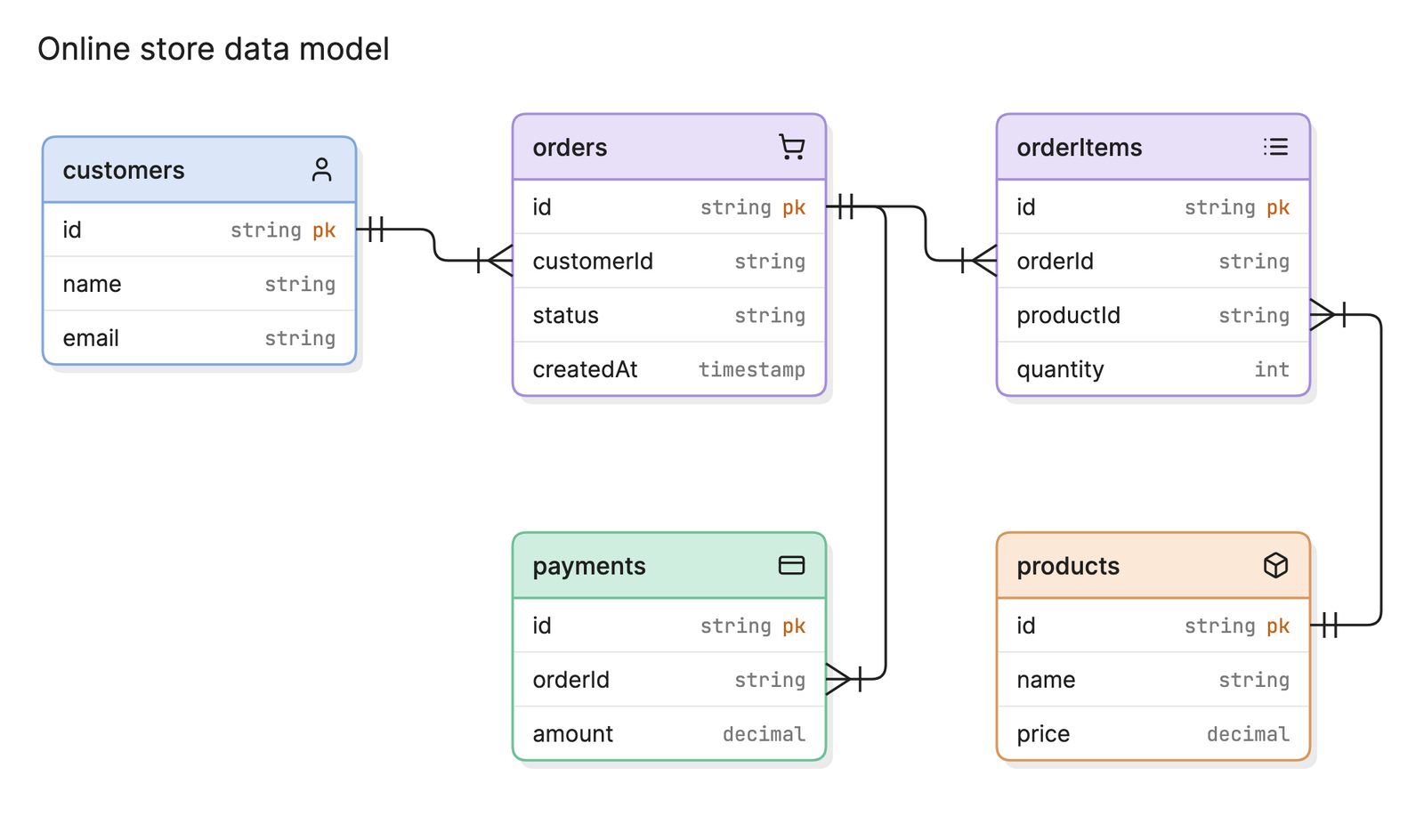
| Entity relationship diagram | Tables, columns and foreign keys | The question is about stored data |
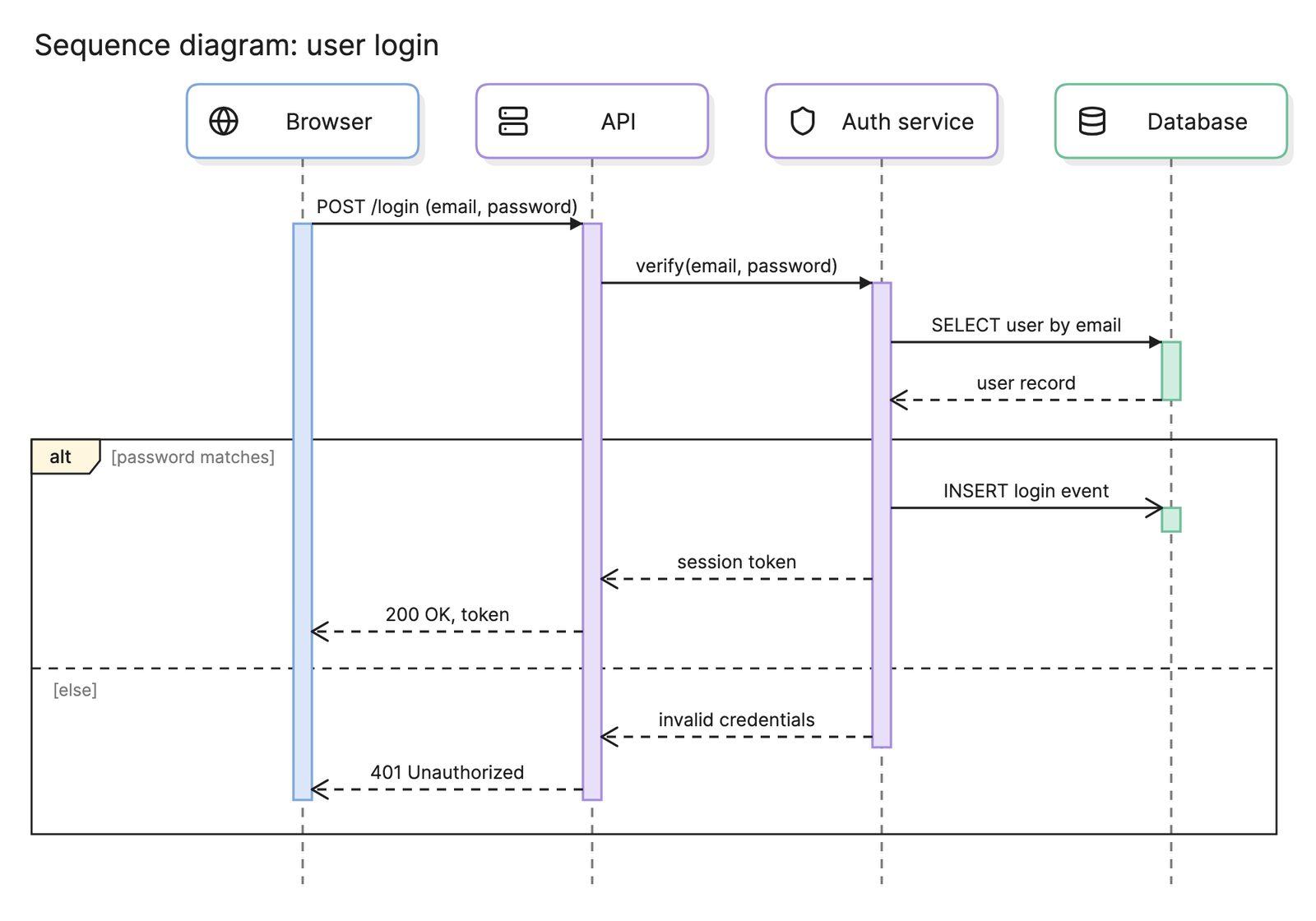
| Sequence diagram | Messages between objects over time | The question is about behavior, not structure |
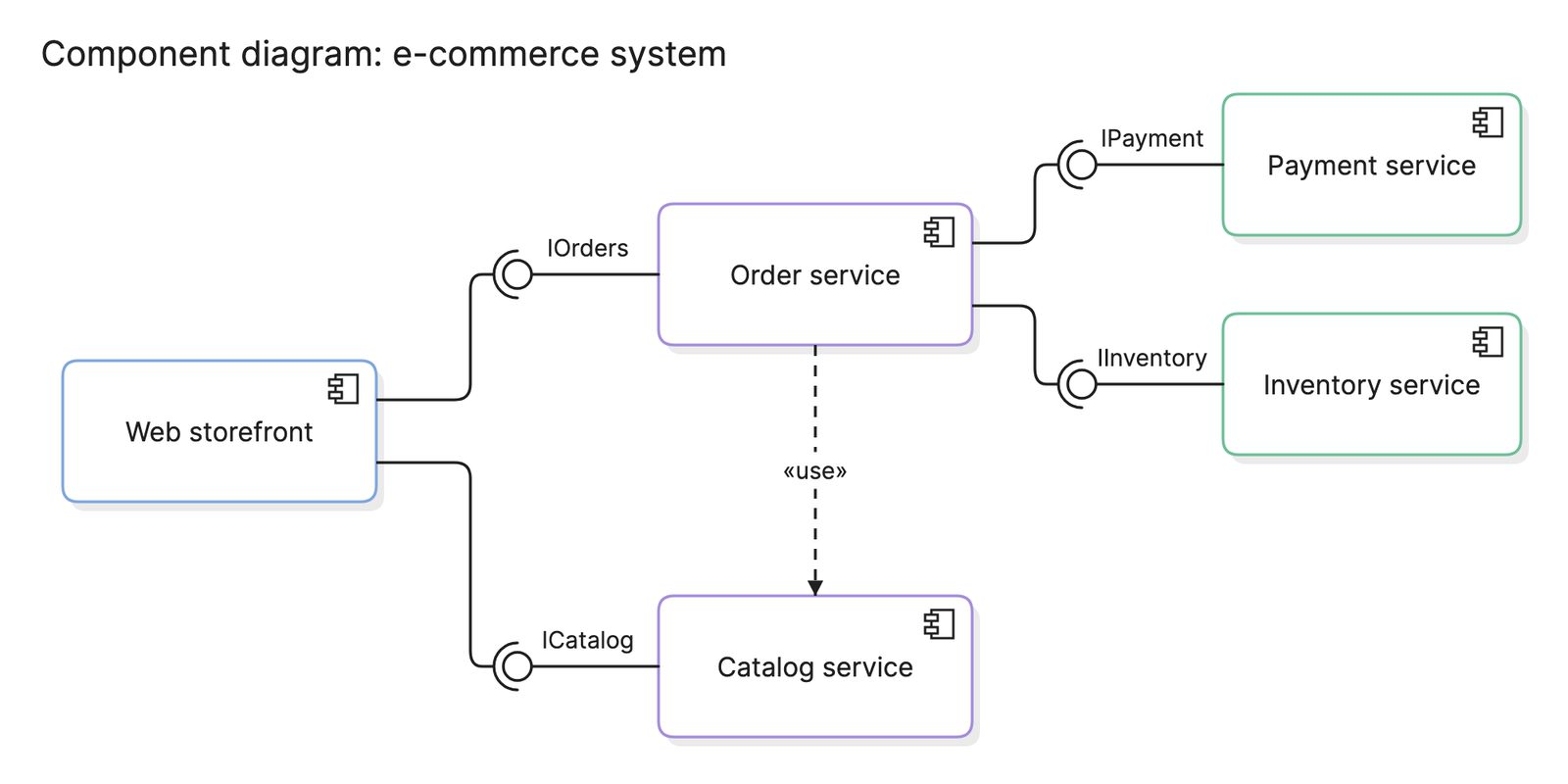
| Component diagram | Larger units and their interfaces | Classes are too fine-grained for the audience |
What tools can you use to make a class diagram?
- IDEs and code analysis tools. Most can draw a class diagram from source. They are accurate but noisy, and they cannot help you design something new.
- Diagram-as-code tools. PlantUML and Mermaid both have a class diagram syntax, so the diagram can live in the repository and be reviewed like code.
- AI diagramming tools. Tools like Eraser take a plain-English description or a code snippet and return a class diagram you can keep editing, which suits design work where the classes do not exist yet.
Frequently asked questions
-
What is the difference between a class diagram and an ERD?
A class diagram models code: classes with attributes and operations, inheritance and object references. An entity relationship diagram models stored data: tables, columns and foreign keys. The two often look similar for the same system, but an ERD has no operations or inheritance, and a class diagram has no keys.
-
What is the difference between aggregation and composition?
Both mean one class is made of parts. In composition, the whole owns its parts and they cannot exist without it, so deleting an order deletes its order lines. In aggregation, the parts can exist on their own, so a team can be dissolved without deleting its engineers. Composition uses a filled diamond and aggregation a hollow one.
-
What does multiplicity mean in a class diagram?
Multiplicity is the number of objects that can sit at one end of an association.
1means exactly one,0..1means optional,*or0..*means any number and1..*means at least one. In the library example, one member can have0..*loans and each loan belongs to exactly one member. -
Can you generate a class diagram from code?
Yes. Many IDEs and tools read a codebase and draw its classes and relationships. The result is accurate but often cluttered, because it shows everything. Treat it as a starting point and remove the classes that do not matter to the question you are answering.