Cloud and DevOps
Cloud computing architecture
Cloud computing architecture is the arrangement of front-end clients, the network and a provider's back-end compute, storage, database and management services.
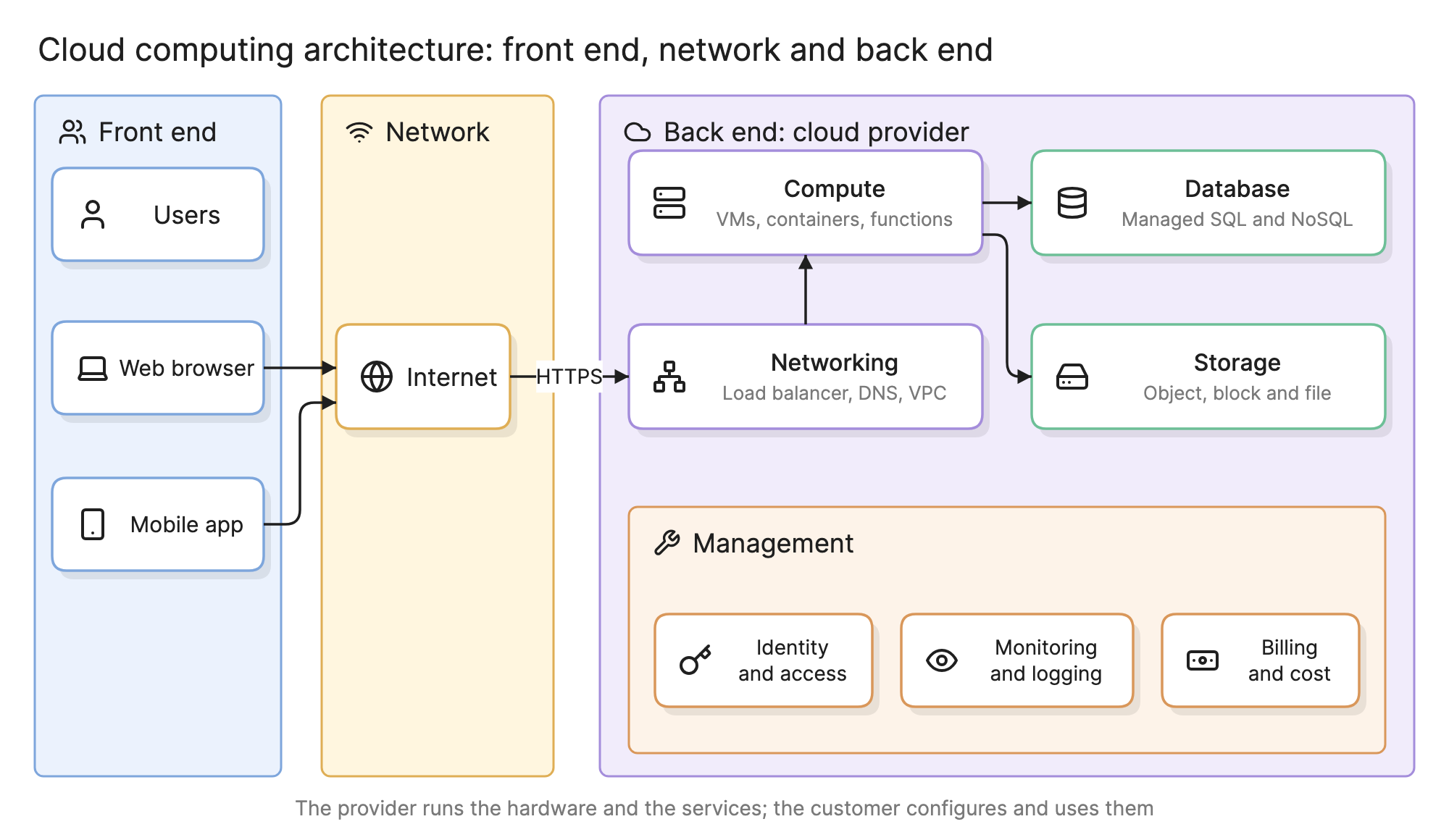
Teams learn the shape of cloud computing architecture so they can decide what to rent from a provider, what to build themselves and where the line of responsibility falls. Every cloud system, from a one-function API to a global platform, has the same three parts.
What are the parts of cloud computing architecture?
The diagram at the top of this page shows the three parts and what lives in each.
- Front end. The clients: people and the browsers, mobile apps or other systems they use to send requests. The front end holds no infrastructure of its own.
- Network. The internet, or a private connection, between the clients and the provider. It is one box in the diagram, but every request crosses it, and its latency shapes the design on both sides.
- Back end. Everything inside the provider’s boundary, in five service families:
- Compute. Virtual machines, containers and functions that run your code.
- Storage. Object storage for files, block storage for disks and file storage for shared volumes.
- Database. Managed relational and NoSQL databases, caches and search, patched and replicated by the provider.
- Networking. Virtual networks, subnets, load balancers, DNS, content delivery and the gateways to the internet or a data center.
- Management. Identity and access, monitoring and logging, billing and the APIs and consoles that configure all of the above.
The provider runs the hardware and the services. You configure and combine them, which is why an architecture diagram of a cloud system is mostly a picture of how back-end services are wired together.
What are the cloud service models?
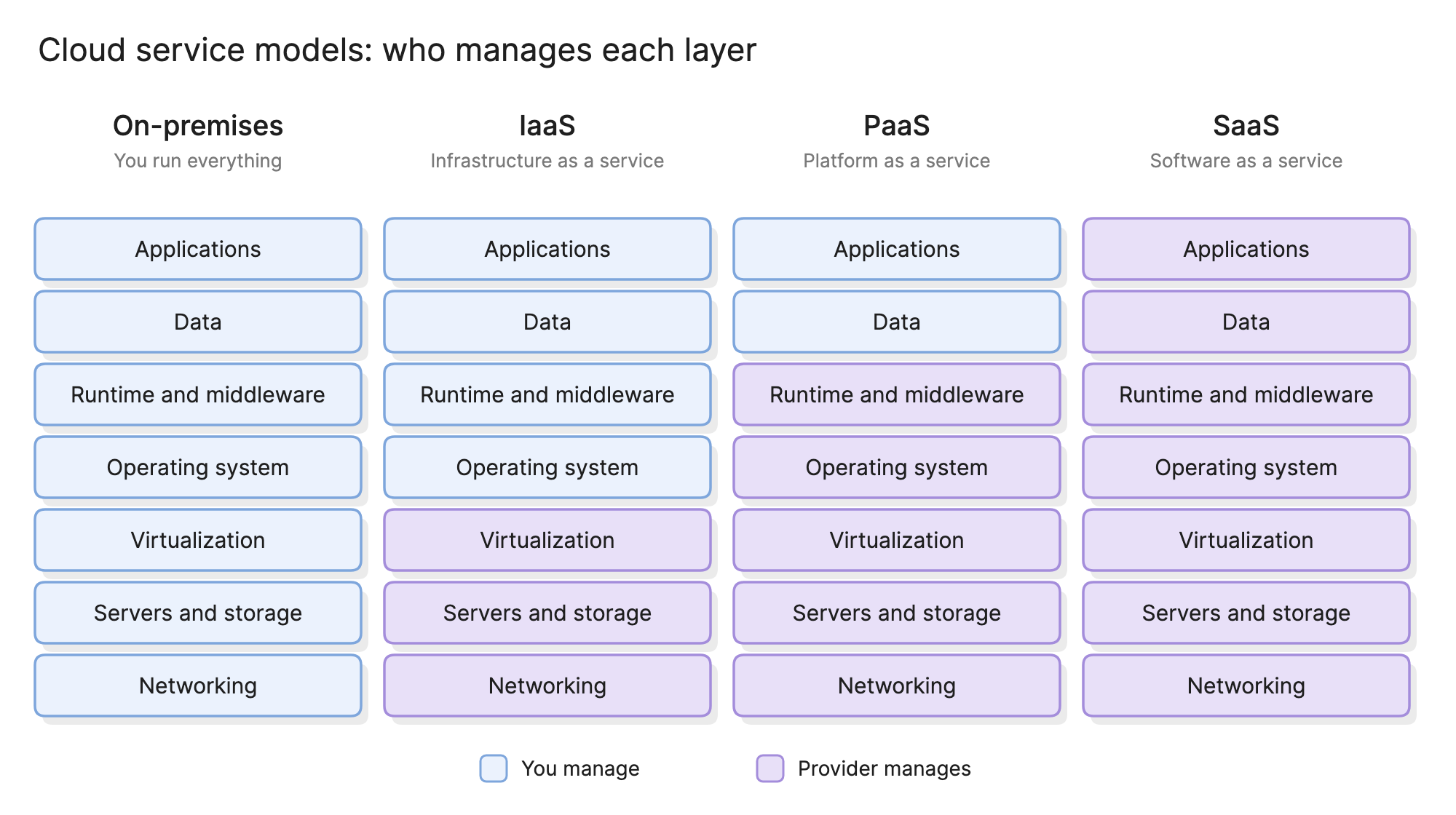
Service models describe how much of the stack the provider manages for you.
| Model | Provider manages | You manage | Example |
|---|---|---|---|
| IaaS (infrastructure as a service) | Hardware, virtualization, networking | Operating system, runtime, application, data | A virtual machine with a web server you installed |
| PaaS (platform as a service) | Everything up to the runtime | Application code and data | A managed container platform or database |
| SaaS (software as a service) | The whole application | Users, settings and the data you put in | A hosted email or CRM product |
Serverless functions sit between PaaS and SaaS; see serverless architecture. Most real systems mix models, such as a managed database behind containers on virtual machines that send mail through a hosted service.
What are the cloud deployment models?
- Public cloud. Services run on a provider’s shared infrastructure, isolated by account. The default and the cheapest way to start.
- Private cloud. The same self-service model on infrastructure dedicated to one organization, chosen for regulatory, latency or legacy reasons.
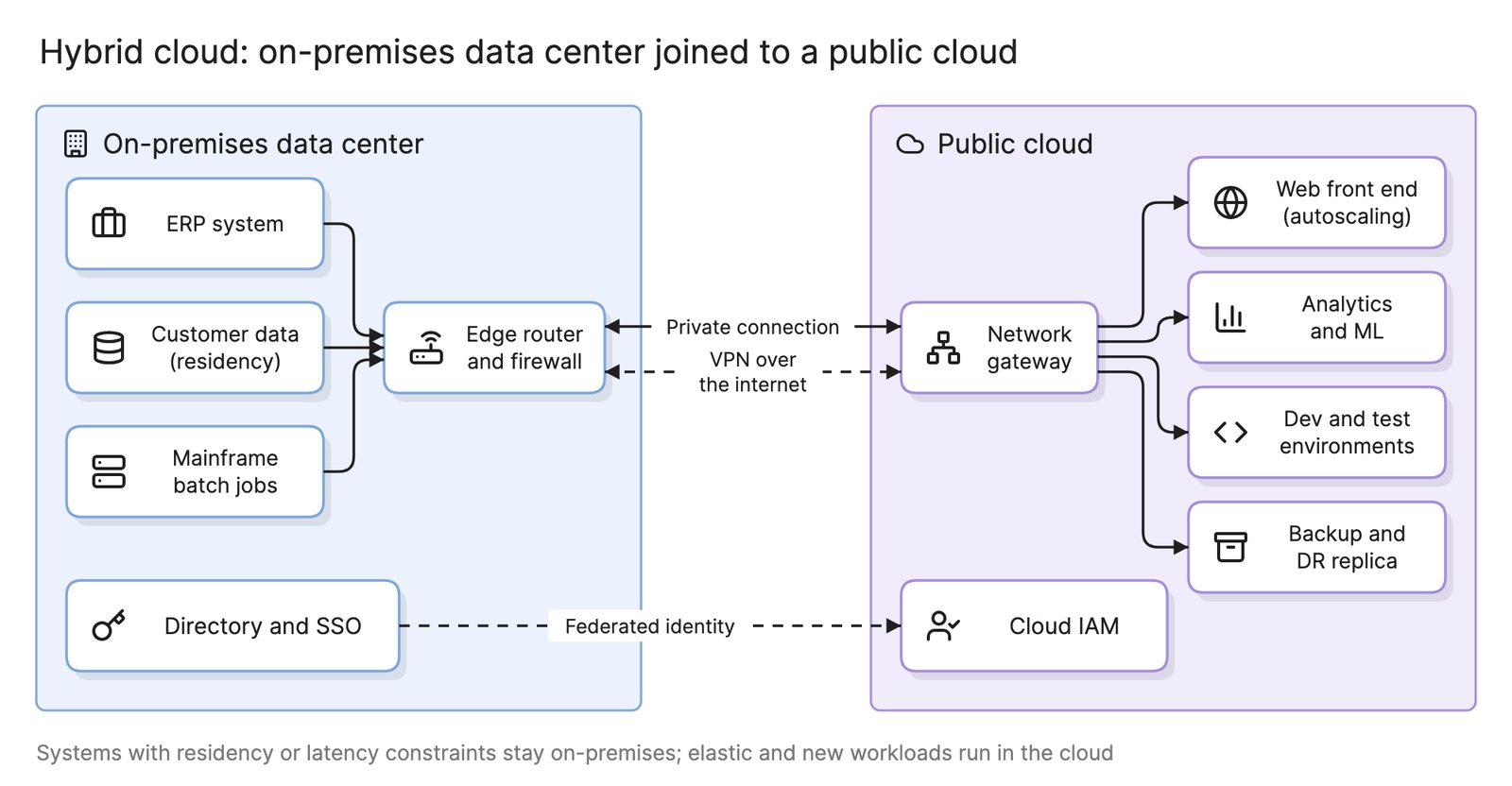
- Hybrid cloud. A private environment and a public cloud joined by a private connection and a shared identity.
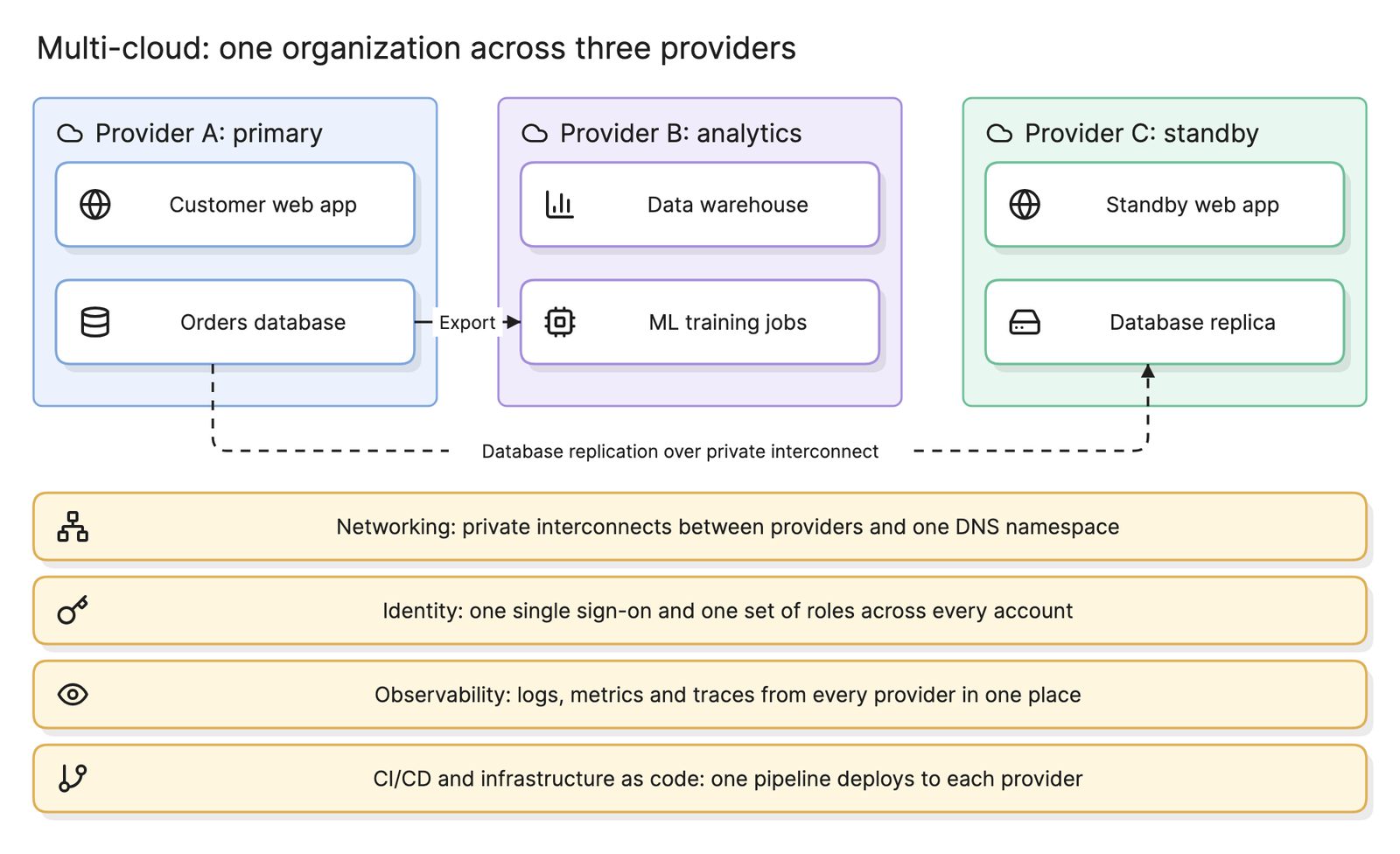
- Multi-cloud. Two or more public providers used by one organization, with identity, networking and tooling shared across them.
How does a request move through cloud computing architecture?
Follow the arrows in the hero diagram. A user opens the web app in a browser, which sends an HTTPS request across the internet to the provider’s networking services, where DNS resolves the name and a load balancer picks a healthy instance. The compute tier runs the application code, reads and writes the managed database and fetches large objects such as images from storage. Nothing in the management band is on the request path, but identity decided which services the application could call and monitoring recorded the request on the way through.
What differs from the same system in a data center is that every arrow crosses infrastructure the provider operates, and every box can be created or deleted through an API. That is why infrastructure as code is the normal way to describe a cloud back end.
How do you design cloud computing architecture?
- Start from the workload. List the traffic pattern, the data, where the users are and what must keep working when something fails.
- Pick a service model per component. Prefer managed services where the component is not what makes your product different.
- Draw the boundaries first. Decide accounts, networks and subnets before placing services. A landing zone gives you this structure ready made, and a hub-and-spoke network is the usual shape for connecting several networks.
- Place compute, data and storage. Stateless tiers behind a load balancer so they scale out; state in managed services that replicate for you.
- Design for failure. Spread across zones for high availability and plan a second region for disaster recovery.
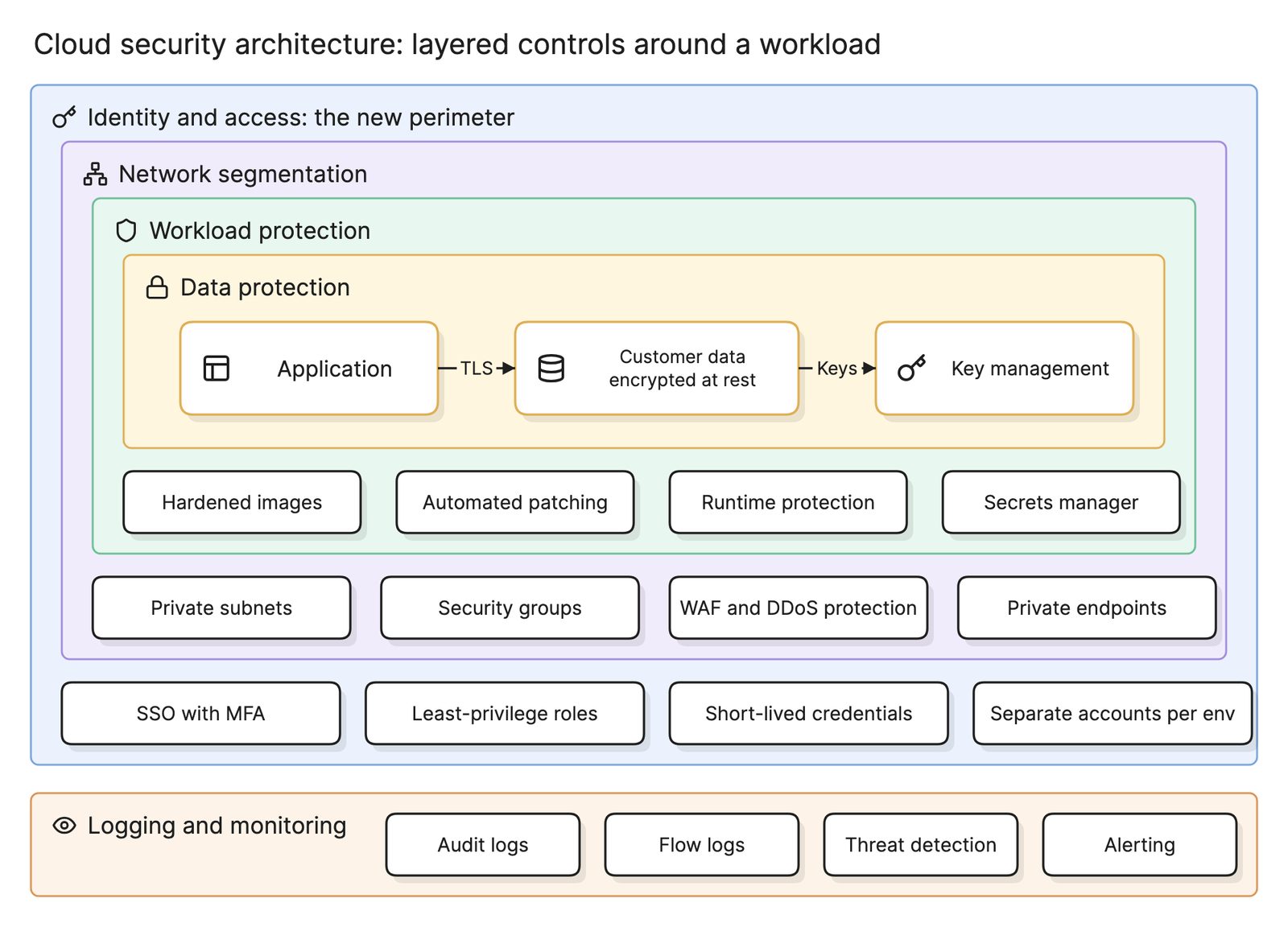
- Layer the security controls across identity, network, workload and data, as described under cloud security architecture, then capture the design as code and keep a diagram with it.
What are common cloud computing architecture mistakes?
- Lifting and shifting without redesign. Copying virtual machines from a data center keeps every operational cost and gains little.
- Treating the network as free. Traffic between regions and out to the internet is billed and adds latency.
- One account for everything. Production, development and security tooling in one account share one blast radius.
- Ignoring the responsibility line. Assuming the provider patches your operating systems or backs up your database when the service model says that is your job.
What tools can you use to design cloud computing architecture?
- Provider architecture frameworks. Each major provider publishes a well-architected framework with reference architectures and review checklists.
- Infrastructure as code with a visual plan. Tools that read Terraform or CloudFormation and draw the resources they would create.
- AI diagramming tools. Tools like Eraser turn a description of your system or your infrastructure code into an AWS diagram, an Azure diagram or a Google Cloud diagram with the provider’s icons, which you can keep editing as the system grows. See the best cloud diagram tools for a comparison.
For more on this kind of diagram, see architecture diagrams.
Frequently asked questions
-
What is the difference between cloud computing architecture and cloud infrastructure?
Cloud infrastructure is the provider's hardware and the virtualized compute, storage and network built on it. Cloud computing architecture is how that infrastructure is arranged for a workload: which services are used, how clients reach them and how the pieces connect. Infrastructure is the raw material; architecture is the design you draw on an architecture diagram.
-
What are the three service models in cloud computing?
IaaS gives you virtual machines, storage and networks; you manage everything from the operating system up. PaaS gives you a managed runtime, so you bring code and data and the provider patches the rest. SaaS gives you a finished application, where you manage users and settings only. Most systems mix all three.
-
What is the shared responsibility model?
The provider secures and operates the cloud itself: data centers, hardware, hypervisors and managed services up to the interface you configure. You secure what you put in it: identities, network rules, application code, data and whatever operating systems you run. The line sits higher with PaaS and SaaS than with IaaS, as the service model strip above shows.
-
Is cloud computing architecture the same as a cloud architecture diagram?
No. The architecture is the design; the diagram is a picture of it. A cloud architecture diagram usually shows one specific system, with provider icons for the exact services used, inside the account and network boundaries that hold them. This page describes the general shape that every such system follows.