Cloud and DevOps
Landing zone
A landing zone is the pre-built foundation of accounts, identity, networking, logging and guardrails into which cloud workloads are deployed.
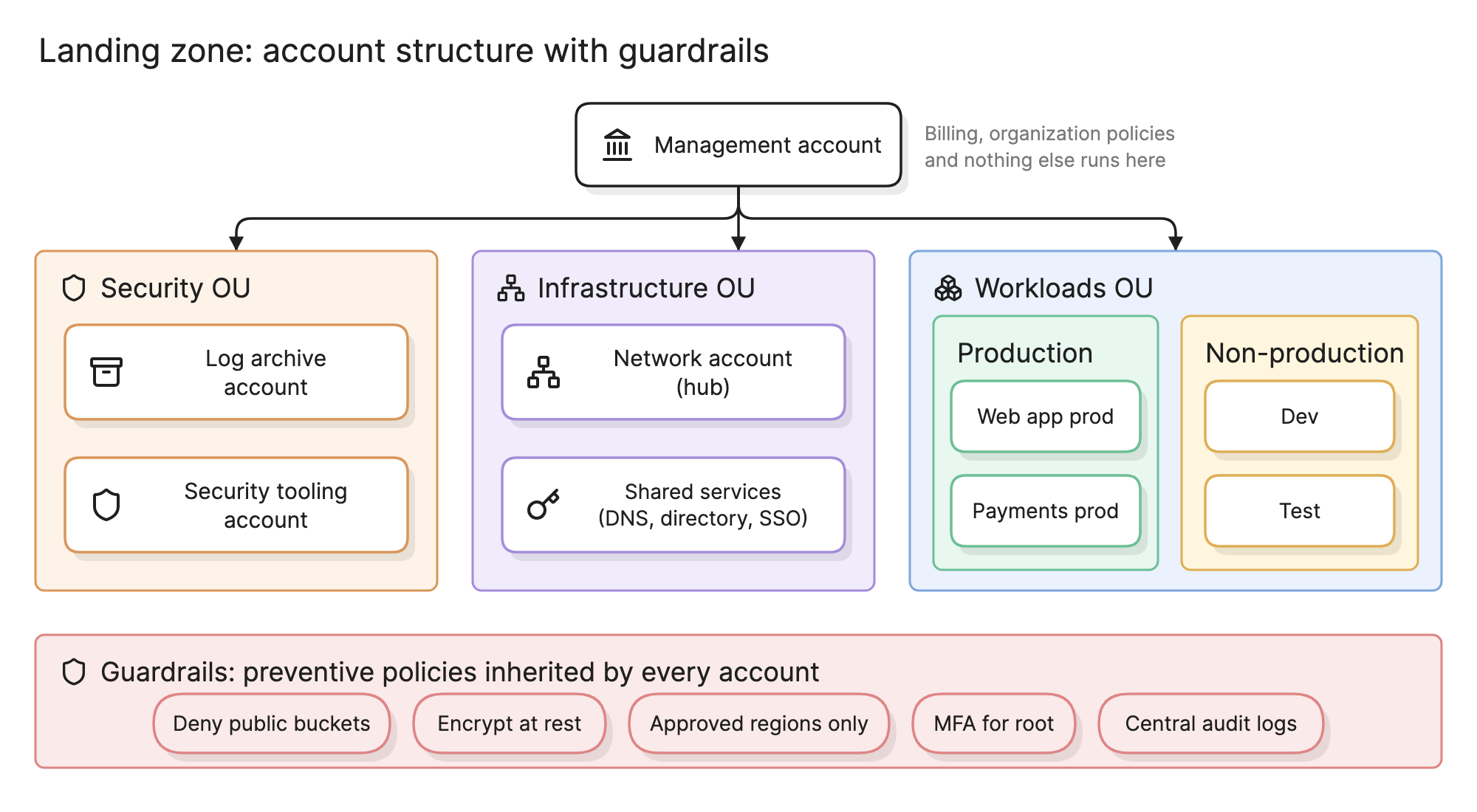
Teams build a landing zone before the first workload so that every account that follows starts with the same identity, network, logging and guardrails. Without one, each team sets up its own account its own way, and the differences become the security findings and migration work of a few years later.
Why does a landing zone matter?
- Isolation by default. Production, development, logs and security tooling in separate accounts cannot damage each other.
- Guardrails are inherited. A policy set once at the top of the tree applies to every account below it, including ones created next year.
- Teams start fast. A new team gets an account with networking, identity and logging already attached, instead of spending a month on plumbing.
- It cannot be retrofitted cheaply. Splitting one account into many after workloads depend on it means moving resources, re-pointing integrations and re-issuing credentials.
What does a landing zone include?
The diagram at the top of this page shows the usual pieces. From the top of the tree down:
- Management account. The root. It owns billing and organization-wide policies and runs nothing else, because anything in it has the widest blast radius in the estate.
- Organizational units (OUs). Groups of accounts that share policies. A security OU, an infrastructure OU and a workloads OU, with production and non-production under workloads, is the common minimum.
- Log archive account. Receives audit logs, flow logs and configuration history from every account, write-only, so an attacker in a workload account cannot erase their tracks.
- Security tooling account. Runs threat detection, posture scanning and the security team’s own tools, with read access into every account.
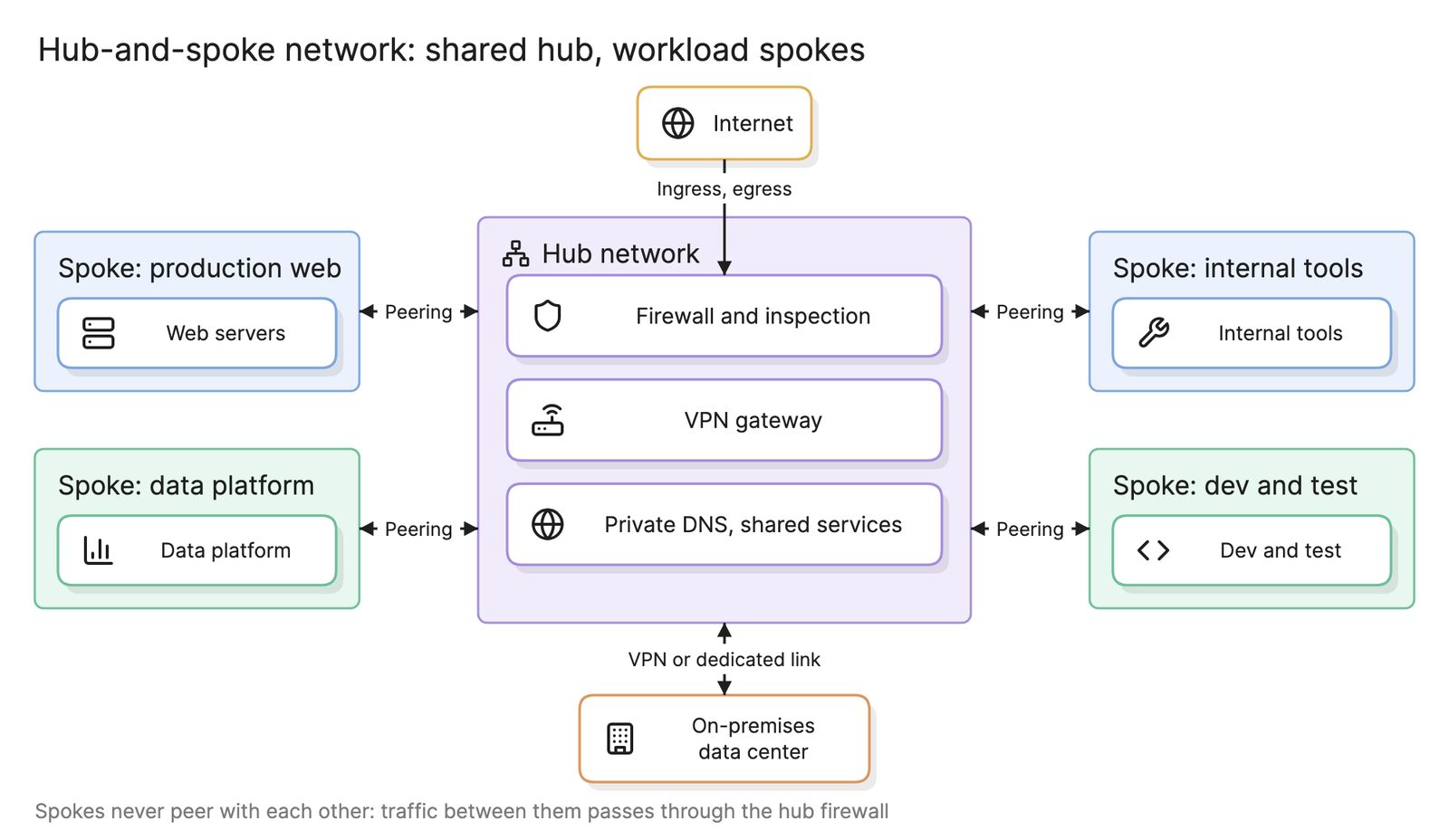
- Network account. Holds the shared network: the hub of a hub-and-spoke network with its firewall, VPN gateway and DNS, plus the data center connection in a hybrid cloud.
- Shared services account. Directory, single sign-on, shared DNS zones, artifact repositories and anything else every workload uses.
- Workload accounts. One or more per application, split by environment. Production and non-production sit in different OUs because they get different guardrails.
- Identity. Single sign-on from a central directory into every account, with permission sets rather than per-account users.
- Guardrails. Preventive policies that stop actions across the tree: no public storage buckets, encryption required, only approved regions, MFA on root credentials and logging that cannot be switched off. Detective controls flag what preventive ones cannot block.
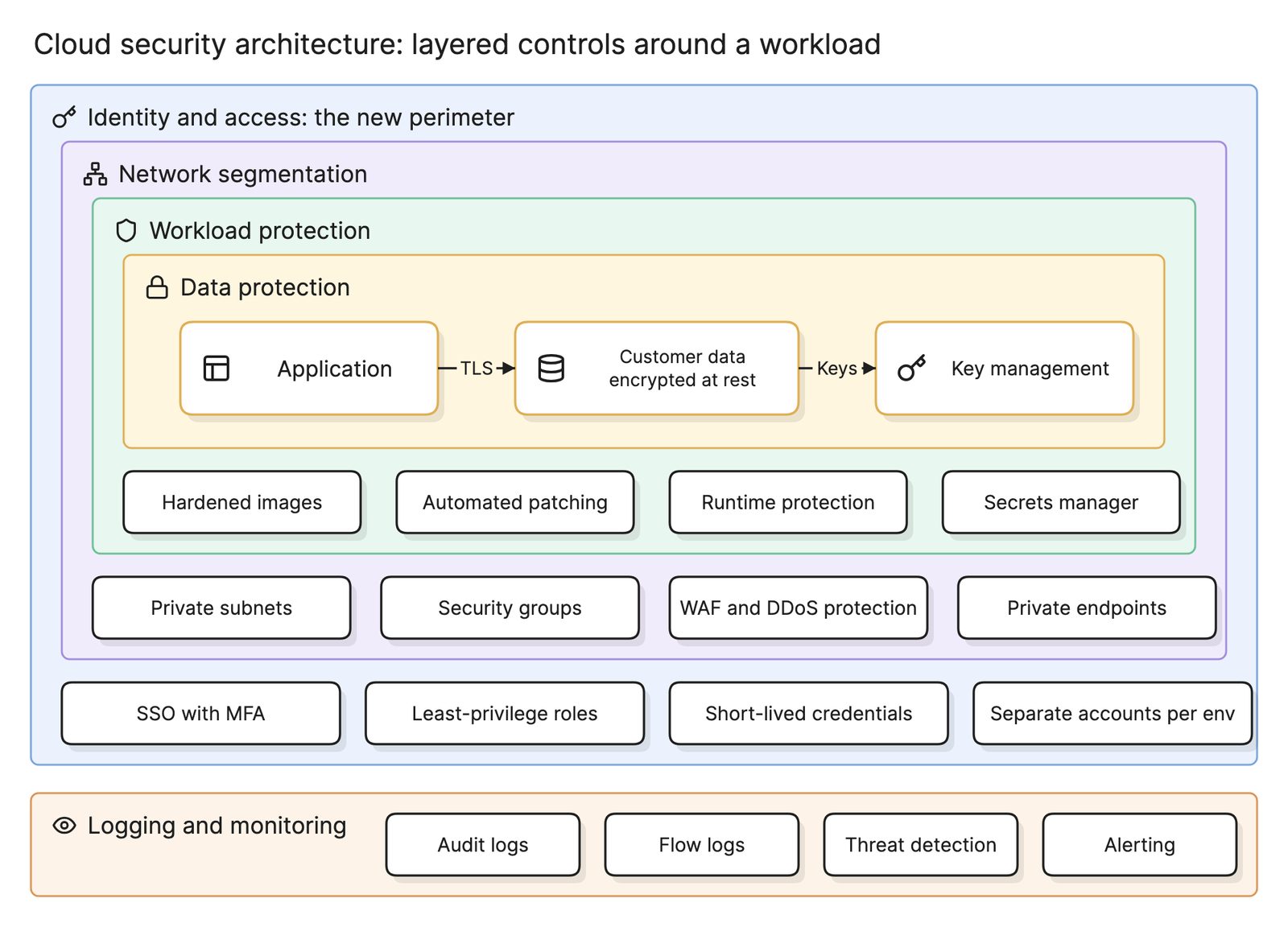
The security pieces follow the layers in cloud security architecture; the landing zone is where they are built once rather than per application.
Why does a landing zone come first?
Everything in a landing zone is cheap to set up when the accounts are empty and expensive to change when they are not. Moving a database to a different account means downtime and new credentials. Adding a guardrail that denies a region after a team has deployed there means a migration. Turning on central logging after an incident means the evidence was never collected.
The other reason is consistency: a landing zone built from code produces identical accounts, so an architecture diagram of one workload account looks like every other.
How do you build a landing zone?
- Design the account tree. Decide the OUs and the accounts in each, and draw it as a tree like the hero diagram before creating anything.
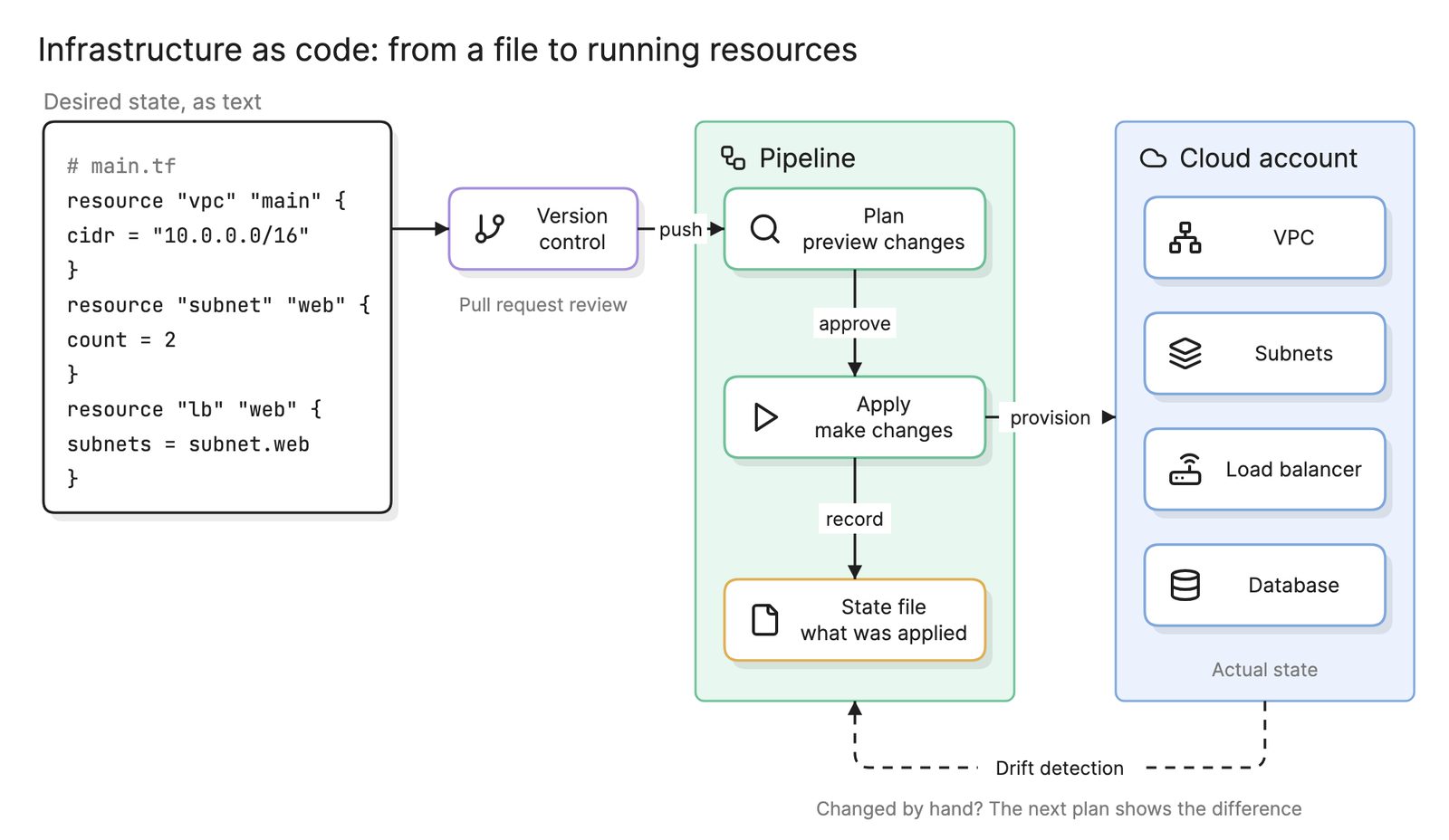
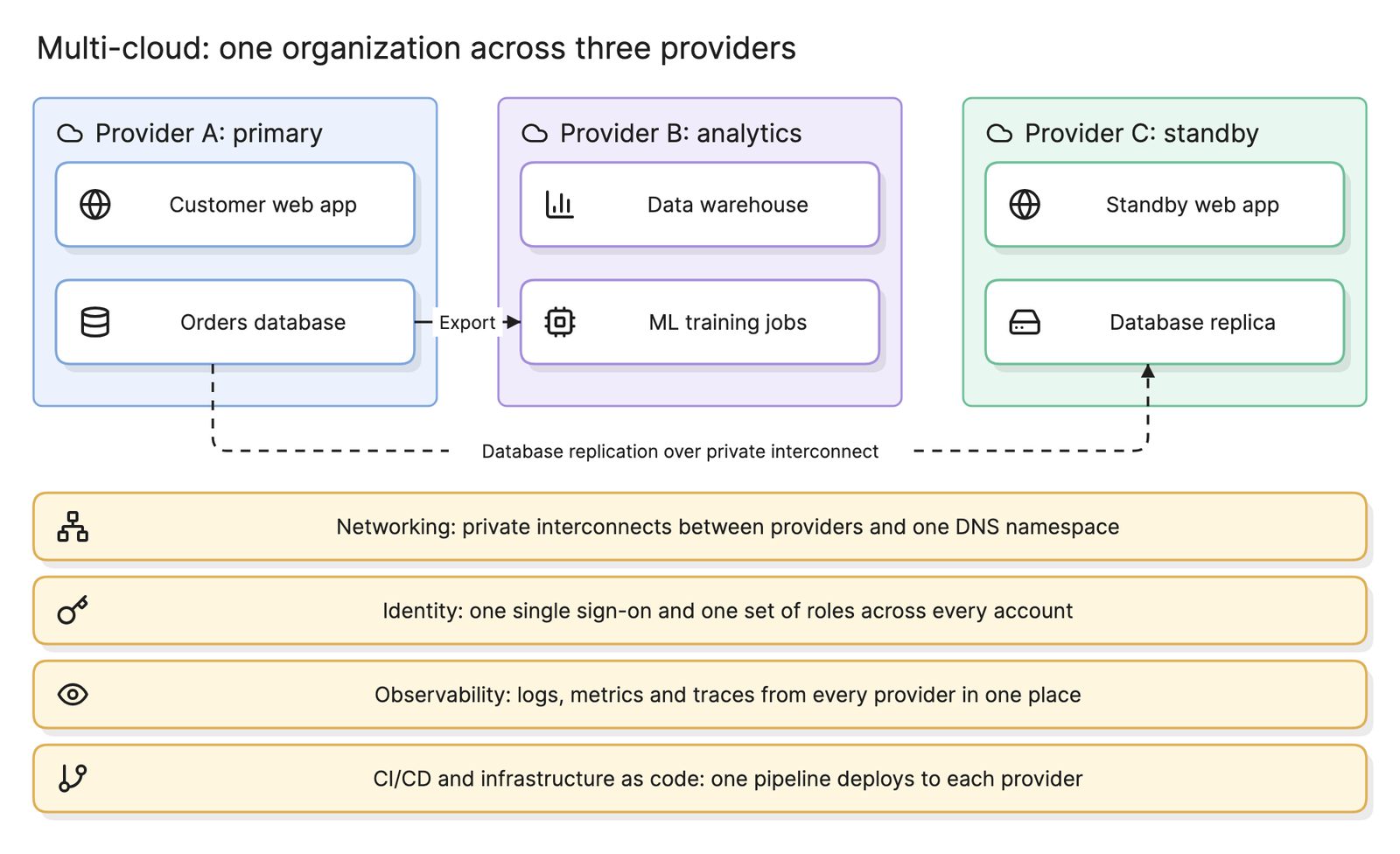
- Define it as infrastructure as code, so the structure is reviewable, repeatable and applied the same way on every provider in a multi-cloud estate.
- Start with the provider’s accelerator. Every major provider offers a starter that creates the core accounts and guardrails. Use it for the base and add your own code on top.
- Build the security accounts first. Log archive and security tooling, with every account shipping to them from the moment it exists.
- Build the network account. The hub, the shared DNS and the data center connection, with address space planned for every spoke that will ever attach.
- Connect identity. Federate the directory and define permission sets for the few roles people actually need.
- Write the guardrails as policies at the OU level, test them against a sandbox account and only then attach them.
- Vend accounts through a pipeline. New accounts are created by code that attaches them to the right OU, the hub and the log archive, never by hand.
What are common landing zone mistakes?
- Running workloads in the management account. It has no guardrails above it. Anything there is a route to the whole estate.
- One account per environment for everyone. A shared production account for all teams recreates the single-account problem one level down.
- Designing networks per account. Overlapping address ranges that can never be connected. Plan the whole address space up front.
- Guardrails nobody tested. A deny policy attached to the production OU without a dry run can stop deployments across every team at once.
How does a landing zone relate to other cloud structures?
| Structure | What it defines | Where it lives in the landing zone |
|---|---|---|
| Landing zone | Accounts, identity, logging, guardrails, shared network | The whole tree |
| Hub-and-spoke network | How account networks connect to shared services and the data center | The network account’s hub and each workload account’s spoke |
| Cloud security architecture | The layered controls that protect a workload | Identity and logging in the landing zone, the rest per workload |
| Disaster recovery | How a workload recovers in another region | Workload accounts, using regions the guardrails allow |
What tools help with a landing zone?
- Provider landing zone accelerators. Each major provider offers a service or reference implementation that creates the core accounts, OUs and guardrails, which most organizations use as the base.
- Infrastructure as code with policy checks. Terraform or provider-native languages for the structure, plus policy-as-code tools that test guardrails before they are attached.
- AI diagramming tools. Tools like Eraser turn the Terraform that defines your accounts and networks into a Terraform diagram you can keep editing, so the picture of the landing zone stays as current as the code.
For more on this kind of diagram, see DevOps diagrams.
Frequently asked questions
-
What is the difference between a landing zone and a cloud account?
An account is one container for resources with one bill and one set of permissions. A landing zone is the structure of many accounts, plus the identity, networking, logging and guardrails that are set up across them before any workload arrives. One account is a room; the landing zone is the building with its wiring, locks and alarms already fitted.
-
Why do landing zones use many accounts?
An account is the strongest isolation boundary a cloud provider offers. Separate accounts for production, development, logging and security mean a compromised key or a runaway script in one cannot reach the others, and costs are attributed without tagging discipline. Service quotas are also per account, so busy workloads do not starve each other.
-
Do you need a landing zone for a small team?
A small one, yes. Even two or three accounts with single sign-on, central logging and a handful of guardrails take a day to set up with a provider's starter tooling and save weeks of untangling later. The mistake is not building a small landing zone; it is building everything in one account and trying to split it after production depends on it.
-
How does a landing zone relate to a hub-and-spoke network?
The landing zone's network account usually holds the hub of a hub-and-spoke network: the shared firewall, VPN gateway and DNS. Each workload account gets a spoke network attached to that hub. The account structure provides isolation and billing; the network structure provides connectivity. They are designed together and built in the same code.