Cloud and DevOps
Infrastructure as code
Infrastructure as code manages servers, networks and cloud services through versioned configuration files a tool applies, instead of manual console changes.
Teams adopt infrastructure as code when the console stops scaling: a second environment needs to match the first, a change needs review before it happens and nobody can say what is running. Writing the infrastructure down as files fixes all three.
Why does infrastructure as code matter?
- Repeatable environments. Staging is the same file as production with different variables.
- Review before change. A pull request shows exactly which resources will be created, modified or destroyed before anything happens.
- A history. Version control records who changed the network and when.
- Recovery. The same files rebuild the infrastructure in another zone or region, the basis of high availability and most disaster recovery plans.
- Documentation that is never stale. The files are the system, so a diagram generated from them is always current.
What are the parts of infrastructure as code?
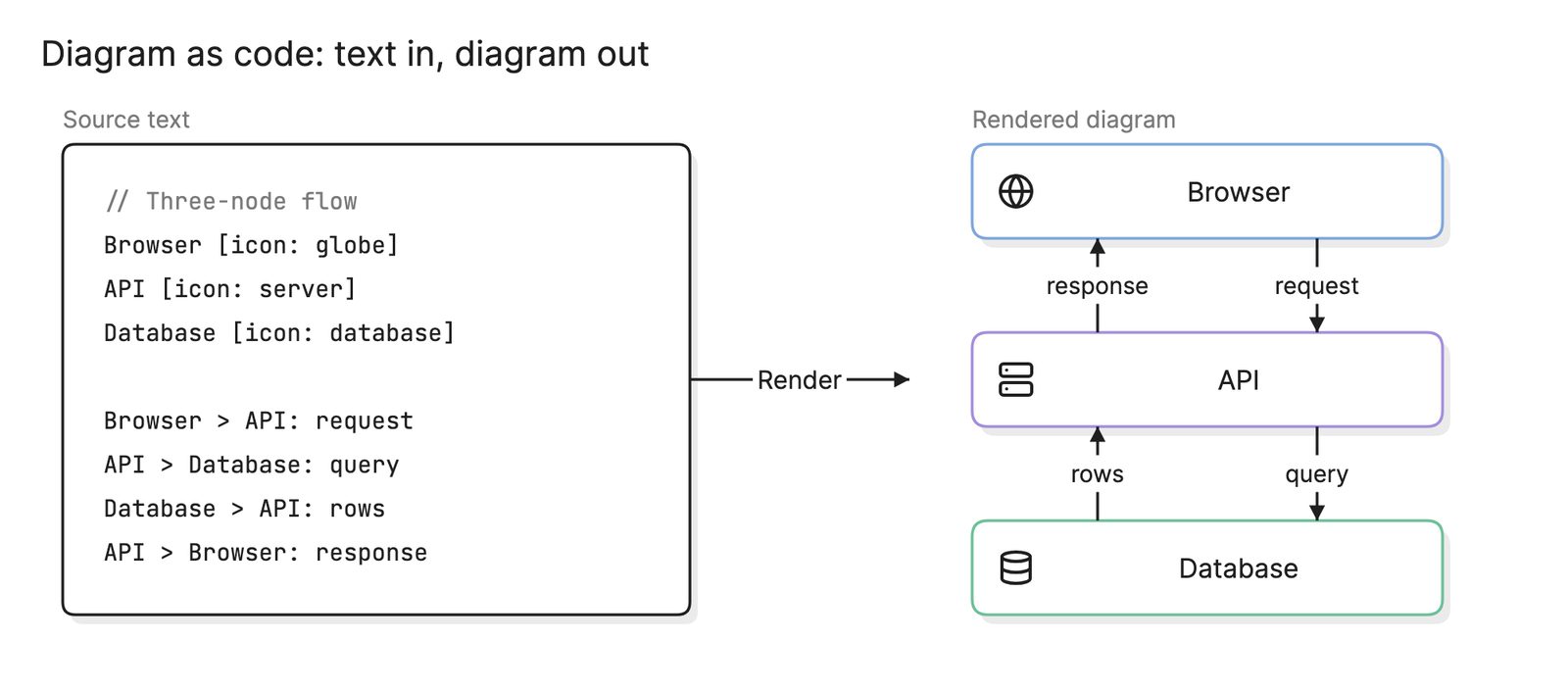
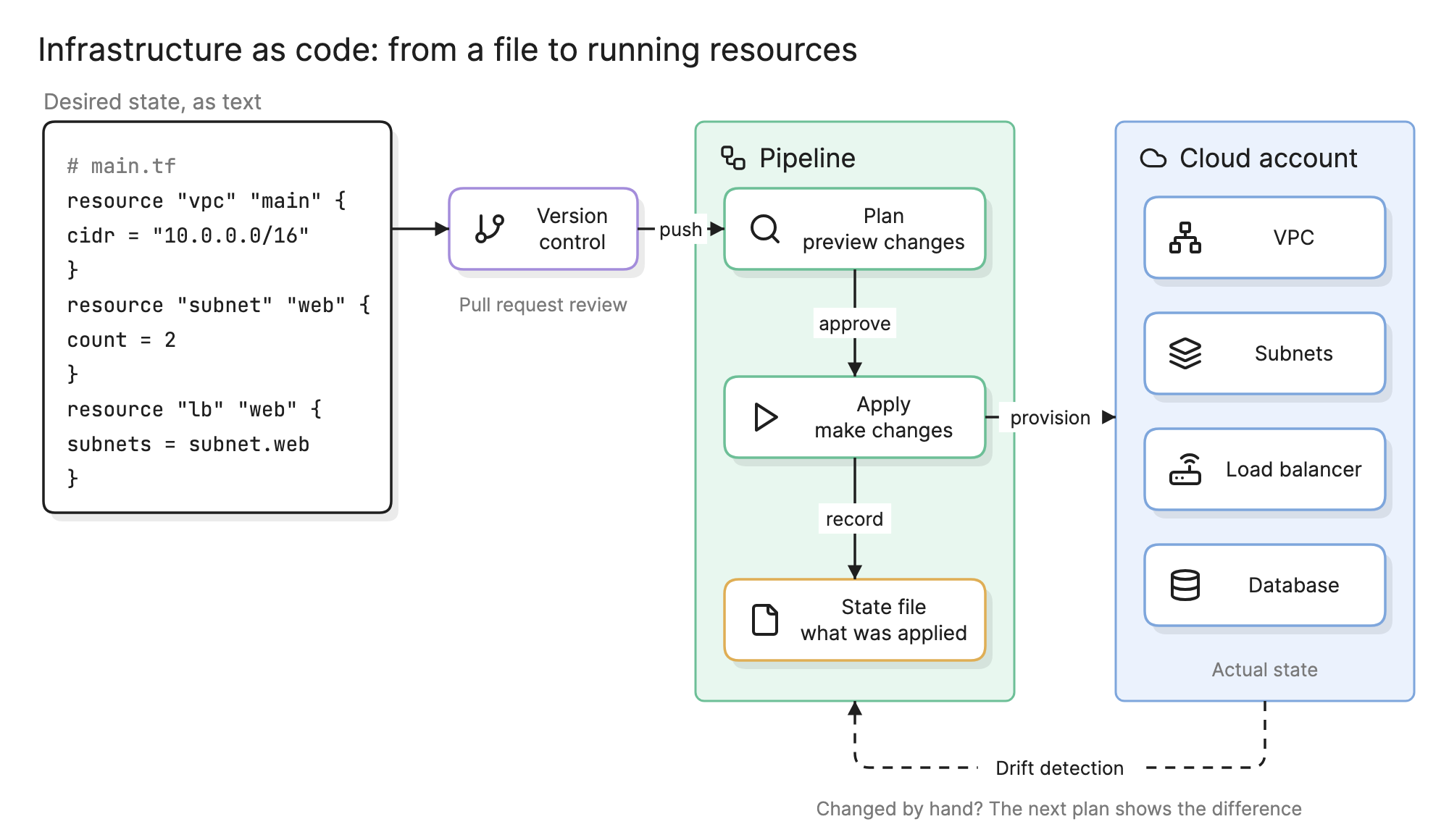
- Configuration files. Text that declares resources and their settings: a network with a CIDR range, two subnets, a load balancer attached to them. In the diagram above this is the monospace box on the left.
- Version control. The files live in a repository and change through pull requests.
- Plan. The tool compares the files with what exists and prints the changes it would make. Nothing happens yet.
- Apply. After approval the tool makes the changes, in dependency order, and records the result.
- State. The record of which real resource corresponds to which block in the files. The plan step depends on it.
- Modules. Reusable bundles of resources with inputs and outputs, such as “a VPC with public and private subnets,” instantiated with different variables for dev, staging and production.
What is the difference between declarative and imperative infrastructure?
| Declarative | Imperative | |
|---|---|---|
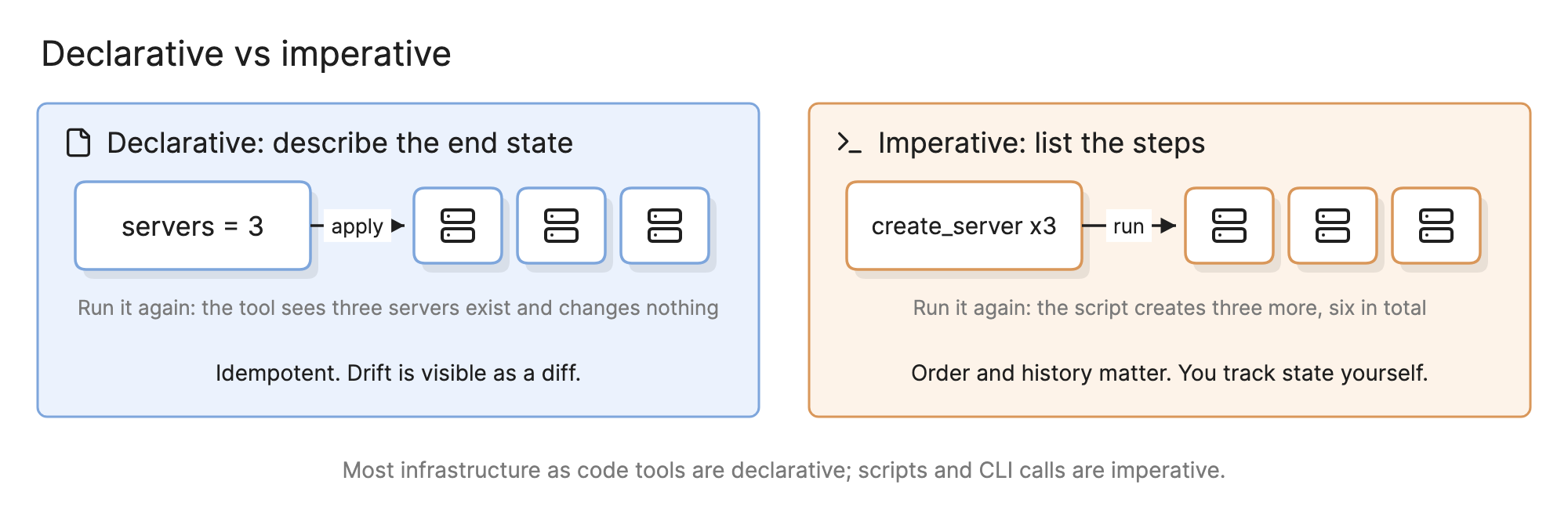
| You write | The end state: “three servers” | The steps: “create a server, three times” |
| Running twice | Changes nothing the second time | Creates three more |
| Drift | Visible as a diff in the next plan | Invisible until something breaks |
| Order | The tool works out dependencies | You order the steps yourself |
| Typical form | Configuration language or a general-purpose language that builds a resource graph | Shell scripts and CLI calls |
Most infrastructure as code tools are declarative, because idempotence is what makes a plan possible. Imperative scripts still have a place for one-off operations.
How do you read an infrastructure as code workflow?
Start at the file. The example at the top of this page declares a VPC, two subnets and a load balancer. A commit goes to version control, where a pull request shows the diff and a reviewer approves it.
The pipeline then runs a plan, which reads the files and the state file, asks the cloud what exists and prints something like “2 to add, 1 to change, 0 to destroy.” A person or a policy check approves it, apply makes those exact changes in the cloud account on the right and writes the new resource ids back into the state file.
The dashed loop at the bottom is drift detection. A scheduled plan compares the cloud with the files again; if someone resized the database by hand, the plan reports a change with no commit behind it, and the team either applies the file to undo it or updates the file to keep it.
How do you adopt infrastructure as code?
- Start with one new environment. Importing a hand-built production system is slow; building the next environment from files is fast and teaches the team the tool.
- Put state in remote storage with locking. Two people applying at once against a local state file corrupts it.
- Split by blast radius. Networking, shared services and each application in separate state files.
- Write modules for the patterns you repeat, such as a standard microservice with its load balancer, DNS and observability alarms.
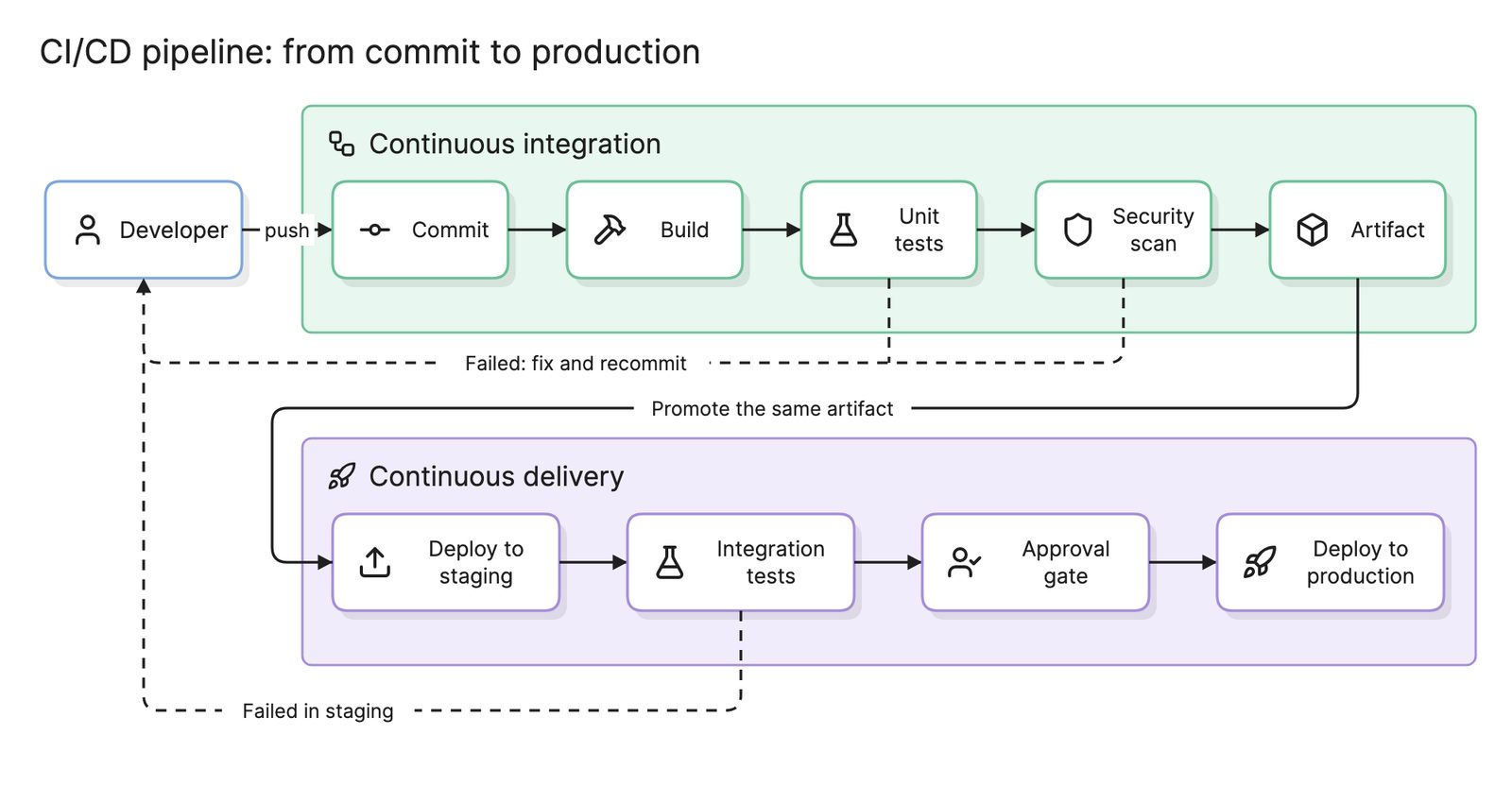
- Run plan on every pull request and apply only from the main branch. This makes the pipeline the only path to production. The CI/CD pipeline page covers the gates.
- Test it. Lint and validate on every commit, run policy checks against the plan (no public buckets, required tags) and spin up a short-lived environment for integration tests.
What are common infrastructure as code mistakes?
- Console changes on the side. Every manual fix is drift that the next apply will revert, sometimes mid-incident.
- Secrets in the files. Passwords belong in a secrets manager that the configuration references, not in the repository.
- Applying without reading the plan. “1 to destroy” on a database is easy to miss in a long plan. Policy checks catch the dangerous cases automatically.
How does infrastructure as code compare with related practices?
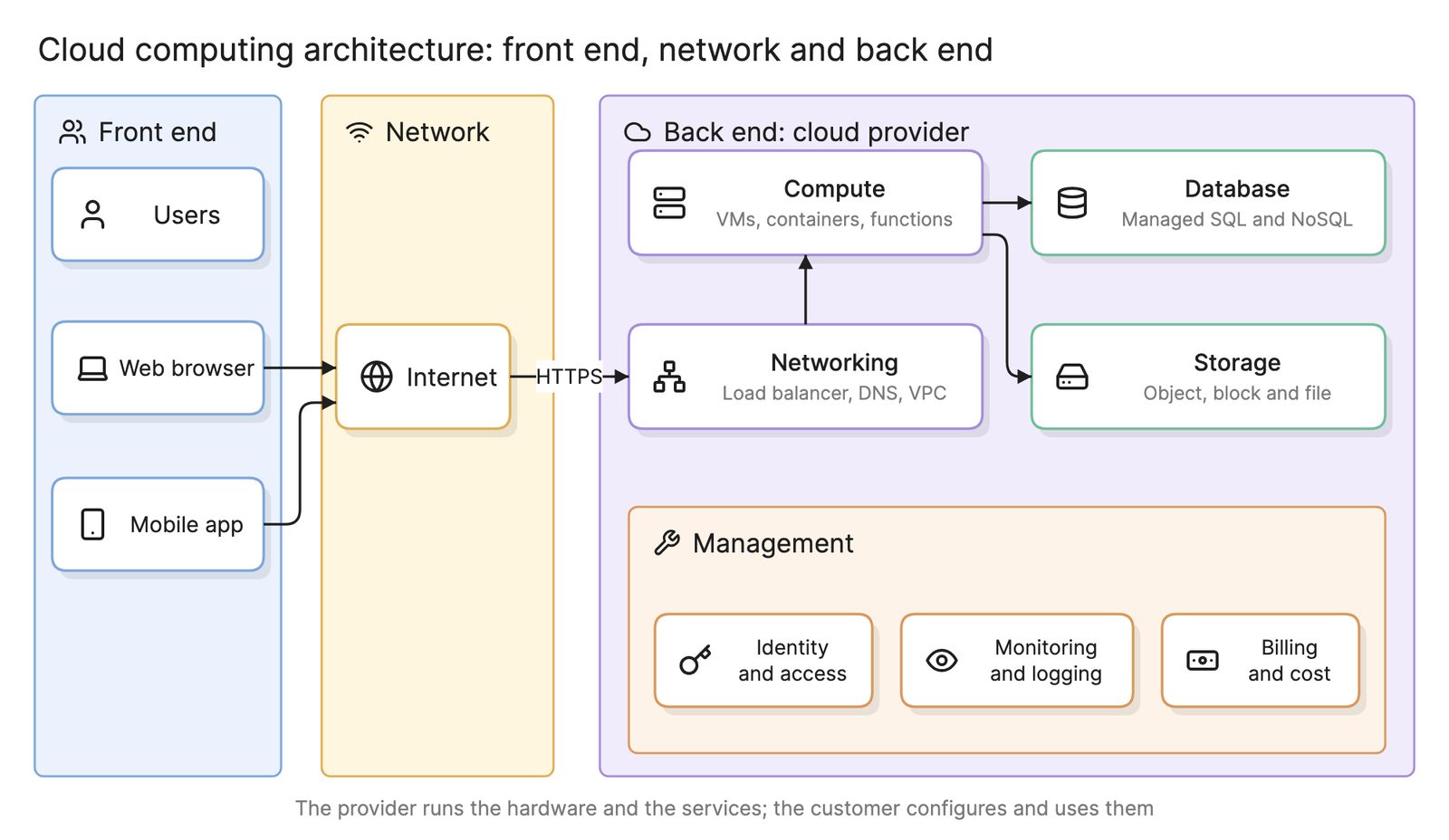
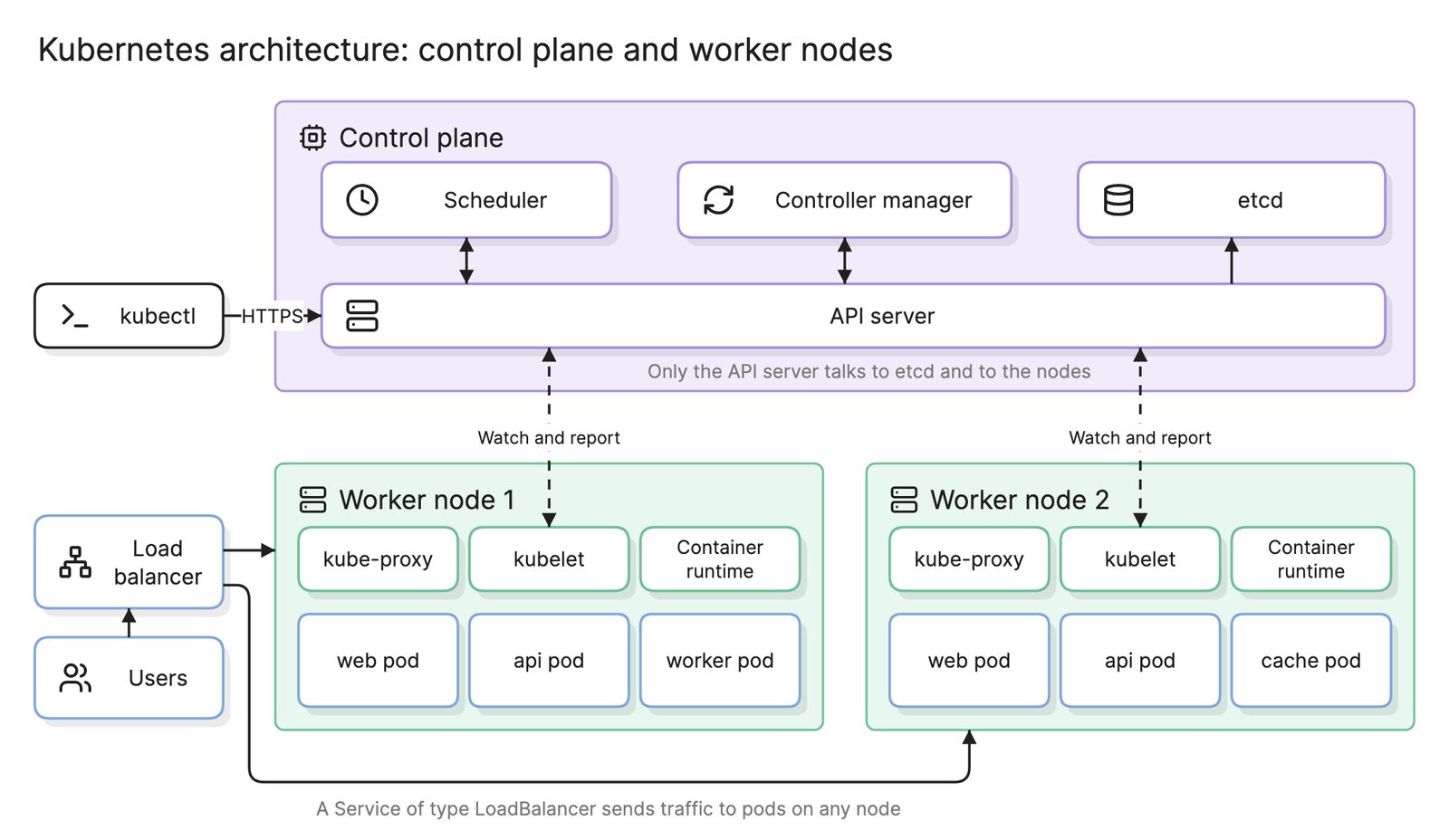
A Kubernetes architecture applies the same declarative idea to workloads: manifests describe the desired pods and the control plane reconciles toward them, while infrastructure as code usually provisions the cluster itself. Diagram as code describes a picture as text; infrastructure as code describes a system as text, and the picture can be derived from it. What the files describe is a cloud computing architecture, and a CI/CD pipeline is what runs plan and apply with the right gates.
What tools help with infrastructure as code?
- Provisioning tools. A cloud-agnostic declarative tool with its own configuration language, frameworks that build the same resource graph from a general-purpose programming language and each provider’s native templating service. All follow the plan and apply model.
- Policy and testing tools. Linters, policy-as-code engines that reject a plan which breaks a rule and frameworks that deploy a temporary environment and assert against it.
- AI diagramming tools. Tools like Eraser read your configuration files and draw the architecture they describe with a Terraform diagram generator, so the diagram comes from the same source as the infrastructure and can be regenerated after each change.
For more on this kind of diagram, see DevOps diagrams.
Frequently asked questions
-
What is the difference between infrastructure as code and configuration management?
Infrastructure as code provisions the resources themselves: networks, virtual machines, managed databases, load balancers. Configuration management tools work inside a server once it exists, installing packages and editing files. Many teams use both, with one tool creating the machines and another preparing them, although containers and managed services have shrunk the second job.
-
What is state in infrastructure as code?
State is the tool's record of which real resources it created from which blocks in your files, including ids the cloud assigned. The plan step compares the files with the state and with what actually exists, and works out the smallest set of changes. Keep state in shared remote storage with locking, never on one laptop.
-
What is drift and how do you detect it?
Drift is any difference between the resources in the cloud and the resources your files describe, usually because someone changed something by hand in the console. Running a plan on a schedule detects it, because the plan reports changes even when nobody edited the code. The fix is to apply the file again or to update the file to match.
-
Can infrastructure as code generate an architecture diagram?
Yes. Because the files already list every resource and the references between them, a tool can parse them and draw an architecture diagram without anyone redrawing it. This is one of the main reasons to adopt it: the documentation comes from the same source as the infrastructure, so it cannot go stale on its own.