Guide
How to generate C4 diagrams from a GitHub repo
Point Eraser at a repository and get context, container and component diagrams you can edit, then keep them current on every pull request.
The C4 model is easy to agree with and tedious to apply to a system that already exists. Someone has to read the code, list what runs, and draw each level by hand.
This guide skips that step. You point Eraser at a repository, ask for each level, and get context, container and component diagrams you can edit. Then you set them to update when the code changes. The title says GitHub; the same steps work with GitLab and Azure DevOps.
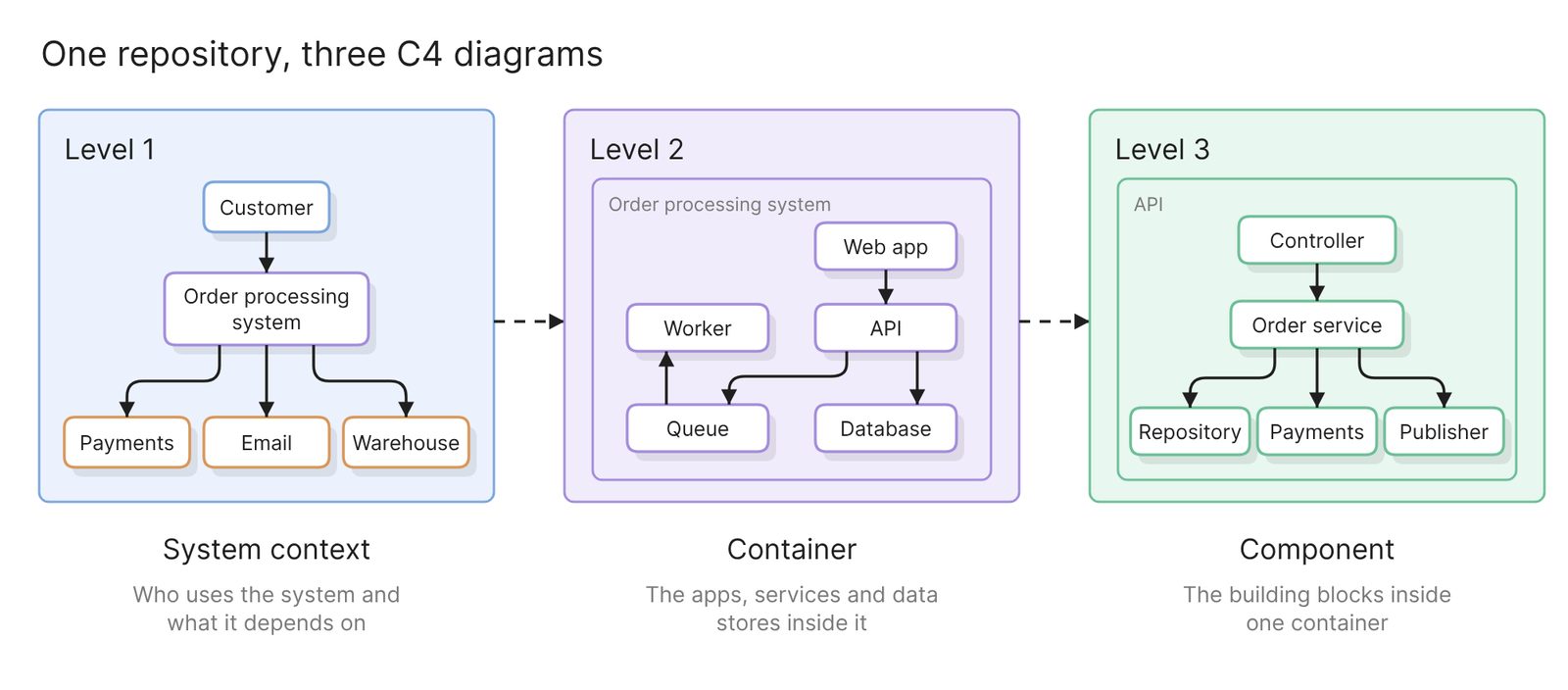 Example: three levels of the same system, from one repository
Before you start
You need two things:
- Access to Eraser
- Access to the repository. A public repository needs no connection at all
Decide which levels you need before you generate anything. The C4 model’s own guidance is that “the system context and container diagrams are sufficient for most software development teams”.
One limit to keep in mind: Eraser reads the files in the repository. It cannot see runtime configuration, or services that live in other repositories. Treat the first result as a draft to check, not a finished record.
Step 1. Connect the repository
For a private repository, you install the Eraser GitHub App and choose which repositories it can read. That is the whole setup.
GitLab and Azure DevOps repositories connect with an access token instead. The docs have the steps for each.
Step 2. Generate the system context diagram
Start a new AI diagram, attach the repository, and ask for level 1:
Draw a C4 system context diagram for this repository. Show the system as
one box, the people who use it and the external systems it calls. Label
every relationship with what flows over it.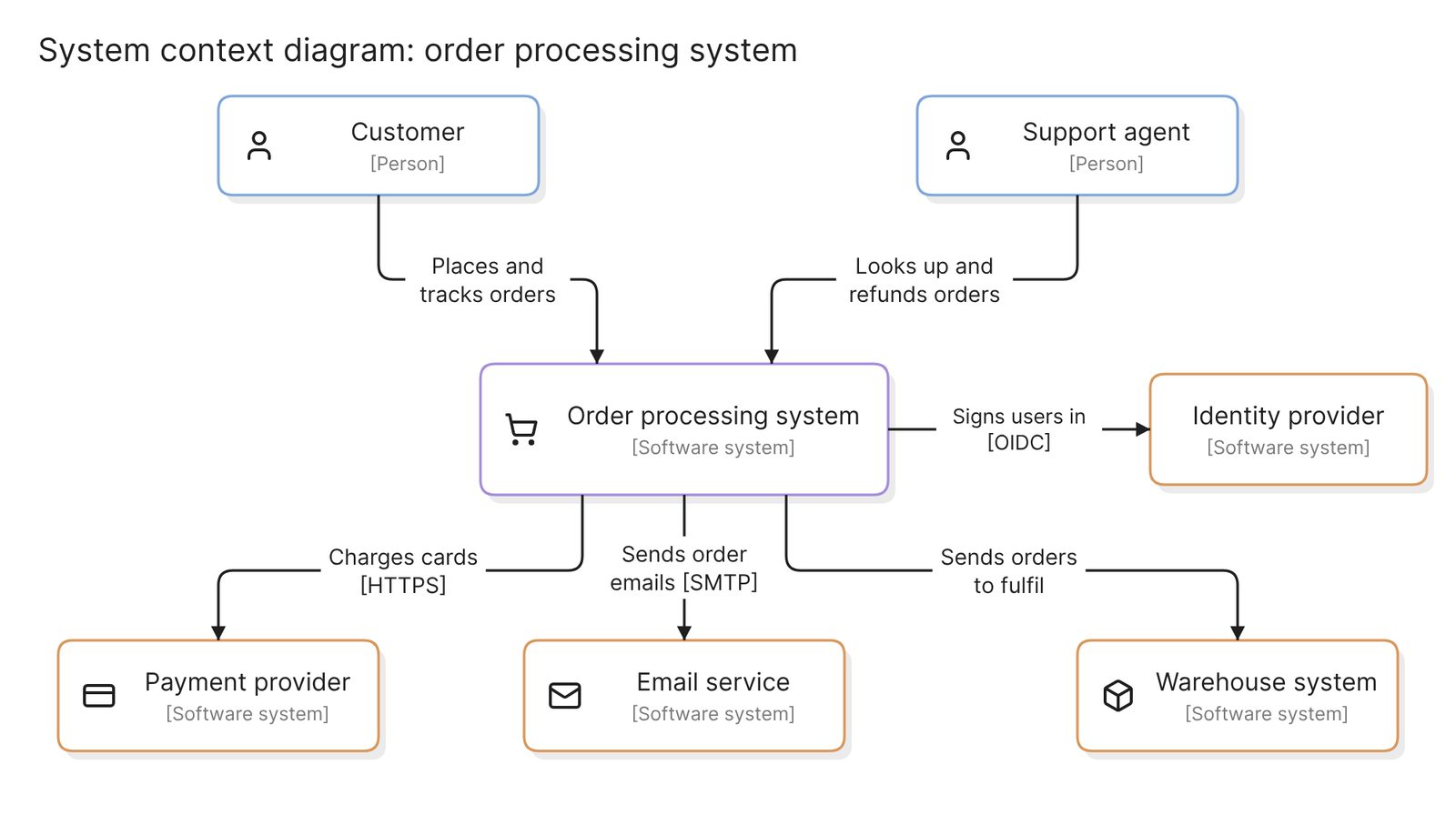 Example: a system context diagram
Check the external systems first. A payment provider or an email service shows up in code as an SDK import or a URL in a config file. That makes it the easiest thing for a scan to miss, and it is the first thing a reader of a context diagram looks for.
Step 3. Generate the container diagram
Level 2 opens the system box and shows what runs inside it:
Draw a C4 container diagram. Treat each deployable unit or data store as a
container: web app, API, worker, database, queue. Label each with its
technology, and each relationship with its purpose and protocol.
Naming the files that define what runs gives a better result. If the repository has a compose file or an infrastructure folder, add it to the prompt.
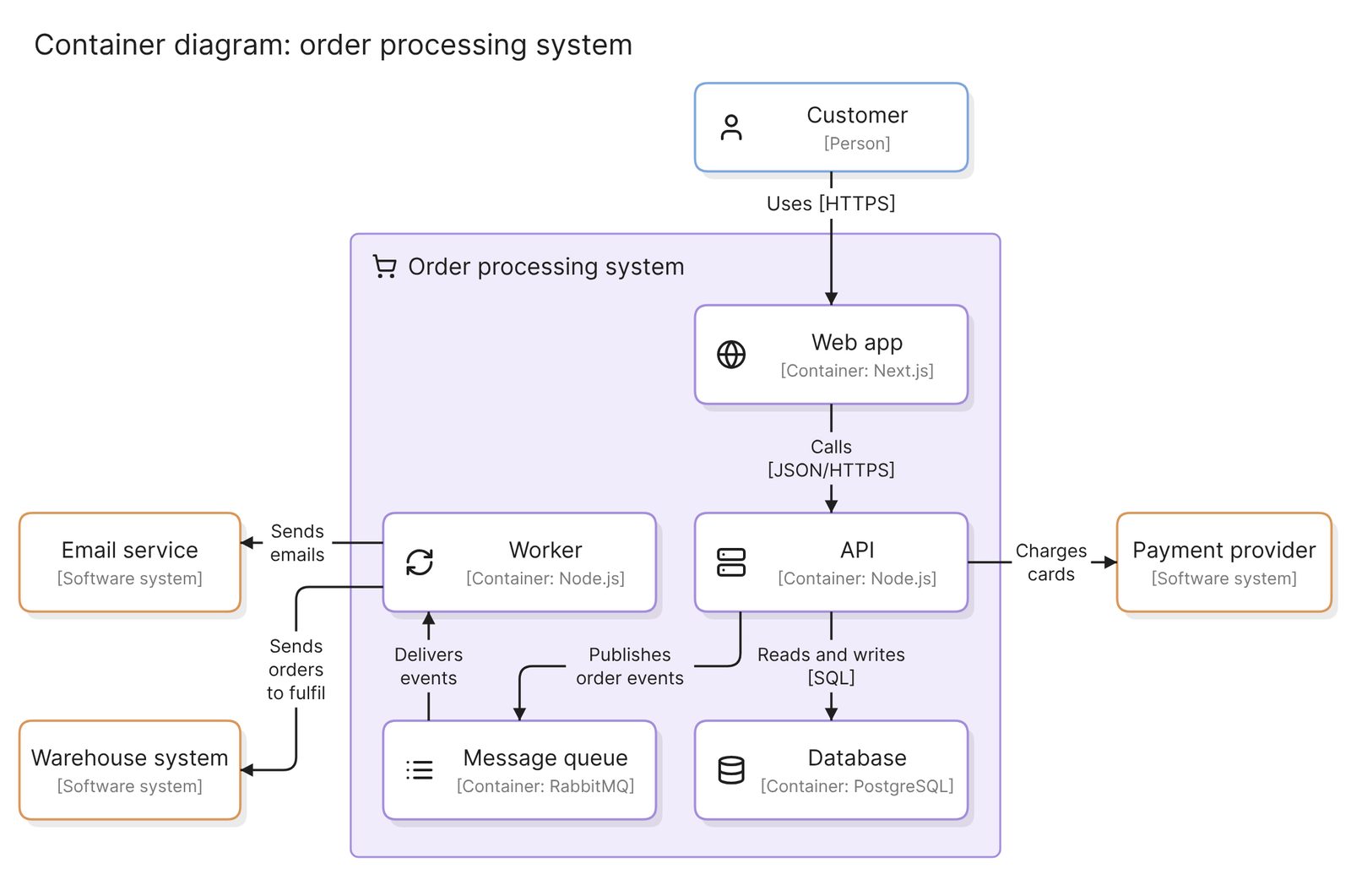 Example: a container diagram
Check for one box per thing that runs or stores data, a technology on every box, and no line without a label.
Step 4. Add a component diagram where it earns its place
Level 3 opens one container. Point the prompt at that container’s code:
Draw a C4 component diagram for the API container, using the code in
services/api/.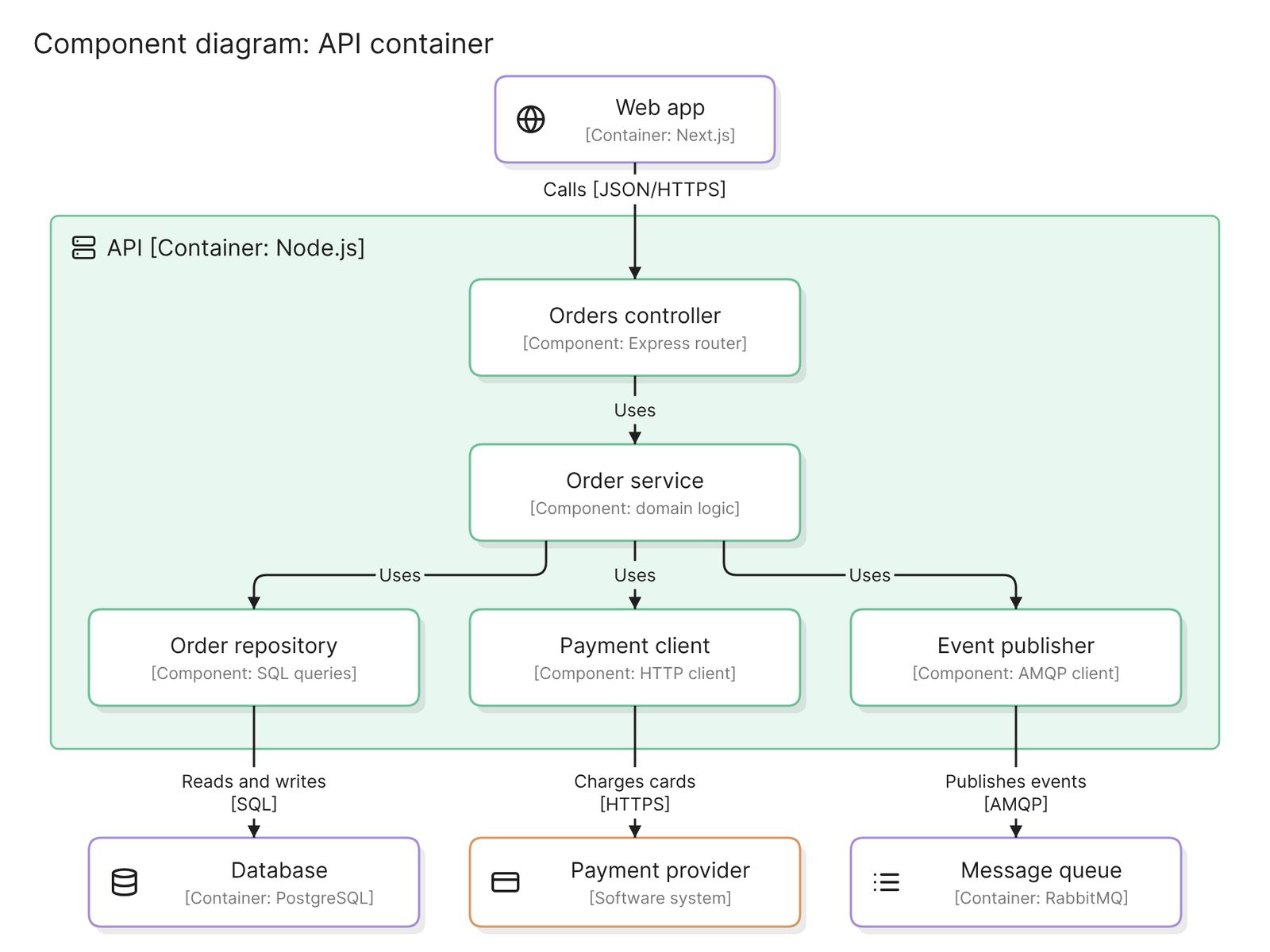 Example: a component diagram of one container
Draw a component diagram only for containers that are complex or shared. For most of a system, level 2 is where people stop reading.
Skip level 4. The C4 model calls the code diagram “very much an optional level of detail” and does not recommend it for long-lived documentation, because an IDE can generate it on demand.
The same approach covers C4’s supporting diagrams: a deployment diagram from your Terraform or Kubernetes files, and a dynamic diagram as a sequence diagram of a single request.
Refine the diagrams
- Use your team’s names. Rename boxes to what people call them, not what the folders are called.
- Keep names identical across levels. A container on level 2 should be the same box that level 3 opens up.
- Fix by prompting or by hand. Ask for a change in words, or edit the diagram directly.
Keep them current
A C4 diagram is only useful while it matches the code. Eraserbot handles that. You give it a prompt and the files to watch.
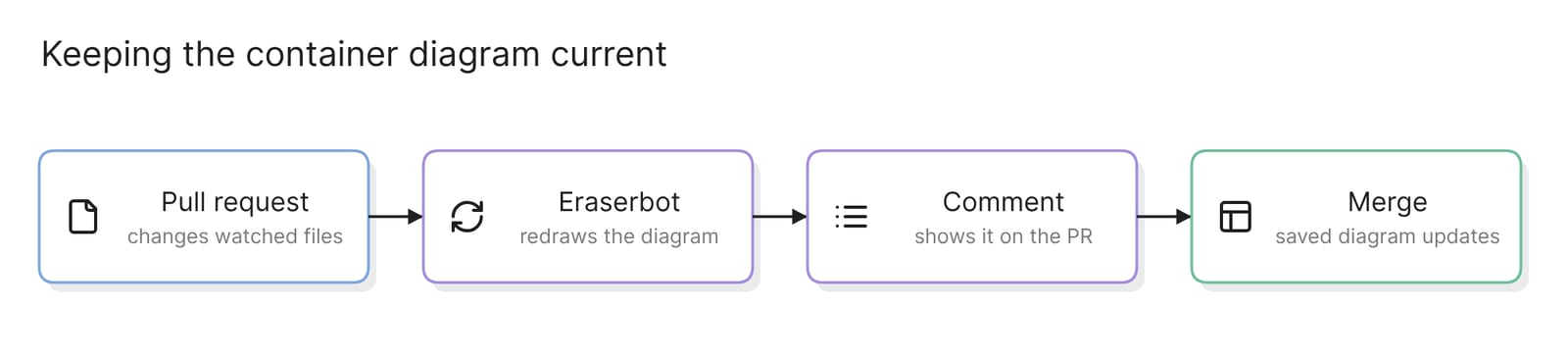 What happens when a pull request touches the files a diagram depends on
When a pull request changes those files, Eraserbot redraws the diagram and posts it as a comment within a minute or two. The saved diagram updates when the pull request merges. It works with GitHub and GitLab.
On GitHub you can also commit the diagram file to the repository. That keeps the diagrams next to the code they describe, which is the point of diagram as code.
Other ways to get C4 diagrams
- Model it in Structurizr. The Structurizr DSL is a text language for defining one architecture model, from which every view is drawn. The C4 site lists modelling tools as its recommended kind. It is the right choice when you want a single source of truth. Someone writes and maintains the model by hand.
- Write the diagrams as text. C4-PlantUML and Mermaid’s C4 syntax keep diagrams in the repository and render in Markdown. Both are written by hand, and Mermaid’s page lists unfinished features and a layout that is not fully automatic.
- Ask your coding agent. An agent such as Claude Code or Cursor can read the repository and draw through a diagramming MCP server. Best diagramming MCP servers in 2026 compares them.
- Draw them by hand. draw.io has a C4 shape library. That suits a workshop. Every level is a separate drawing to maintain afterwards.
Best C4 model tools in 2026 compares the tools built for C4. For a wider look at text-based tools, see Best diagram-as-code tools in 2025.
FAQ
Can AI generate C4 diagrams from code?
Yes, for the context, container and component levels. It reads the repository and drafts each one. The draft needs a check by someone who knows the system, mostly for external systems and anything defined outside the repository.
Which C4 levels should I generate?
Context and container for every system. Add a component diagram only where a container is complex or shared, and leave the code level to your IDE.
Does this work with private repositories, GitLab or Azure DevOps?
Yes. Private repositories need to be connected first. GitHub, GitLab and Azure DevOps are all supported, and a public repository needs no connection.
How do I keep C4 diagrams in sync with the code?
Set up Eraserbot on the diagrams that matter, with the files they depend on. It redraws each one when a pull request changes those files.
Can I store the diagrams in the repository?
Yes, on GitHub. Eraser can commit the diagram files to the repository and pull them back in.
Where to go next
To try a level without connecting anything, the C4 diagram generator draws one from a description. The glossary’s C4 model page covers the four levels, the notation and the common mistakes.