Guide
GCP architecture diagram: generate one from your live projects
Connect Google Cloud with a read-only service account, scan your projects and ask for the diagram you need: one project, the network or one workload.
In Google Cloud, everything you run is filed under a project, and the console shows one project at a time. The architecture rarely stops at that edge. A VPC network is global, its subnets can be shared with other projects, and a managed database sits in a network that Google runs. A GCP architecture diagram has to show all of that at once.
The projects themselves are a better source than memory. A read-only service account lets Eraser scan what is deployed, and a prompt turns that scan into the architecture diagram you asked for. Allow about fifteen minutes, mostly for setup.
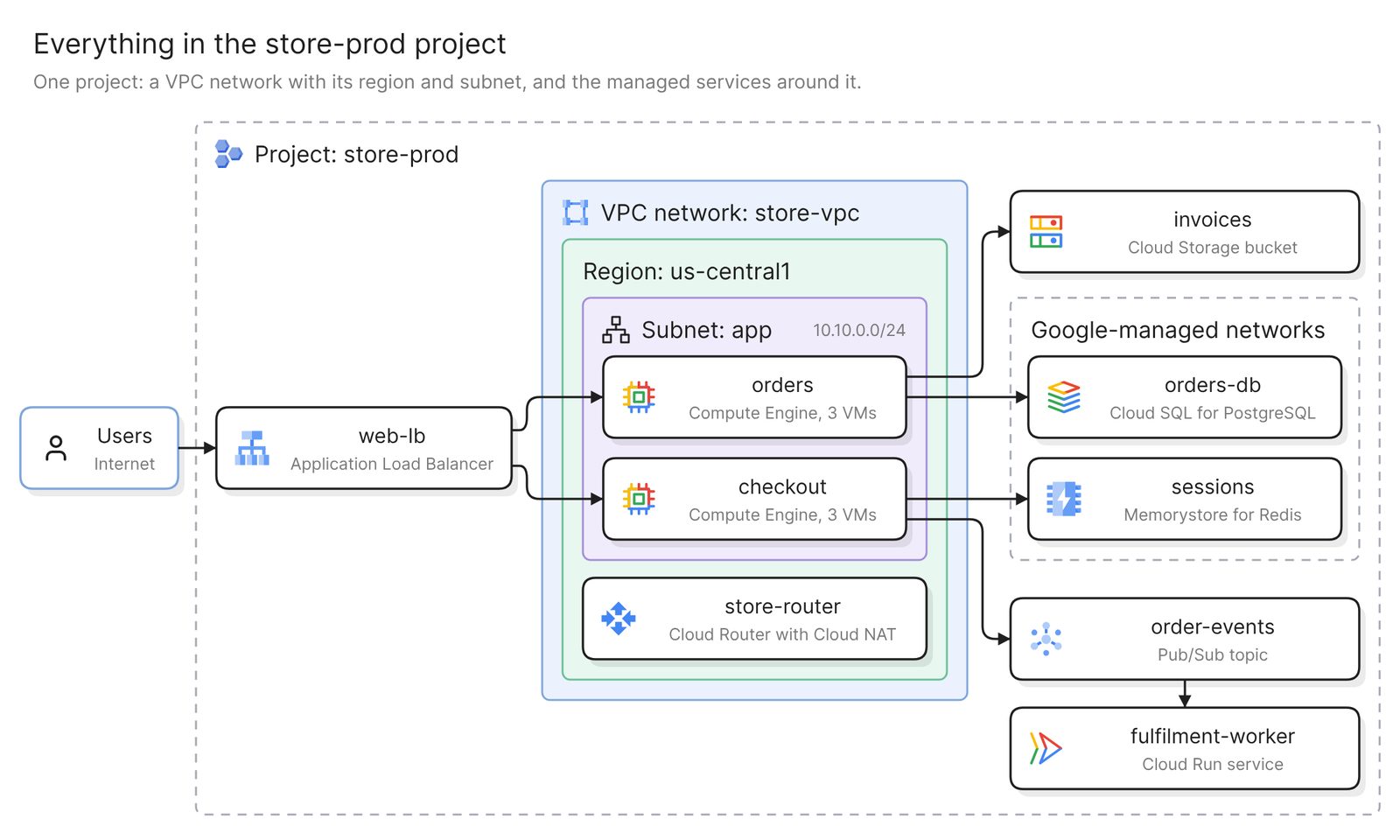 Example: one project, with its VPC network, region and subnet as nested groups
Before you start
You need two things:
- Access to Eraser
- Access to the Google Cloud projects you want to diagram, with permission to create a service account and grant it roles
Eraser reads your projects through a service account that you create and that holds only read roles. It sees which resources exist and how they are configured, and nothing stored in your buckets, databases or secrets. The scan also ends at the edge of each Google Cloud resource. It records a GKE cluster and its node pools, and what runs in the cluster has to come from the manifests.
Step 1. Connect Google Cloud
You create a service account in a project of your choice and grant it read access. No key file is created, because Eraser’s scanner requests a short-lived token at scan time. Eraser refuses an account that can write, even through a role inherited from a folder or the organization.
The one decision is where to grant the access. Google Cloud’s resource hierarchy puts an organization at the top, optional folders below it, and then the projects that hold the resources. Grant access project by project, or once on a folder or the organization, which covers every project beneath it. You then choose which of those projects to import, and the first scan starts.
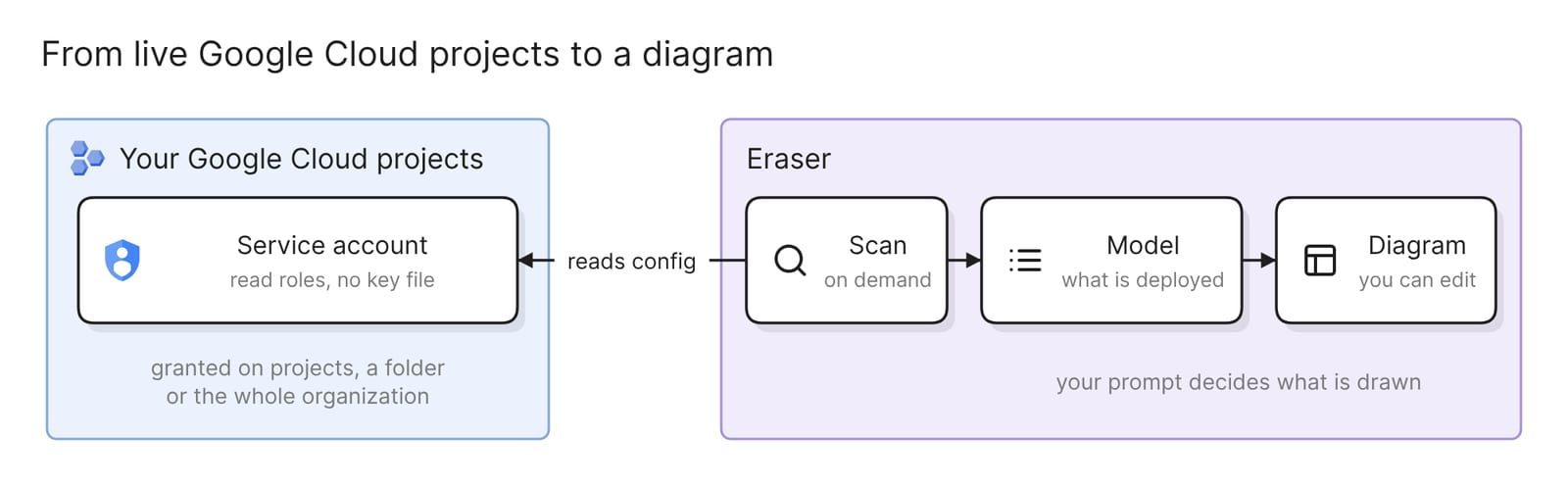 What connecting Google Cloud sets up
Creating the account and granting roles on a folder need different rights, so two people may share the setup. The docs have the click-by-click steps, and a gcloud script that does the Google Cloud side from Cloud Shell.
Step 2. Ask for the diagram
The scan fills a model, Eraser’s inventory of what your projects hold and how the pieces connect. In AI chat, attach the model as a reference and describe the diagram in your own words. One model covers every project you imported, so name the one you mean:
Create an architecture diagram of the store-prod projectWhat comes back is an ordinary Eraser diagram, editable by hand or by prompting again. Before you share it, check three things.
- The network is drawn once. A VPC network is a global resource and its subnets are regional, so one network box should hold a group per region with that region’s subnets inside. If the network appears once per region, ask for it to be merged.
- Managed databases sit outside your subnets. With private services access, “Cloud SQL creates the instance within its own VPC network” and peers it with yours. With Private Service Connect, only an endpoint address is in your network. If
orders-dbis drawn inside theappsubnet, have it redrawn outside the network. - Nothing is missing. Compare one kind of resource with what Cloud Asset Inventory lists for the project. Anything created after the last scan is absent until you rescan.
Step 3. Narrow it to the diagram you need
The project diagram proves the scan works. The diagrams people keep are smaller, and each prompt below gets one from the same scan.
A GCP network diagram
Show the network topology of my Google Cloud projects: VPC networks with
their subnets grouped by region, peerings, Cloud Routers and NAT, VPN
tunnels and load balancers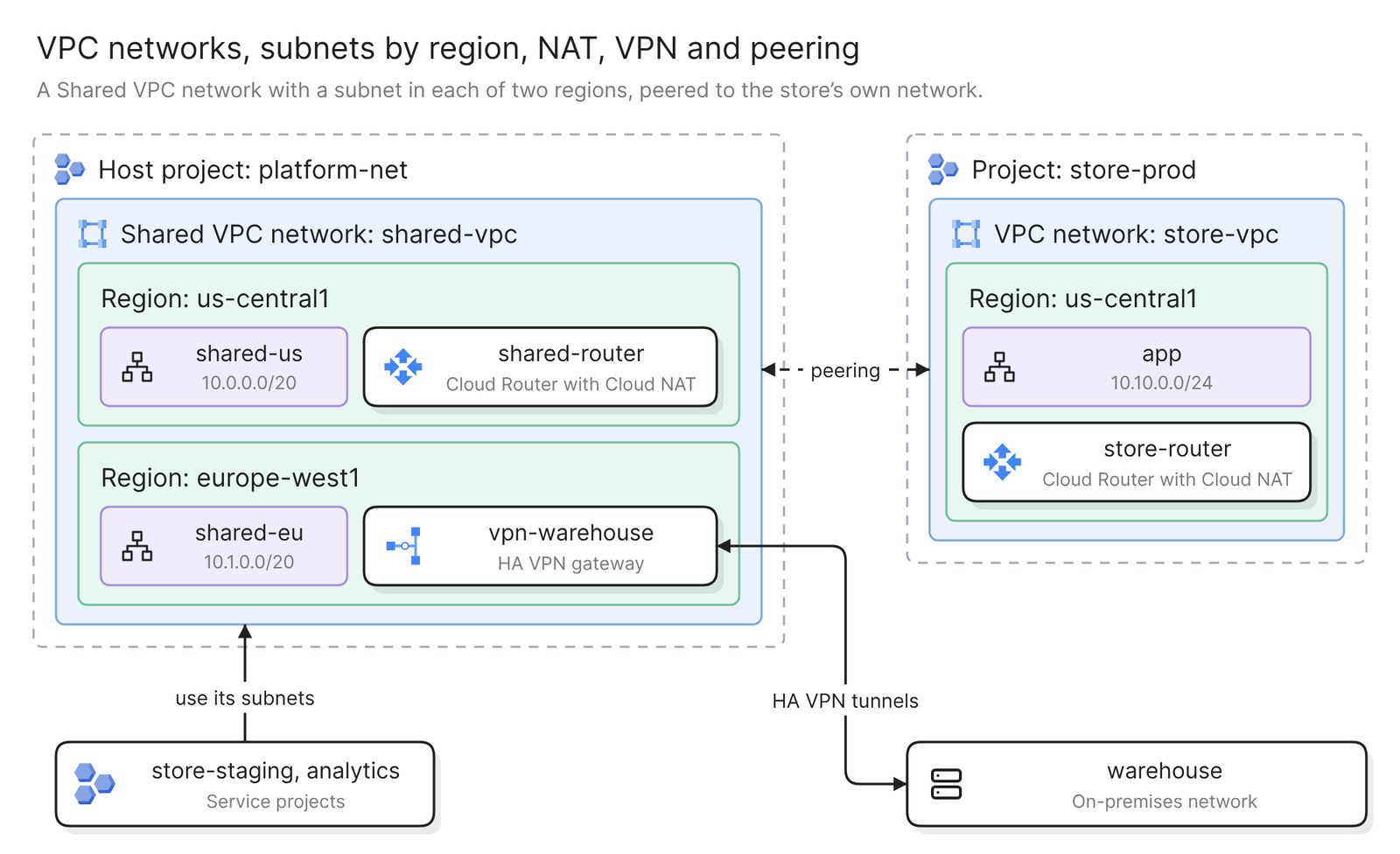 Example: a Shared VPC network across two regions, peered to the store’s own network
Use this network diagram for a network review or an address-plan change. It drops the applications and keeps each network, its subnets by region, and the routers, tunnels and peerings that join them.
If you use Shared VPC, the network belongs to a host project and the workloads to service projects, a design Google recommends for most use cases in a landing zone. Import both kinds of project, or the model holds the workloads without their network.
Google says VPC Network Peering “does not provide transitive routing”, so in a hub-and-spoke network built on peering, one spoke has no route to another by way of the hub.
Cloud NAT appears on a router, since a NAT gateway is configured on a Cloud Router for one region.
One workload
Diagram the checkout service: everything it calls and everything that
calls it, across projects
A workload does not respect project lines. Its service, its topic and its bucket may each be filed in a different project. This prompt follows the dependencies wherever they are, which suits onboarding and incidents.
What can reach a database
Show what can reach orders-db, and whether each path uses its private
address or its public one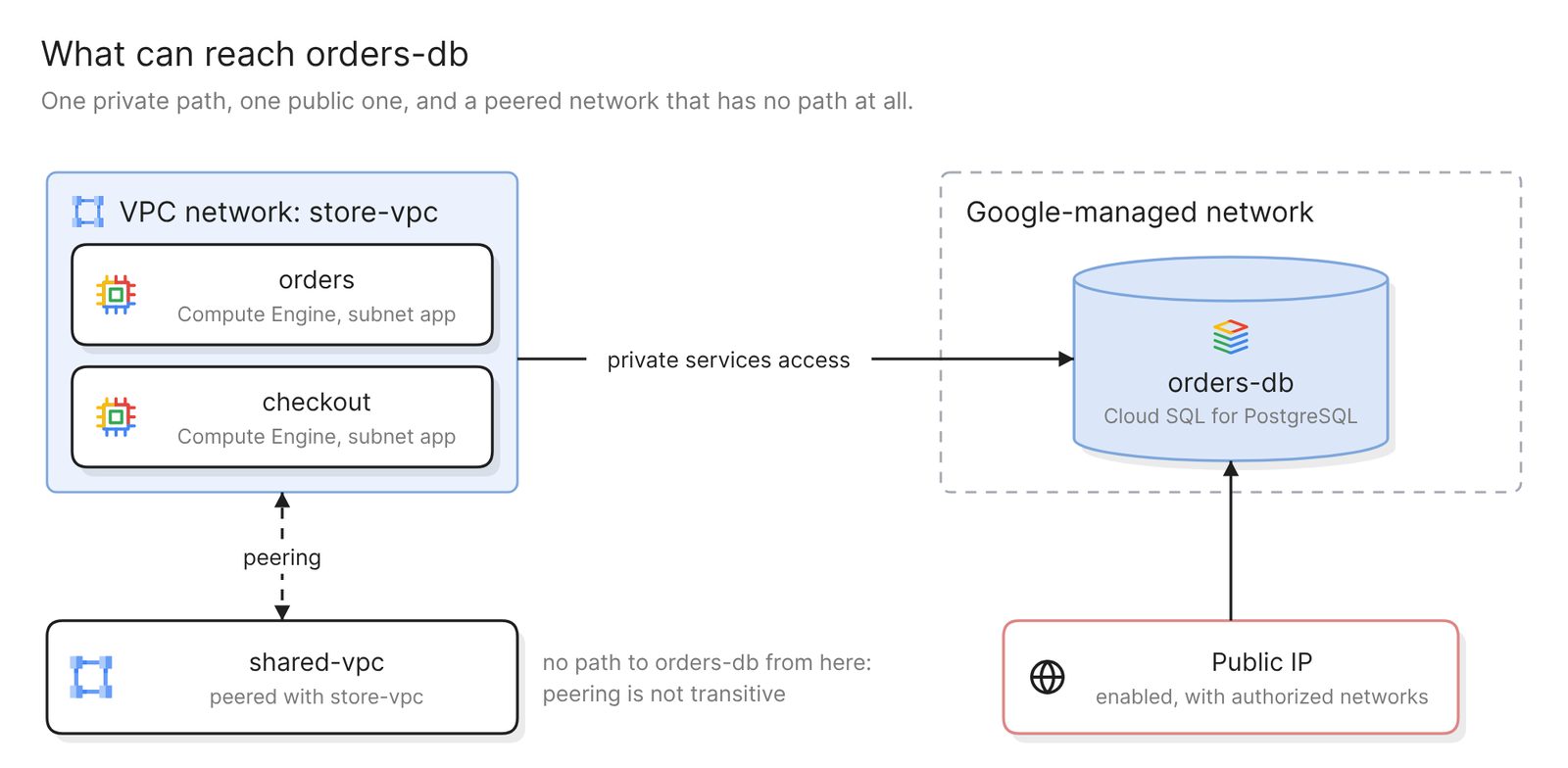 Example: every path to one Cloud SQL instance, with the public one in red
Bring this one to a security review. A Cloud SQL instance can have “a public IP address, a private IP address, or a combination of both”, so an instance that was given a private address may still answer on a public one.
The private path has a limit too. Private services access is itself a peering, so it does not chain. In the example, shared-vpc is peered with store-vpc and still has no route to orders-db.
The scan reads configuration, so the diagram shows which paths are open. It cannot show which ones carry traffic.
Prompt again on any of them to add a service, drop a region or regroup, or apply your team’s styles.
Keep it current
Every diagram is as old as the scan behind it, and scans run on demand. After a release, rescan and regenerate the diagrams people rely on. A project created later is not picked up by itself, so add it to the connection, granting the account access first if it has none. If you have rearranged a freeform diagram by hand, verify it against the model instead, which lists each issue and changes nothing.
Share the result with a link, embed it in Confluence or Notion, or export it as a PDF or a Visio file.
To end the access, disconnect the projects in Eraser and delete the service account in Google Cloud. Disconnecting alone leaves the account in place.
Other ways to make a GCP architecture diagram
- Use what the Google Cloud console has. Network Topology, part of Network Intelligence Center, graphs VPC networks, load balancers and hybrid connections with traffic metrics, and needs no setup. Choose it when the question is where traffic flows. It draws only what sent or received traffic in the period you select, and leaves out traffic to some managed services, Cloud SQL and Memorystore among them.
- Design it in Application Design Center. Google’s Application Design Center has a design canvas where you lay out an application from components, and it generates the Terraform to deploy it. It fits a new application, since you start from a template or your own Terraform.
- Draw it yourself with Google’s icons. Google publishes its product icons as SVG and PNG files and redesigned the set in early 2025, and draw.io has a Google Cloud Platform shape library. For a design that is not built yet, drawing is the only route. After deployment, the drawing is updated by hand or goes stale.
- Script it in Python. Diagrams is an open-source library with node classes for Google Cloud. You install Python and Graphviz and describe the architecture in a script, which fits teams that review diagrams in pull requests. The script is written by hand, so it is as current as its last commit.
Best cloud diagram tools in 2026 compares the products that draw from a connected cloud.
FAQ
What access does Eraser need to my Google Cloud projects?
A service account that you create, with read roles only, granted on single projects or on a folder or the organization. It reads configuration and nothing stored in buckets, databases or secrets. No key file is created.
How do I make a GCP network diagram?
Use the same scan and ask for VPC networks, subnets by region, peerings, Cloud Routers and VPN tunnels. Import every project that owns a network first. With Shared VPC, that includes the host project.
Does Google have its own architecture diagram tool?
For resources that already exist, Network Topology in the console graphs the network and its traffic. For a new design, Application Design Center has a canvas that deploys what you lay out, and Google publishes its product icons for any drawing tool.
Does the diagram update when my infrastructure changes?
Not by itself. Eraser has no scheduled scan, so the diagram stays as it was until you rescan and then regenerate it, or verify it against the model.
Where to go next
To draw a design that is not deployed yet, describe it to the GCP diagram generator. The Terraform diagram generator works from .tf files. The same method works on AWS and Azure, and one prompt can read more than one scan, which helps if you are multi-cloud.
For reference architectures, see a three-tier web app on Google Cloud, an e-commerce serverless architecture and website hosting on Google Cloud. For the layers every cloud shares, the glossary has cloud computing architecture.